01Passing zone
1,240
Passed the screen today
Everyone who walked past the screen, by hour and weekday. The audience the screen could reach.
- Dashboard view
- Passers by Analysis
- Sensor
- Signal sensing across the corridor
Digital signage
Ariadne counts the people around your screens: how many pass, how many stop in the viewing zone, how long they stay, and where they go next. Media owners sell screen time on a measured audience, and brands see whether a campaign moved people to the store, so a promotion is measured rather than assumed.
No cameras. No images. No face analysis.
Since 2023, Ariadne has measured the audience at the DOOH screens in five Madrid transport interchanges, including Moncloa.
Total Passers By
18,420
Last 14 days
Total Turn In Rate
6.8%
Avg dwell, viewing zone
1 min 52 s
Average Hourly Number of Passers By
Illustrative view of the Ariadne Analytics passers-by app.
Product tour
Product tour



What it is
Digital signage audience measurement counts the people a screen can reach: how many pass it, how many stop in front of it, how long they stay, and where they go afterwards. Ariadne does it with Hybrid Fusion, its patented camera-free method. Time-of-Flight sensors count the people entering a screen's viewing zone, and phone signal sensing follows movement through the space around it, for example from an atrium screen to the store it promotes. Both streams are combined centrally, so each screen zone gets its own passers-by count, dwell profile, and destinations.
Counting is the base layer, and the same sensors run Ariadne's consented visitor marketing, browser-based wayfinding, and the wider people counting platform. For the field as a whole, from DOOH standards to attention metrics, read the guide to digital signage analytics.
Products
People counting is the layer underneath. Each of the six views on top of it answers one question a screen owner or a brand on screen asks.
Select a view to see what Ariadne measures around a screen
1 of 7
01
Used by: Every team that runs screens
Counts at every entrance and choke point, visitors and dwell per area, and flow between areas. The layer every view below runs on, measured without cameras.
95%+ counting accuracy in typical retail deployments
People counting platform02
Used by: Media sales, store operations
How many people passed the screen zone, by hour and by weekday, and what share of them turned in to the store or zone behind it.
Passers by Analysis in Ariadne Analytics
See the passers-by view03
Used by: Media sales, brand teams
Visitors and dwell time in the area in front of each screen, in dwell bands, so a stop counts separately from a walk-past. Ariadne reports dwell as time in the zone, not as a verified look.
Dwell bands, group size, and returning visitors per zone
Dwell time as an attention proxy04
Used by: Retail media, brand teams
How many people went from the screen zone to the promoted store, shelf, or stand, and what share of a zone's visitors reached it.
Area Transitions and Area Capture Rate
Proving in-store screens moved people05
Used by: Brand and campaign teams
Mark a campaign's start and end dates, then compare passers-by, dwell, and flow against another range or the same week last year. Side by side, not a modelled uplift.
Omnichannel Campaigns in Ariadne Analytics
Watch the Omnichannel tour06
Used by: Marketing teams, tenants
A QR code on the screen can double as the opt-in. Visitors who choose to join receive messages when they enter an area you pick, and link clicks are counted per message.
Visitor opt-in and campaigns are part of Ariadne Advanced
Consented visitor marketing07
Used by: Center management, visitors
A directory screen or kiosk opens browser-based wayfinding on the visitor's phone. Nothing to install, and a live blue dot only after the visitor opts in.
Patent EP3964852A1
Browser-based indoor navigationIllustrative sketches of what Ariadne measures around a screen.
Screen zones
A screen's audience is not one number. Ariadne measures the corridor in front of it, the viewing zone where people stop, and the store or stand the content points to, so passing traffic, real stops, and what happened next are reported separately.
01Passing zone
1,240
Passed the screen today
Everyone who walked past the screen, by hour and weekday. The audience the screen could reach.
02Viewing zone
18%
Stopped in front of it
Visitors who entered the area facing the screen, and how long they stayed, in dwell bands.
03Destination
6%
Went on to the store
Visitors who moved from the screen zone to the promoted store, shelf, or stand.
Dwell is time in the viewing zone, not proof of a look. Ariadne does not detect gaze, so it reports dwell as what it is.
Illustrative figures for one screen on one day.
Venues
The same three zones apply wherever a screen hangs. What changes is who reads the numbers and what they do with them.
01Transit interchanges
The passing audience at DOOH screens on each level of a bus and metro interchange, by hour and weekday, and how long people stay near each screen.
Who acts on it: DOOH media owners, media sales
02Retail stores
Window passers-by and turn-in rate, dwell at in-store screens, and flow from a screen to the promoted shelf.
Who acts on it: Store operations, retail media teams
03Shopping centers
Passers-by per screen zone by hour, directory use, and flow from atrium screens to tenant stores.
Who acts on it: Center marketing, media sales, leasing
04Airports
Footfall and dwell at each advertising site, and flow from terminal media to concessions.
Who acts on it: Commercial and media sales teams
05Brand zones in retail
Visitors and dwell per brand zone or shop-in-shop, flow between zones, and monthly reports per zone.
Who acts on it: Brand and agency teams
| Venue | What Ariadne measures | Who acts on it |
|---|---|---|
| 01Transit interchanges | The passing audience at DOOH screens on each level of a bus and metro interchange, by hour and weekday, and how long people stay near each screen. | DOOH media owners, media sales |
| 02Retail stores | Window passers-by and turn-in rate, dwell at in-store screens, and flow from a screen to the promoted shelf. | Store operations, retail media teams |
| 03Shopping centers | Passers-by per screen zone by hour, directory use, and flow from atrium screens to tenant stores. | Center marketing, media sales, leasing |
| 04Airports | Footfall and dwell at each advertising site, and flow from terminal media to concessions. | Commercial and media sales teams |
| 05Brand zones in retail | Visitors and dwell per brand zone or shop-in-shop, flow between zones, and monthly reports per zone. | Brand and agency teams |
Every venue reports in real time on Ariadne Advanced, or daily on Essentials.
Dashboard
One view per screen zone in Ariadne Analytics: who passed, who turned in, when the corridor is busiest, and what changed during a campaign.
Total Passers By
18,420
Last 14 days
Total Turn In Rate
6.8%
Avg dwell, viewing zone
1 min 52 s
Average Hourly Number of Passers By
Turn In Rate per day
Compare withSame week last year
Auto-refresh5 s1 min1 h
Illustrative data. Labels and controls match Ariadne Analytics.
See when the corridor is full, and schedule content for those hours.
Separate the walk-past from the stop, screen zone by screen zone.
Compare any campaign with another range or with the same week last year.
Optical sensor views refresh as often as every five seconds on Ariadne Advanced.
Scheduled reports by email, plus CSV and PDF exports.
Set the passing traffic at one site against your other sites.
Ask about visitors, dwell, and busiest hours in plain language. Alerts reach email or Microsoft Teams.
Campaigns
Per screen zone and per hour, instead of a footfall estimate for the whole venue. How to size a real, place-based audience.
Monthly audience reports by email, with CSV and PDF exports for each campaign.
See which locations carry the most passing traffic, and read where DOOH measurement standards stand before you publish a number.
The hourly heatmap shows when the corridor is full. More on store screen content scheduling.
Set the campaign dates once and compare them with the weeks before or the same week last year.
See how many people went from the screen zone to the promoted store or stand.
A QR code visitors choose to scan, then messages only to those who joined, through consented visitor marketing.
Ariadne shows the comparison side by side. It does not model an uplift for you, and it does not need to see a face to count a visit.
Hardware
Three ways to put Hybrid Fusion on the floor, chosen by zone and by what the venue already owns. All three feed the same dashboard.
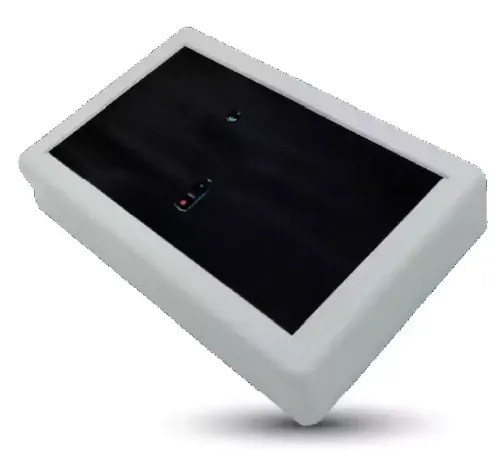
Ariadne ToFu counts every person entering the zone in front of a screen or a store door, whether or not they carry a phone. Compact, ceiling-mounted, and calibrated by Ariadne.
Ariadne ToFu
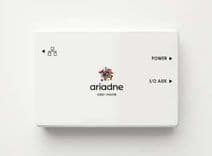
Fusion Pro, Pulse, and SurveyorSIM measure passing traffic and flow across corridors, atriums, and store floors without line of sight. One unit per major zone is typical.
Ariadne Fusion Pro
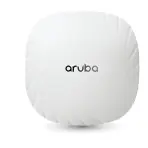
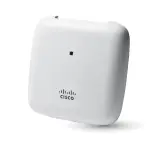
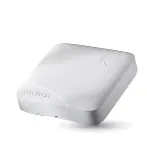
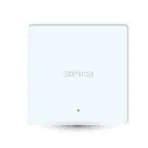
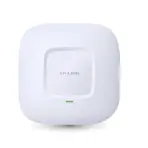
EaseLink runs Hybrid Fusion on the Aruba, Cisco, Ruckus, Sophos, or TP-Link access points already on the ceiling. No new hardware, no firmware changes.
EaseLink
Install path
Screens, corridors, and destinations marked on the venue plan.
Ariadne plans where each sensor goes so every zone is covered.
Sensors mounted and connected, or EaseLink linked to the existing access points.
Counts checked against a manual count per zone until the numbers hold.
Dashboards and reports switched on for the teams that use them.
Four to six weeks for a permanent installation. Days where EaseLink runs on access points the venue already owns.
Integrations
Privacy
Ariadne captures no images and no biometric data, and no MAC address by default. It does not estimate age, gender, or mood, because nothing it records could tell. Time-of-Flight records the geometry of a passing person, not a face. Signal sensing records presence and movement, not identity. Identifiers are stored only when a visitor explicitly opts in, for example by scanning a screen's QR code.
For a screen network that changes two things. There is no camera on the screen to disclose to every passer-by. And in procurement, Ariadne is a non-biometric measurement system that sits structurally outside the EU AI Act's biometric categories, rather than relying on an exemption. The reasoning is set out in Ariadne's camera-free approach.
Compare
Most screen audience tools put a camera on the screen and analyse the faces in front of it. The trade-offs are different.
The usual setup
A camera on or near the screen
With Ariadne
Hybrid Fusion, camera-free
What the sensor records
Video frames of the people facing the screen
What the sensor records
Geometry and signal presence, no images
What counts as audience
Faces detected looking toward the screen
What counts as audience
People passing the zone and people stopping in the viewing zone
Age, gender, mood
Estimated from faces
Age, gender, mood
Not measured, by design
After the screen
Only what the lens sees
After the screen
Flow from the screen zone to the promoted store or stand
Procurement
A camera on every screen, disclosure, and a review of face processing
Procurement
No camera to disclose. Non-biometric by architecture
Ariadne does not detect gaze, so where a buyer needs views of the screen itself, a camera-based tool measures something Ariadne does not. Where the question is how many people a screen reached and what they did next, read DOOH without facial recognition.
Customers
Since 2023, Ariadne has measured the audience at the DOOH screens in five Madrid transport interchanges with Appcelerate: Moncloa, Plaza Elíptica, Plaza de Castilla, Avenida de América, and Príncipe Pío.
The audience at its screens in the Moncloa and Plaza Elíptica interchanges, measured since August 2023.
The audience at its digital screens in the Plaza de Castilla, Avenida de América, and Príncipe Pío interchanges, measured since 2023.
Pricing
Three plans, priced per device per month. Which one a screen network needs depends on one question: daily numbers, or live ones.
01Daily reporting
Counting, sales integration, visitor forecasting, employee scheduling, capture rates, benchmarks, and automated weekly and monthly reports.
Fits monthly audience reports and campaign reviews.
02Real-time reporting
Everything in Essentials, plus real-time reporting, Threa AI, people flow, demand forecasting, visitor opt-in, and marketing campaigns.
The plan for live screen data and opt-in from the screen.
03Custom features
Volume pricing and custom features such as CRM integration, virtual queuing, alerting, and restroom traffic.
Screen networks across many venues.
Background
Hybrid Fusion is covered by DE102022115597A1, EP3964852A1, and CA3125501A1, from work that began at the Technical University of Munich.
Signage and DOOH partners, including Appcelerate, Dimedis, Digiflec, Waapiti, One Digital Media, and Tensator, work with Ariadne.
Over 800 locations in 32 countries, across retail, shopping centers, airports, and cities.
FAQ
No. Ariadne measures with Time-of-Flight sensors, which record the geometry of a passing person rather than an image, and with phone signal sensing, which records presence and movement rather than identity. No image is captured and no face is analysed.
Ariadne measures the audience around your screens and does not control what they play. Audience data reaches your team as scheduled email reports, CSV and PDF exports, and BI integrations such as Power BI, Tableau, and Grafana, so it can sit next to your signage platform's own play logs. Ariadne works with signage and DOOH partners including Appcelerate, Dimedis, and Digiflec.
A Time-of-Flight sensor at each viewing zone you want counted precisely, and signal sensors for passing traffic and flow across the wider space. Venues with supported Aruba, Cisco, Ruckus, Sophos, or TP-Link access points can run the signal layer on them through EaseLink.
You can measure what changed around a campaign. Mark its dates in Ariadne and compare passers-by, dwell, turn-in rate, and flow to the promoted store against another period or the same week last year. Ariadne shows the comparison side by side rather than modelling an uplift, and revenue enters the picture when you connect sales data.
GDPR compliance belongs to each deployment, not to a product, so every venue still publishes its own notice. What Ariadne removes is the hard part: there is no camera footage or face data to justify, store, or delete, no MAC address is stored by default, and identifiers exist only for visitors who opted in.
No. Ariadne does not detect where people look. It counts the people who pass a screen zone and the people who stop in the viewing zone, and reports how long they stay. Dwell in the viewing zone is a useful attention proxy, and Ariadne reports it as time in the zone, not as a verified view.
Yes, on Ariadne Advanced. Time-of-Flight counts refresh in the dashboard as often as every five seconds, and live trajectories show movement through the space as it happens. Essentials reports daily.
Four to six weeks for a permanent installation, from floor-plan review to calibrated data. Days where EaseLink runs on access points the venue already owns.
Resources
Field notes on screen audiences, DOOH measurement, and retail media from the Ariadne blog.

Signage gets approved in a meeting room and fails in a corridor. The behavioral metrics that show whether wayfinding signs actually work, and how to test them.

A static map costs little and lies within months; a kiosk costs more and stays true. The honest cost and effectiveness comparison, and when each is right.

Programmatic DOOH runs on venue data. How footfall feeds reach DSPs and SSPs: audience packs, triggers, reporting feeds, and the privacy line that must hold.
Related
Passers-by, turn-in rate, dwell, and campaign periods in Ariadne Analytics.
Time-of-Flight and signal sensors that install around a screen.
Turn a screen's QR code into an opt-in, and message only the visitors who joined.
Two questions, twenty minutes, a real walkthrough of your venue's footfall.
What to expect
Got a different question?
Anything that isn't a sales conversation. We'll route it to the right person and get back within one business day.