
Most in-store screens run the same content loop from open to close. The same promotions cycle at 09:00 when the store is nearly empty and at 13:00 when it is at its busiest, and the screen has no idea which is which. That is a scheduling problem, not a creative one, and it is the reason a lot of in-store media underperforms the money spent on the hardware and the content.
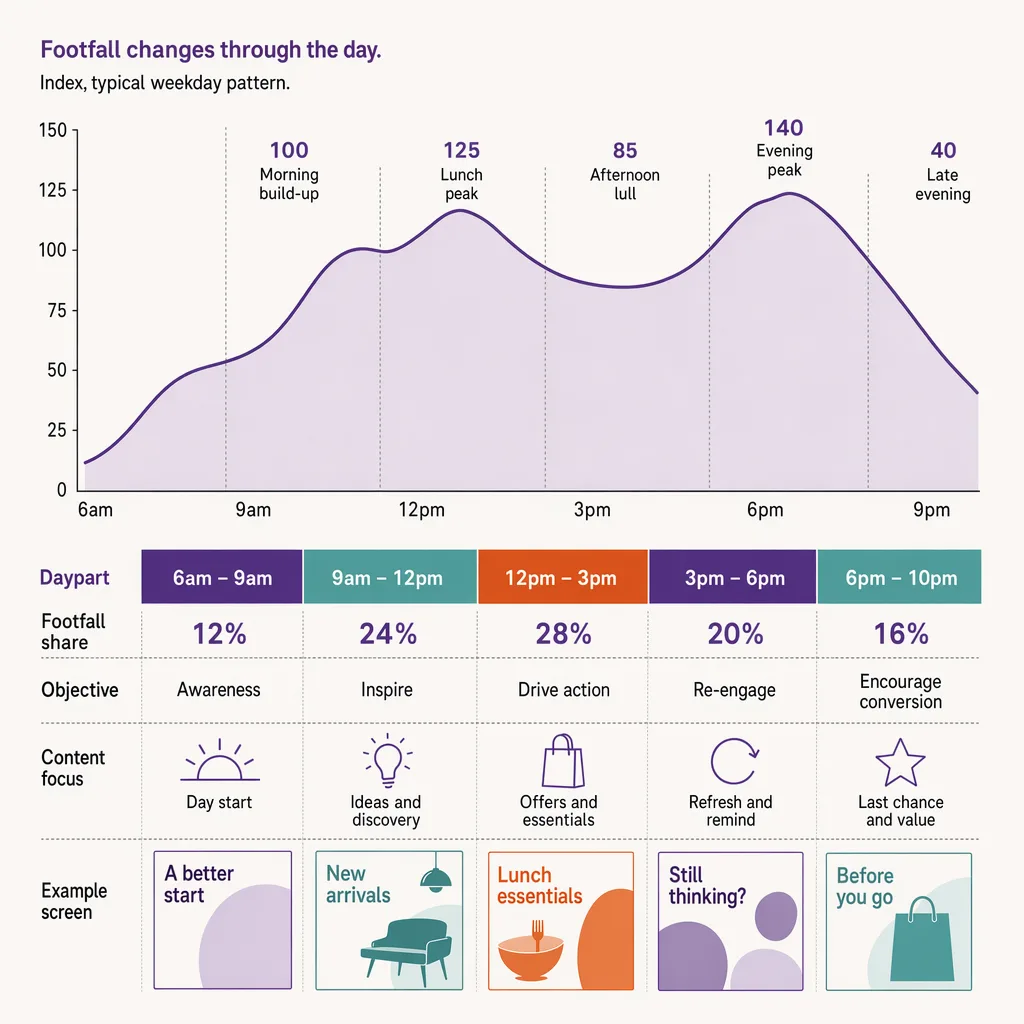
The fix is the same discipline you would apply to staffing: schedule the resource to the traffic that is actually there. Your screens are a finite amount of attention-time in front of a moving crowd, and that crowd is not evenly spread across the day. This post is the operational how-to on timing content to the traffic shape, a practice usually called dayparting. It assumes you already know what dwell time at the screen is and have seen the broader analytics for digital signage picture; here we focus narrowly on when to run what.
How should you schedule store screen content by traffic?
Schedule store screen content the way you would schedule staff: to the traffic that is actually there. Instead of running the same loop all day, you match each daypart's content to who is in the store then. Pull the hourly footfall shape, find the peaks and the quiet stretches, and put your highest-value promotions where the most people will pass and linger. Ariadne supplies the traffic shape camera-free, counting visitors and dwell without capturing any personal data, so content timing tracks real presence rather than a flat assumption about the day.
The rest of this post walks the method: why the flat all-day loop wastes your best placements, how to read the hourly shape, how to daypart against it, where the traffic signal comes from, and how to close the loop by measuring what the change did.
Why a single all-day content loop wastes your best placements
A content loop that never changes treats every hour as identical. It is not. A high street fashion store might see a slow morning, a sharp lunch-hour surge, a mid-afternoon dip, and a second build toward the evening. A screen running a fixed loop plays your best promotion just as often to the three people browsing at 09:30 as it does to the eighty moving through at 13:15. The impression that mattered, the one in front of the lunchtime crowd, competed for loop time with impressions that reached almost nobody.
There are two distinct costs here. The first is dilution: your highest-value content, the promotion you most want seen, only occupies its fair share of a loop that runs all day, so a large slice of its plays land in empty hours. The second is mistiming: content that is only relevant at certain moments, a lunch deal, an after-work offer, a weekend family promotion, runs at hours when it makes no sense. A flat loop cannot solve either problem because it has no concept of when.
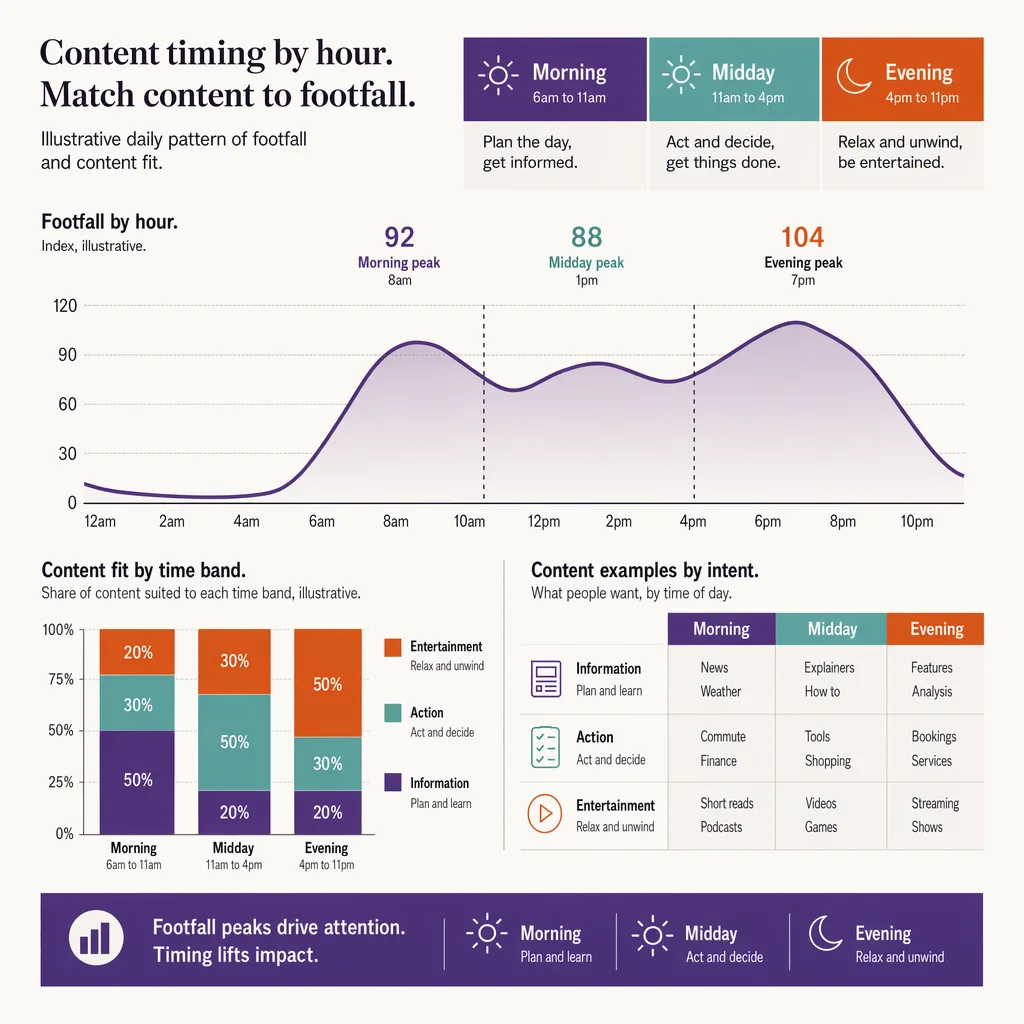
Dayparting solves both. Once the schedule knows the shape of the day, it can weight your priority content toward the hours that carry the most people and reserve time-sensitive content for the windows where it is actually relevant. The screen stops being a passive billboard and starts behaving like a scheduled channel.
Read the hourly traffic shape first
You cannot daypart against a shape you have not measured. The first step is to pull the store's hourly footfall profile and look at the pattern, not the daily total. The daily total tells you the store was busy; the hourly shape tells you when, which is the only thing content scheduling can act on.
Two patterns do most of the work. The first is the day-of-week traffic shape: a Saturday afternoon looks nothing like a Tuesday morning, and a single loop cannot serve both. The second is the within-day surge, most reliably the lunch-hour traffic surge, where a large share of a weekday's footfall can concentrate into a narrow window. If your best content is not weighted toward that window, you are handing your busiest hour to whatever happened to be in the loop.
Look for four things in the shape: the daily peak or peaks, the reliable quiet stretches, the days that break the weekly pattern, and the hours where people not only pass but slow down. That last one matters most for screens, because a passer who does not slow down barely registers the content. High traffic and high dwell together is the window you want your priority content in.
Daypart the content: match high-value promotions to high-traffic, high-dwell windows
With the shape in hand, split the day into dayparts and assign content to each. A workable pattern for a typical retail store:
- Opening and early morning: low traffic. Run brand and evergreen content, or lighter-value promotions. Do not spend your best placement here.
- Late morning build: traffic rising. Begin weighting toward priority content as the crowd grows.
- Lunch peak: highest traffic, and often high dwell if people pause near screens while they decide. This is where your single most important promotion belongs, weighted heavily in the loop.
- Afternoon dip: traffic softens. Ease off the priority content and rotate secondary messages.
- After-work and evening: a second build in many stores. Time-relevant content earns its slot here, such as an evening or commuter-oriented offer.
- Weekend: a different shape entirely, usually flatter and longer. Rebuild the daypart weighting around it rather than reusing the weekday plan.
The principle underneath the schedule is simple: give the hours that carry the most attention your highest-value content, and reserve time-sensitive content for the windows where it fits. Where you have dwell time at the screen as well as counts, use it to break ties. Two windows with similar traffic are not equal if people linger in one and stream past the other. The window where they slow down is worth more per play, so it should carry the content you most want absorbed rather than merely glimpsed.
One boundary is worth stating plainly, because it defines what this method is and is not. Dayparting here is scheduling by traffic volume and dwell, not by who is present. Ariadne does not detect faces, age, or gender, and this practice does not depend on any such thing. You are timing content to how many people are there and how long they linger, which is a presence signal, not a demographic one. That is a deliberate stance, and it is what keeps the approach defensible under GDPR and the EU AI Act rather than an audience-profiling exercise wearing a scheduling label.
The traffic signal that makes it work, camera-free and PII-free
Dayparting is only as good as the traffic data underneath it. A loop timed to an estimate of when the store gets busy is barely better than a flat loop; you need the real hourly shape, measured consistently, and you need it without turning a content-scheduling project into a surveillance one.
Ariadne measures this with Hybrid Fusion, its patented camera-free method. Time-of-Flight depth sensing counts every visitor at the entrances, capturing geometry rather than images, while patented phone signal sensing follows movement through the interior, detecting the signals a phone emits even in airplane mode, and tracks that movement to about one-metre precision. The sensor streams both feeds to Ariadne, where Hybrid Fusion combines them into one trajectory per visit and computes counts, dwell, and paths. The streams carry no identifier: no MAC address, no device ID, no biometric data, and no camera is involved. Identifiers are stored only when a visitor explicitly opts in, which keeps the method GDPR-friendly and outside biometric territory.
Read against the content-scheduling question, that gives you two inputs a fixed loop never had. The count tells you the hourly and day-of-week shape, so you know which windows carry the crowd. The dwell tells you where people slow down near a placement, so you know which windows carry attention and not just bodies. Those two numbers turn dayparting from a guess about when the store feels busy into a schedule built on what the store actually did, hour by hour, with no video and no personal data behind it.
Close the loop: measure dwell and zone response, then re-time
A daypart plan is a hypothesis, not a finished job. You have asserted that a given content-to-hour mapping will earn more attention than the flat loop did. The only way to know is to measure what happened after you shipped it, and then re-time.
Watch two signals after each change. The first is dwell in front of the screen through the day: did the windows you weighted with priority content actually hold people longer, or did the crowd pass without slowing? The second is zone response: did traffic to the promoted product or area move when the content ran in its intended window? If the lunch-peak promotion is doing its job, you would expect a lift in the zone it points to during and shortly after that window. Any lift figure you report should be treated as illustrative until you have measured it in your own store, not carried over from a template.
If a window you expected to perform does not, the fix is usually one of two things: the content was wrong for that crowd, or the window was wrong for that content. Re-map and measure again. Over a few cycles the schedule converges on the shape of the store, and the same screens that used to run one loop all day start earning their placement because each daypart is timed to the traffic and the attention that is genuinely there. For the wider measurement picture behind this loop, see analytics for digital signage and the digital signage analytics overview, and for the underlying counting and dwell signal, camera-free footfall and dwell.
FAQ
Do I need cameras to schedule screen content by traffic?
No. Ariadne counts with Hybrid Fusion: Time-of-Flight depth sensing plus patented phone signal sensing, never cameras. Time-of-Flight captures geometry rather than images, and signal sensing captures no MAC address by default, so the measurement involves no video, no faces, and no biometric data.


