
Most indoor navigation is designed for the fastest path, and the fastest path often uses stairs or an escalator. For a large share of visitors, that route does not exist. A wheelchair user, a parent with a pushchair, a traveller with heavy luggage, or someone with a temporary injury needs a path they can actually follow, and a wayfinding system that only knows the shortest route is guiding them into a dead end.
Accessible wayfinding is the discipline of offering a genuine step-free path as a real option, not an apology added after the fact. This guide sets out what an accessible route requires, how the major accessibility standards frame it, how the accessible attributes of a building are captured in an indoor map, and how routing logic should treat step-free as a first-class choice. It closes on how footfall data shows whether accessible paths are used and clear. For the fundamentals of indoor wayfinding basics, start with the pillar; this post owns the accessibility layer.
What is an accessible wayfinding route?
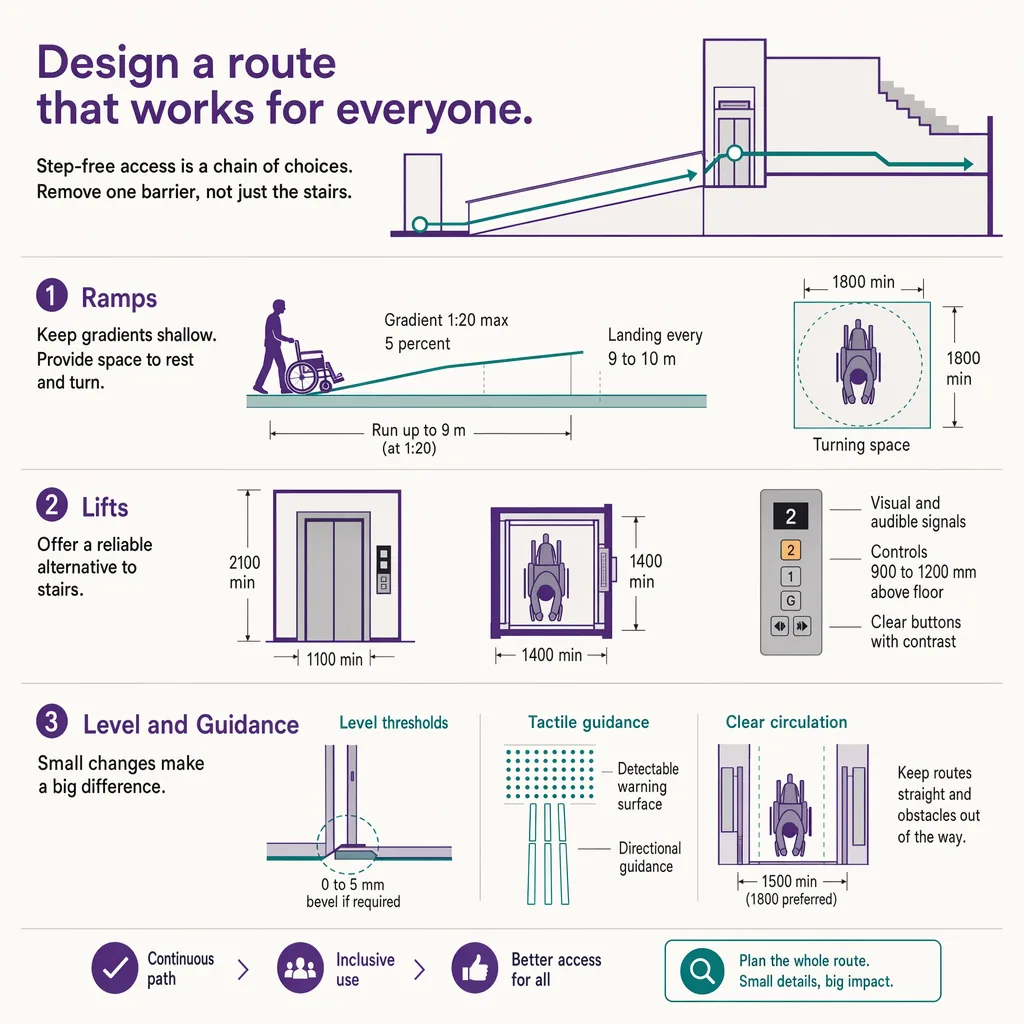
An accessible wayfinding route is a path through a building that a person with limited mobility, or using a wheelchair, can actually follow: it prefers elevators and ramps over stairs and escalators, keeps within accessible grade and door-width limits, and pairs visual directions with tactile and audio guidance where needed. Designing one means tagging the accessible attributes of every segment in the indoor map (which door, which lift, which grade) so the routing engine can build a step-free path on request instead of defaulting to the shortest route that happens to use stairs.
That definition contains the whole problem in miniature: a route is only accessible if every segment along it is, and a single unmarked step or a too-narrow door breaks the chain. The sections below unpack what "accessible" requires at the segment level, and how that information gets into the map.
What "accessible" requires: elevators over stairs, grade, door width, and tactile and audio guidance
Accessibility is a property of the whole path, decided segment by segment. A route that is level for ninety metres and then hits three steps is not step-free. The recurring requirements a route has to satisfy are consistent across venues even where the exact figures differ by jurisdiction:
- Vertical movement without stairs. Level changes are made by elevator or by a ramp within an accessible gradient, never by stairs or an escalator. The route has to know which lifts serve which floors and route through them.
- Door and passage width. Doorways, gates, and turnstiles along the route need enough clear width for a wheelchair, and doors need to be openable without excessive force or an automatic opener.
- Surface and grade. Ramps must stay within an accessible slope, and floor surfaces need to be firm and slip-resistant rather than loose or heavily textured.
- Tactile and audio guidance. Visual directions alone exclude visitors with low vision. Tactile paving, handrails, braille and raised-character signage, and audio guidance extend the route to people who cannot rely on a screen or a printed map.
- Rest and clearance. Longer routes benefit from rest points, and passing places matter where a corridor is too narrow for two wheelchairs to meet.
Get any one of these wrong on a single segment and the route stops being accessible, which is why accessible wayfinding is fundamentally a data problem before it is a display problem.
The standards frame: ADA, EN 17210, and ISO 21542
Accessible design is governed by published standards, and it helps to know which one applies where, at the level of principle. In the United States, the Americans with Disabilities Act (ADA) and its associated accessibility guidelines set requirements for accessible routes, entrances, elevators, ramps, and signage in places of public accommodation. In Europe, EN 17210 sets out functional accessibility and usability requirements for the built environment, and ISO 21542 is the international standard covering accessibility and usability of the built environment. Many countries also apply their own national building regulations on top of these.
The honest way to use these standards is to treat them as the source of the actual dimensions and to read the current text rather than quote a remembered clause. This post describes accessible routing as a general principle; it does not assert specific clause numbers, and following the principles here does not by itself guarantee legal compliance in any jurisdiction. Confirm the applicable standard and its current requirements with a qualified accessibility consultant before you rely on a specific figure. What the standards share is the core idea the rest of this guide is built on: an accessible route has to be continuous, and every segment along it has to meet the requirement.
Capturing accessible-route data in a BIM or indoor map
A routing engine can only offer a step-free path if the map tells it which segments are step-free. That means the accessible attributes of the building have to be captured as data: which doors meet clear-width requirements, which lifts serve which levels, which ramps sit within an accessible grade, where tactile paving and accessible restrooms are. Each of these becomes an attribute on a segment or a point in the indoor map.
The natural place for that data to originate is the building model. When a venue is drawn in BIM, the door widths, lift shafts, ramp grades, and level connections already exist as modelled elements, and the accessible attributes can be carried through into the navigable map rather than re-surveyed by hand. For how source building data becomes a routable map, see tagging route data in BIM. The key point is that accessibility data is not a separate layer bolted on at the end; it is a set of attributes the map should carry from the moment it is built, so the routing engine has something to route on.
Where BIM data is missing or the building has changed since it was modelled, the accessible attributes have to be surveyed and maintained, because a route that was true at handover can be broken by a later refit, an out-of-service lift, or a corridor narrowed by new fixtures. Accessible-route data ages, and a wayfinding system is only as trustworthy as the freshness of that data.
Routing logic: offering a step-free path as a first-class option, not an afterthought
Once the map carries accessible attributes, the routing logic has to use them properly. The common failure is to treat accessibility as a filter applied to a shortest-path result, which can produce a route that is technically step-free but absurdly long, or that fails silently when no accessible path exists. Better routing treats step-free as its own routing mode, computing the shortest path that satisfies every accessibility constraint, and telling the visitor honestly when the only accessible route is significantly longer or when a needed lift is out of service.
Presentation matters as much as computation. The step-free option should be easy to select, remembered for the session so a visitor does not re-request it at every junction, and clear about the specific accessible elements it uses (this lift, that ramp). A route that claims to be accessible and then presents a step is worse than no route at all, because it sends someone confidently toward a barrier.
Kiosk and signage accessibility as part of the route
The route to a destination includes the tools a visitor uses to find it, and those tools have their own accessibility requirements. A wayfinding kiosk that a wheelchair user cannot reach, or whose screen a visitor with low vision cannot read, breaks the accessible journey before it starts. Reachable touch height, high contrast, large type, audio output, and a step-free approach to the kiosk itself are all part of accessible wayfinding, not a separate topic. For the full treatment of the physical touchpoint, see accessible kiosk design.
Static signage carries the same duty. Signs sized to be read from a seated eye line, with adequate contrast and, where required, braille and raised characters, keep the physically signed route usable alongside any digital layer. Accessible wayfinding is the whole system working together: the map data, the routing logic, the kiosk, and the sign on the wall.
How footfall data on accessible paths informs design
Designing an accessible route is the start. Knowing whether it works in practice is a separate question, and it is measurable. Are the step-free routes actually used, or do visitors who need them end up asking staff because the route was hard to find? Is the accessible path clear, or is it regularly obstructed by a stacked delivery, a cleaning cart, or seasonal display furniture? A route that is accessible on the map but blocked in reality is a design that has quietly failed, and only measurement will surface it.
Ariadne measures this with Hybrid Fusion, its patented camera-free method. Time-of-Flight depth sensing counts every visitor at the entrances, capturing geometry rather than images, while patented phone signal sensing follows movement through the interior, detecting the signals a phone emits even in airplane mode, and tracks that movement to about one-metre precision. The sensor streams both feeds to Ariadne, where Hybrid Fusion combines them into one trajectory per visit and computes counts, dwell, and paths. The streams carry no identifier: no MAC address, no device ID, no biometric data, and no camera is involved. Identifiers are stored only when a visitor explicitly opts in, which keeps the method GDPR-friendly and outside biometric territory.
Applied to accessibility, that shows a facilities team whether the lift-and-ramp path is carrying traffic, where visitors bunch up or reverse near an accessible route (a sign the path is hard to find or blocked), and which junctions produce hesitation. Ariadne does not author the accessible-route data and does not judge compliance; it measures whether the paths are used and stay clear, which is the evidence a venue needs to keep an accessible design honest over time. The case is sharpest in a hospital, where an outpatient cannot afford a wrong turn, and at an arena, where an accessible route has to stay clear through a dense arrival. See Ariadne indoor navigation for how that measurement supports wayfinding across a venue.
Related reading
FAQ
What is an accessible wayfinding route?
It is a path through a building that a person with limited mobility or using a wheelchair can actually follow. It uses elevators and ramps instead of stairs and escalators, stays within accessible grade and door-width limits, and pairs visual directions with tactile and audio guidance where needed, so the route is continuous and step-free from start to finish.
Which standards govern accessible routes?
In the United States, the Americans with Disabilities Act (ADA) and its accessibility guidelines. In Europe, EN 17210 covers functional accessibility of the built environment, and ISO 21542 is the international standard, with national building regulations often applying on top. Confirm the current text and the applicable standard with a qualified consultant before relying on a specific figure; following general principles does not by itself guarantee compliance.
How is accessible-route data captured in an indoor map?
By tagging the accessible attributes of each segment and point: door clear widths, which lifts serve which floors, ramp grades, tactile paving, and accessible restrooms. When a building is modelled in BIM, those attributes can carry through into the navigable map rather than being surveyed by hand, and they need to be maintained as the building changes.
How should routing handle step-free paths?
As a first-class routing mode, not a filter on the shortest route. The engine should compute the shortest path that satisfies every accessibility constraint, remember the step-free preference for the session, name the specific lifts and ramps it uses, and tell the visitor honestly when the accessible route is longer or a needed lift is out of service.
Do you need cameras to see if accessible routes are used?
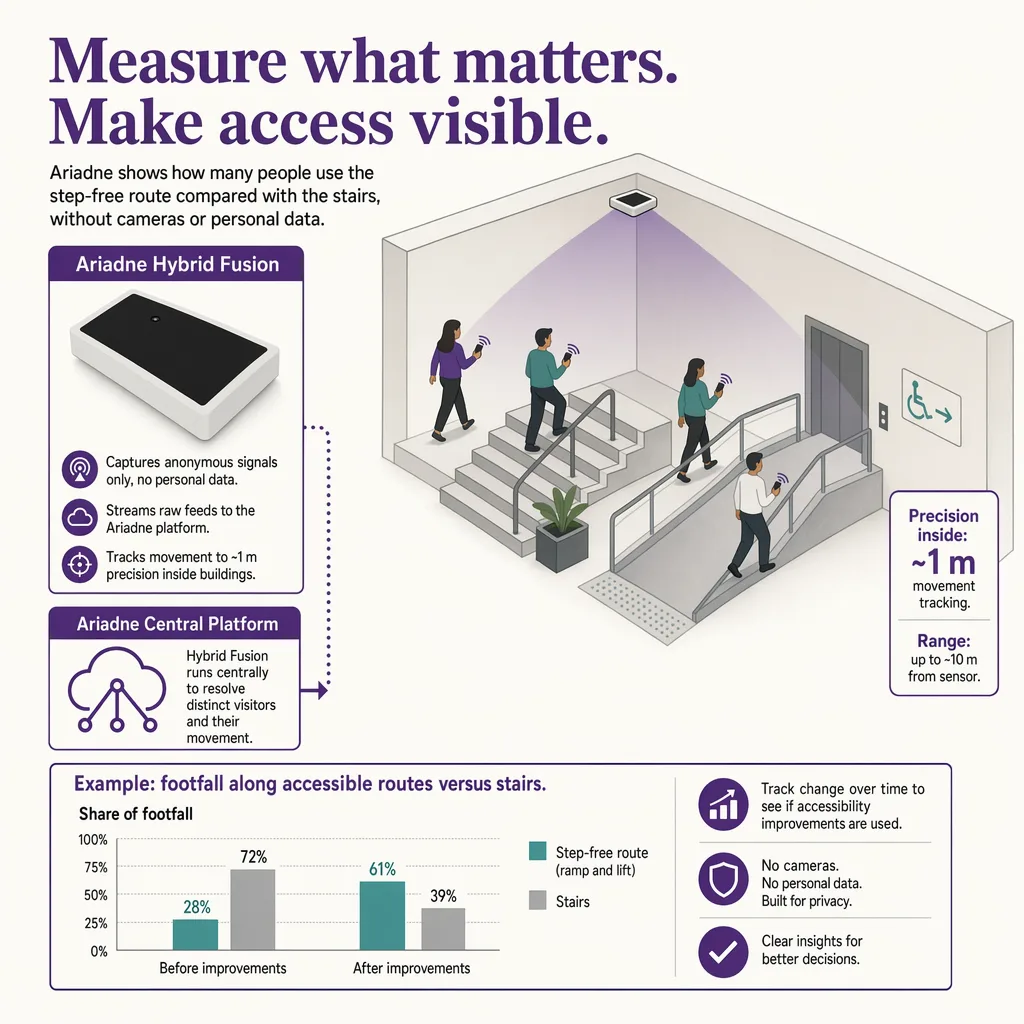
No. Ariadne counts with Hybrid Fusion: Time-of-Flight depth sensing plus patented phone signal sensing, never cameras. Time-of-Flight captures geometry rather than images, and signal sensing captures no MAC address by default, so the measurement involves no video, no faces, and no biometric data.


