
Why a wayfinding map is not just a floor plan
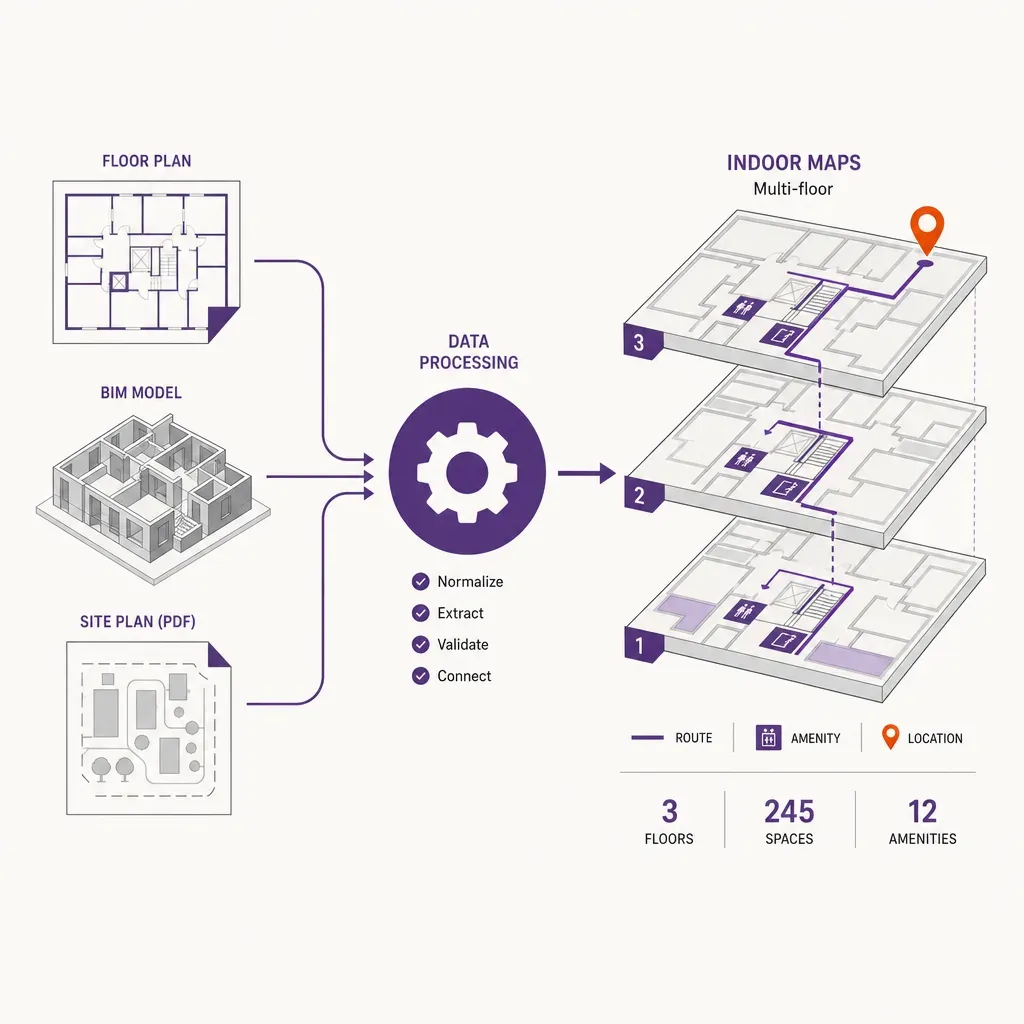
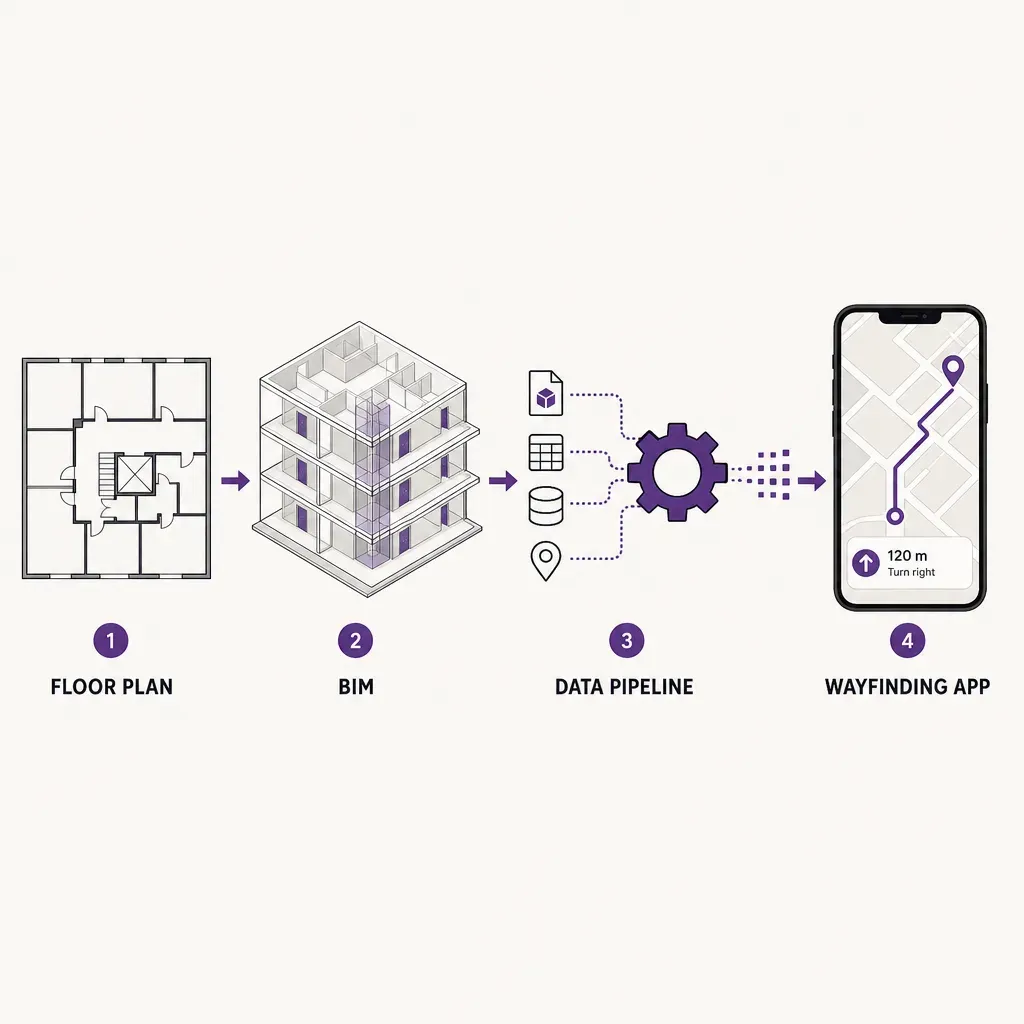
A printed floor plan tells a person where the rooms are. A wayfinding map tells an app how to route someone from where they are standing to the gate, ward, store, or meeting room they need, on a phone, in a building they do not know, while the venue itself keeps changing. Those are different jobs, and the second one needs a data pipeline behind it. The job of that pipeline is to take whatever the venue already owns, a CAD set, a BIM model, a PDF site plan, sometimes a hand-drawn evacuation diagram, and turn it into a routable, queryable, multi-floor map that an indoor navigation app can use without breaking on edge cases.
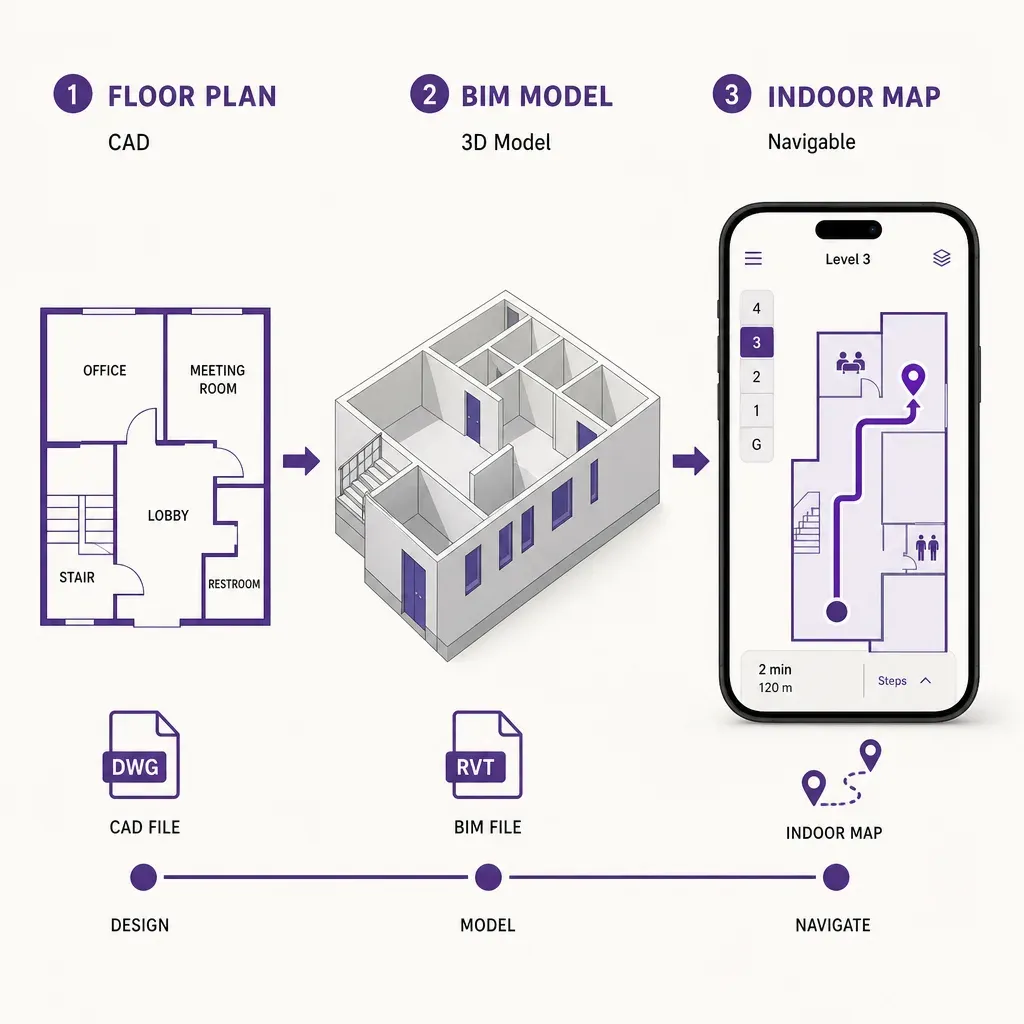
Almost every wayfinding project under-budgets this step. The model from the architect is rich, but it was built to construct a building, not to navigate one. The export is geometrically heavy, full of objects an app will never use, missing the metadata the app actually needs, and locked to a moment in time. The pipeline closes that gap. This piece walks through the six stages of that pipeline as they are run in practice, and it sets out what each stage owes the next.
Stage 1: geometry import from CAD, BIM, or floor plans
The first stage is to get a clean geometric truth into a working format. Three input families turn up repeatedly, and each one needs a different intake.
- BIM (IFC). Industry Foundation Classes is the open standard most modern projects share. An IFC file holds walls, slabs, doors, spaces, and equipment as typed objects with attributes, not just lines. That makes IFC the richest starting point a wayfinding pipeline can have, because the model already knows that a wall is a wall and a door is a door. The intake step parses the IFC, keeps the storey structure, and extracts the categories that matter for navigation: spaces, walls, doors, openings, stairs, lifts, ramps. Everything structural that is not relevant for route finding (foundations, slabs as solids, MEP runs) is set aside.
- CAD (DWG or DXF). Older buildings, and many active ones, only ship CAD. The line work is precise but typed loosely: layers tell you what is a wall and what is furniture, and the convention varies by office. The intake step here is a layer reconciliation. The pipeline maps the venue's layer naming to a small canonical set, walls, doors, fixed obstacles, room boundaries, vertical circulation, and discards layers that hold titleblocks, hatching, dimensioning, or trade work irrelevant to navigation.
- PDF or raster floor plans. Many venues only have a PDF. That is workable but it adds a tracing step. The plan is georeferenced against the building footprint, then walls, doors, and rooms are vectorised, by hand for a small site, with assisted tooling for a larger one. The output of this step is the same canonical geometry the IFC and CAD paths produce, so downstream stages do not care which intake was used.
Two things have to be true by the end of stage one, regardless of input. First, every floor is in the same coordinate system, anchored to a known georeference so the indoor map lines up with the world outside. Second, every space has a closed boundary, because every later stage assumes you can ask whether a point is inside a room.
Stage 2: geometry simplification
The model the architect delivers is heavier than a wayfinding app needs by one or two orders of magnitude. A wall in BIM is a solid with thickness, layers, and parametric joins. For routing, that wall is a line segment. A door is a parametric family with swing geometry; for routing, it is an opening with a position and a width. Simplification reduces the model to what the navigation engine actually queries.
Typical operations in this stage:
- Wall centerline extraction. Convert thick wall solids into their centerlines, then snap colinear segments together so a corridor reads as one line, not a string of fragments.
- Door and opening reduction. Each door becomes a point with a width attribute on the wall it sits in. Swing geometry is dropped; the routing engine does not need to draw the door, only to know it exists and whether it is passable.
- Room polygon cleanup. Spaces are reduced to clean polygons, with slivers and self-intersections removed. Adjacent rooms that share a wall are made topologically adjacent, so a path can cross from one to the next through a door.
- Furniture and fixture pruning. Desks, chairs, planters, and decorative geometry are removed by default. Fixed obstacles that affect routing, columns, permanent counters, security gates, are kept, because a route that runs through a column is not a route.
The right simplification target is honest: small enough to load and route on a phone in a few hundred milliseconds, detailed enough that the route the app draws lines up with what a visitor sees in front of them. That is a per-venue trade-off, and it is the first place a pipeline benefits from having a human in the loop rather than full automation.
Stage 3: multi-floor graph construction
Routing does not run on geometry. It runs on a graph: nodes that represent places, edges that represent the connections between them. Stage three turns the simplified geometry into that graph and, more importantly, connects the graphs of each floor into a single navigable building.
The building blocks are familiar from any routing system:
- Nodes. A node is a position the route can pass through: a door, a corridor junction, the bottom or top of a staircase, the door of a lift, a designated point inside a large open space.
- Edges. An edge is a passable segment between two nodes, with a length and a width. Edges carry costs, the basic cost is distance, with adjustments for stairs, narrow openings, or routes a venue wants to discourage.
- Vertical connectors. Stairs, escalators, lifts, and ramps are the joins between floors. Each is modelled as one or more edges between the top and bottom node, with attributes that say whether they are passable in both directions, whether they are time-bound (an escalator that runs only during opening hours), and whether they are accessible.
Two construction details decide whether the graph behaves well in production. The first is junction handling in open spaces. A long corridor is easy; a wide atrium needs a network of routable lines, not a single edge across an empty polygon, so the graph reflects realistic paths rather than diagonal cuts a visitor cannot actually walk. The second is the vertical join. The pipeline must know that the bottom of stair S-03 on the ground floor connects to the top of stair S-03 on level one, and that this is the same physical stair. That sounds trivial; in practice, mismatched naming between drawing sets is the single most common source of broken routes across floors. The pipeline owes the project a verification step that walks every vertical connector and confirms the join.
Stage 4: point of interest tagging
A graph that knows the geometry of the building can compute a route. It cannot yet answer the question a visitor actually asks, which is a name, not a coordinate. Stage four binds names to places. Every point of interest the app exposes, a gate, a ward, a department, a store, a meeting room, a toilet, a baby change, a defibrillator, a charging point, is created as a record with a stable identifier and tied to a node in the graph.
A working POI record carries at least:
- A stable ID. An identifier that does not change when the venue renames the space. The display name can change, the ID should not, because deep links and saved favourites depend on it.
- Display names per locale. The visitor-facing name in every language the app supports, kept separate from the ID. A retail POI may be called by both the tenant name and a generic category (a pharmacy that is also branded).
- Category and search keywords. Categories that drive filtering (food, services, vertical circulation) and keywords that drive search (an Italian restaurant should appear when a visitor types pizza).
- Hours and live status hooks. Opening hours that the app can use to dim a closed store at night, and a place to plug in live availability if the venue feeds it (a gate that has just changed, a clinic that is running late).
POI tagging is the stage venue teams care most about, because it is the one they will edit forever. The pipeline owes them an editor that does not require touching BIM. The model below the POI layer is geometry; the layer they edit is records.
Stage 5: accessibility metadata
Accessibility is not a separate map. It is metadata attached to the same nodes and edges the rest of the routing uses. The pipeline marks the model up so that a visitor who needs an accessible route gets one as easily as a sighted visitor gets the shortest one.
The metadata a wayfinding app actually queries:
- Step-free flags on vertical connectors. Every stair is marked not step-free; every lift, ramp, or level escalator that can be walked is marked step-free. The routing engine reads this flag when a visitor selects an accessible route and avoids any edge that is not step-free.
- Door widths and thresholds. Each door records its clear width and whether it has a raised threshold, so the engine can reject doors that a wheelchair will not fit through.
- Surface and gradient. Edges record the surface (smooth, cobble, grating) and the gradient on ramps, so the engine can avoid a 10 percent slope when a gentler alternative exists.
- Accessible POIs. Accessible toilets, hearing loops, baby change rooms, quiet rooms, and assistance points are first-class POIs in their own right, not buried inside a wider category.
Two things matter about how this metadata is gathered. It is hard to derive automatically from BIM alone, because the model rarely carries it consistently. It needs a venue walk-through, often with the access team, and it should be entered against the same node IDs the geometry already owns, so a later geometry update does not blow it away.
Stage 6: the update workflow
A building changes. A tenant moves, a corridor is closed for refit, a new clinic opens, a stairwell is taken out of service for a week. A wayfinding pipeline that only runs at handover slowly drifts out of alignment with the building, and visitors notice within weeks. The sixth stage is the one most projects forget to plan, and it is the one that decides whether the indoor map is still trustworthy in year three.
A practical update workflow separates three kinds of change:
- Live operational change. A gate change, a temporary closure, a clinic running late. These do not touch the geometry; they touch attributes on nodes and edges, and the app pulls them through the venue's live data feeds. Turn-around: seconds to minutes.
- Soft change. A retailer moves into a unit, a department renames, opening hours shift. These touch the POI layer only. They are handled by the venue's own editors, with no re-import of geometry. Turn-around: same day.
- Hard change. A wall moves, a stair is reconfigured, a new wing opens. These need a fresh geometry import, a re-run of simplification, and a graph rebuild on the affected floors. The pipeline keeps node IDs stable wherever the underlying geometry has not changed, so the POI and accessibility metadata survive the rebuild and do not need to be re-entered by hand. Turn-around: days, scoped to the affected area.
The discipline that makes this work is the stable ID convention introduced at stages three and four. If a node ID is treated as a contract, the venue team can re-import a corrected drawing without losing the editorial work on top of it. If IDs are regenerated on every import, every re-import is effectively a fresh build, and the venue stops bothering to update at all.
Where the people-counting side connects
The pipeline above is about getting visitors to where they want to go. The other half of the indoor data picture is understanding how visitors actually move, which is a people counting question. The two sides share the same map, but they ride on different sensors and they answer different questions.
On the counting side, a Time-of-Flight depth sensor sits over each entry and reads the geometry of every person who crosses the threshold to within roughly 30 centimetres. It captures shape and movement, not images, and there is no camera, no face data, and no device identifier in the stream. The count is anchored to the same coordinate system as the wayfinding map, so an entry count belongs to a specific door, and a zone occupancy belongs to a specific room polygon, on the same graph the navigation app routes against.
Group sizing inside the building, how many people are in a zone right now, how dwell varies by area, comes from Ariadne's patented signal sensing. It detects the radio signals phones emit, including in airplane mode, and triangulates position without capturing a MAC address by default. The result is a live picture of occupancy that maps directly onto the routing graph the wayfinding side already owns: how busy each zone is, where bottlenecks build, which routes are under-used.
The wayfinding app and the counting layer are deliberately separate as far as the visitor is concerned. The navigation side is opt-in: a visitor downloads the venue app, agrees to use it, and the app runs positioning on their phone for as long as they have it open. The counting side runs underneath the building and never sees an individual; it sees totals, occupancies, and flows. The privacy contract is set out in the privacy policy, and the practical consequence for the pipeline is that the same map can serve both purposes without the navigation side ever feeding the counting side a personal identifier.
A short checklist for venues commissioning the pipeline
If you are scoping a wayfinding project and want to make sure the data pipeline is not the part that bites later, these are the questions to put to the vendor in writing.
- Which inputs can you ingest? Confirm IFC, DWG or DXF, and traced PDF are all supported, because the venue rarely has only one of them.
- How are node IDs assigned, and what survives a re-import? If IDs are stable across geometry updates, your POI and accessibility work survives a refit. If they are not, you will redo it every time.
- How are vertical connectors verified? Ask for the walk-through that confirms each stair, lift, and escalator is joined correctly across floors. Mismatched joins are the single most common cause of broken cross-floor routes.
- Who edits POIs after handover, and how? The venue team should be able to rename a store, change opening hours, or add a meeting room without going back to the BIM model.
- How is accessibility metadata gathered and maintained? If the answer is only what the BIM model carries, you will have gaps. There should be a venue walk-through built into the scope.
- What is the workflow for a hard geometry change? A scoped re-import on the affected floors, with stable IDs preserved elsewhere, is the right answer. A full rebuild every time is not.
- How does the same map serve people-counting analytics? If the venue wants occupancy and flow as well as navigation, the map needs to anchor both. Confirm the counting side is camera-free and that no personal identifier crosses from the navigation side.
Related reading
FAQ
Is BIM required, or can the pipeline start from CAD or PDF?
BIM gives the richest starting point because the model already typifies walls, doors, and spaces, so less manual classification is needed downstream. CAD is workable with a layer reconciliation step, and a PDF floor plan can be vectorised with assisted tooling. By the end of the geometry import stage the format is the same regardless of input, so later stages do not depend on the source.
How are stairs, lifts, and escalators handled across floors?
Each vertical connector becomes one or more edges in the graph, joining a node on the top floor to a node on the bottom floor. The pipeline verifies every join on a walk-through, because mismatched names between drawing sets are the single most common cause of routes that fail to cross floors correctly. Connectors carry attributes for direction, accessibility, and time-bound operation.
Does the wayfinding map have to be rebuilt when the venue changes?
Only when geometry changes. A live operational change, a gate change or temporary closure, runs through node and edge attributes in seconds. A soft change, such as a renamed store or new opening hours, is edited in the POI layer the same day. A hard change, a moved wall or a new wing, needs a scoped geometry re-import, but stable node IDs let the POI and accessibility work on unchanged areas survive the rebuild.
How is accessibility data different from regular routing data, and why is it gathered separately?
Accessibility data is metadata on the same nodes and edges the rest of the routing uses, not a separate map. It is gathered separately because BIM models rarely carry it consistently, so the pipeline expects a venue walk-through with the access team to record step-free routes, clear door widths, ramp gradients, and accessible POIs. Holding it against the same node IDs as the geometry means a future geometry update does not lose the accessibility markup.
Does the people-counting side need cameras or personal data?
No. Ariadne counts with Time-of-Flight depth sensing at entries and patented phone signal sensing inside the building. Time-of-Flight reads the geometry of people crossing a threshold to within roughly 30 centimetres, never an image. Signal sensing captures no MAC address by default, so no device identifier sits in the count. The wayfinding map and the counting layer share a coordinate system, but no personal identifier crosses from the opt-in navigation app into the counting layer.


