
Why outpatient wayfinding is an appointment problem
A missed outpatient appointment is rarely about the patient not wanting to be there. It is about the patient arriving on site, running into a building they do not understand, and giving up. The taxi dropped them at the wrong entrance. The signs use clinical names rather than the words on their letter. The lift only goes to certain floors. The corridor splits and the arrow points the wrong way. They wander, they ask, they walk back outside to check the address, they miss the slot, and the clinic records a did-not-attend. The clinical record reads as a behavioural problem. The cause was an architectural one.
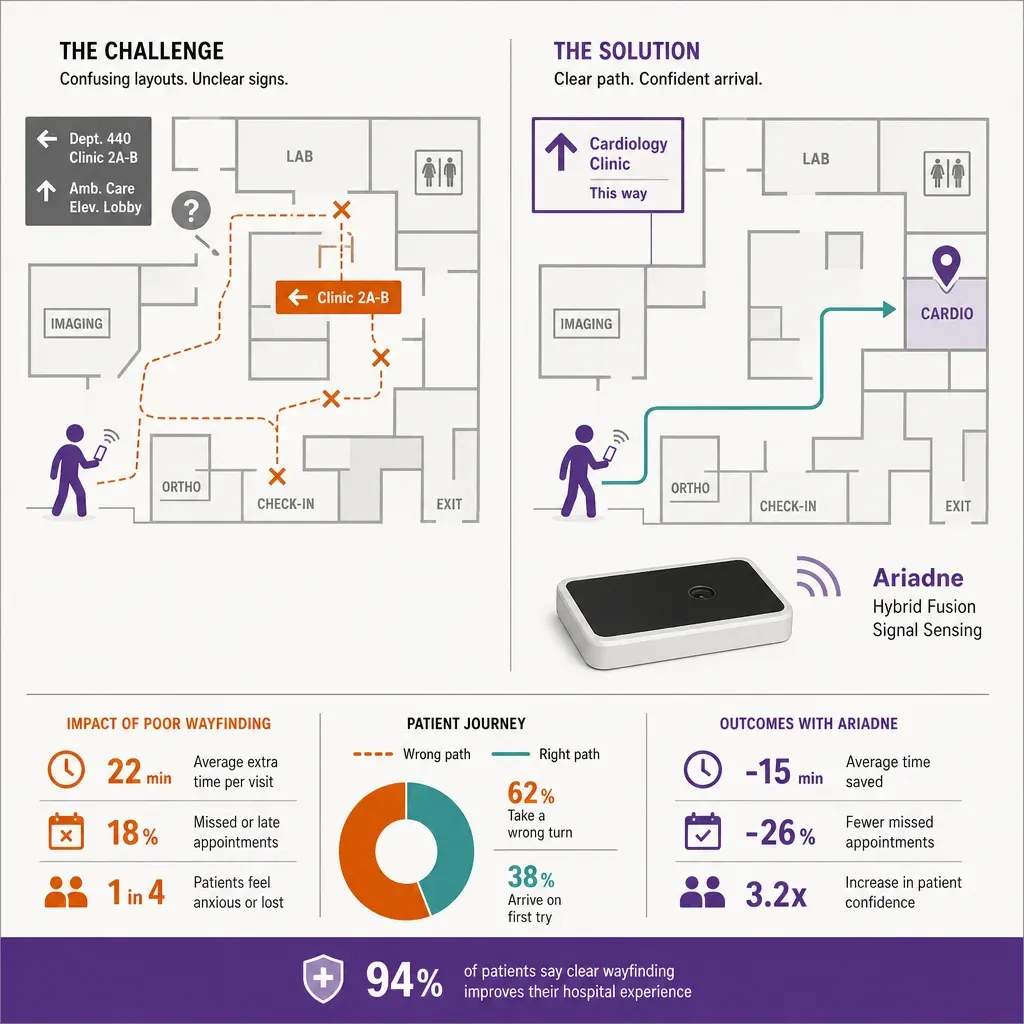
Most large hospitals lose a meaningful share of outpatient slots this way, with typical reported did-not-attend rates running anywhere from around five percent at well-run sites to twenty percent at sprawling ones. The exact figure varies by speciality, by patient demographic, and by how the trust counts. The point is not the number, it is that indoor wayfinding sits directly on it. A patient who walks confidently from the entrance to the right clinic in time for their slot is a patient who was seen. Everything else is overhead.
This piece sets out six design rules for outpatient wayfinding that work in practice on real hospital campuses. They are written from the patient journey backward: not what the maps team wants to publish, what the patient needs at the moment they need it. The rules are entry-point clarity, multi-modal signage, app navigation done honestly, language and reading-level accessibility, reassurance moments along the route, and edge cases for mobility, age, and anxiety. None of them are exotic. Most outpatient buildings fail at three or four of them at once.
Rule 1: entry-point clarity
A hospital campus often has six or eight or twelve entrances. Two of them are for ambulances. One is for staff. Two are loading bays. Maybe three are for the public, and one of those three is the one the outpatient department wants you to use. The patient does not know any of that. They know the postcode their letter gave them, they know whatever Maps showed them, and they know whichever entrance the bus or taxi dropped them at. The first design rule is to make the right entrance unambiguous from outside, and to recover gracefully when the patient picks a wrong one.
Three things have to be true at the entry layer:
- Each public entrance has a stable, simple name. Not the architectural name, not the historical name, the name the appointment letter uses. If the letter says Entrance B, the door says Entrance B, the sign on the road says Entrance B, the bus stop says Entrance B, and the routing app spells it the same way. A patient should never have to translate between three different names for the same door.
- Wrong-entrance recovery is signed for, not asked at the desk. If a patient walks into the wrong entrance, the volunteer at the door is one option. The standing sign that says From here, outpatients dermatology is a left turn through the link bridge and along the green route is a better one. The desk staff are overloaded; the sign is not. Recovery routes belong on the wall, with the same names the letter uses.
- The entry experience matches the letter. Whatever names, colours, or symbols the letter uses for the route are the same ones the patient sees when they arrive. If the letter uses a coloured route system, the colour is on the wall. If the letter uses building names, the buildings are signed by those names. Anything the letter assumes the patient already knows has to be on the wall when they look up.
A small instrumentation point that pays for itself. Counting arrivals at each public entrance and breaking them down by where they were headed shows the trust which doors are doing the work and which are being used wrong. If a third of the patients who needed Entrance B walked into Entrance D, the signage on the road was misleading, not the patient.
Rule 2: multi-modal signage
Outpatient buildings rely on a single modality of signage at their peril. The patient who reads the wall signs and the patient who looks for floor markings and the patient who follows colours and the patient who needs the app to talk to them are all in the same corridor at the same moment, and the design has to land for all of them. The second rule is that signage runs on multiple channels at once, and they say the same thing.
The channels that matter inside a hospital:
- Overhead signs at every decision point. Not just at junctions, at every point where a patient can plausibly go the wrong way. The clinic name, the wing, the route colour if there is one, the floor. If a corridor runs for sixty metres without a confirmation sign, half the patients on it will assume they went the wrong way and turn around.
- Floor markings or coloured lines. A line on the floor that the patient can follow without looking up is unreasonably effective for outpatient routes. It tolerates low literacy, low vision, distraction, and unfamiliar building geometry. Where the line breaks (a lift, a stair, a junction to a different colour), the wall sign explains.
- Departmental identity at the destination. When the patient arrives at the clinic, the entrance to the clinic itself is unambiguous. The name on the door matches the name on the letter. The reception desk is visible from the corridor, not hidden behind a turn. The waiting room is named, not labelled Waiting Area 4.
- Audio and tactile cues at key points. A talking lift that says the floor and the names of the departments on it. Tactile paving at routes used by patients with sight loss. Braille on lift buttons and door plates. These are not nice-to-have features for an outpatient building; they are part of the route.
The discipline that holds multi-modal signage together is that all modalities use the same vocabulary. If the wall says Cardiology Outpatients, the floor route to it is the same colour the letter named, the lift announcement says Cardiology Outpatients, and the door at the end says the same words. Each channel is a backup for the others; none of them should be saying something different.
Rule 3: app navigation done honestly
An app is the right answer for the patient who already uses their phone for everything and the wrong answer for the patient who does not. The third rule is that the app exists, it is good, and the building does not require it. Patients who want to use it get a route that actually works. Patients who do not get a building that signs itself.
An honest outpatient navigation app has a short list of properties:
- Opt-in, never the only way. Patients who download the app and accept the navigation prompt get a turn-by-turn route to their clinic. Patients who do not are not penalised. The building signage is the floor under the app, not a thinner version of it.
- Starts from the appointment, not from a search box. If the patient opens the app from a link in their appointment letter, the destination is already set. Asking a confused patient to type Dermatology Outpatients into a search box at the door is the moment they give up.
- Routes are accessibility-aware. An accessible route option avoids stairs and narrow doors and prefers lifts and ramps. A blue-badge route option starts from the disabled parking. A pre-arrival route option starts from the bus or train. These are different starting nodes on the same graph, not a separate app.
- The route shows time, not just distance. A patient with five minutes until their slot wants to know whether the route gets them there on time. An estimate that accounts for the lift wait and the typical walking pace of an outpatient population is more useful than metres.
- Position is reliable indoors, without claiming more than it is. Inside a building, an indoor positioning system that uses Wi-Fi and Bluetooth Low Energy signal patterns with map matching gives a usable blue dot in most corridors, with degraded accuracy in large open spaces or near long metal-clad walls. The app tells the patient when accuracy is low and offers a Where am I confirmation step at landmarks, rather than pretending the position is precise when it is not.
The honesty principle matters because a hospital app that claims more than it can deliver does more damage than no app at all. A patient who trusted the blue dot and ended up in the wrong wing will not trust the app on their next visit, and they will tell the volunteer at the door that the app sent them wrong. An app that says high confidence here, lower confidence in this atrium, please confirm at the lift earns trust the second time.
Rule 4: language and reading-level accessibility
The patient population of an outpatient department speaks more languages than the appointment letter does and reads at a wider range of levels than the signage assumes. The fourth rule is that wayfinding language is selected for the patient who will struggle most, not for the trust communications team.
The practical moves that close this gap:
- Plain-language clinic names. A clinic called Otorhinolaryngology Outpatients is invisible to a meaningful share of the people walking past it. Ear, Nose and Throat is the same clinic with a name patients recognise. Where clinical naming is mandated, the plain-language equivalent appears alongside it, the same size, not in brackets in small type.
- Top languages on every sign that matters. Outpatient buildings should know the top three to six languages spoken by their patient population and put them on the entrance signs, the floor directories, and the destination doors. This is not the place to be exhaustive; pick the languages a meaningful number of patients actually need and commit to them properly.
- Pictograms that are tested with patients. A wheelchair pictogram, a baby change pictogram, a male and female toilet pair, a lift symbol, a stair symbol. These should match the international set rather than a designer's clever re-imagining, because the international set is the one patients already know.
- Letter language matches the building language. If the appointment letter is in a patient's language, the wayfinding in the building should at least confirm the destination name in that language. A patient who arrives at the clinic and recognises the name on the door, even one word of it, knows they are in the right place.
Reading-level discipline is the boring half of this rule. Signage written for someone who reads English as a fifth language under time pressure is shorter, more concrete, and more redundant than signage written for the trust's tone of voice. That is the right trade.
Rule 5: reassurance moments along the route
The fifth rule is about the silences between signs. A patient walking a long route through an unfamiliar building goes through a predictable cycle: confidence, drift, doubt, and then the decision to turn back. The route design that beats the did-not-attend rate is the one that puts a reassurance moment into every drift before it becomes doubt.
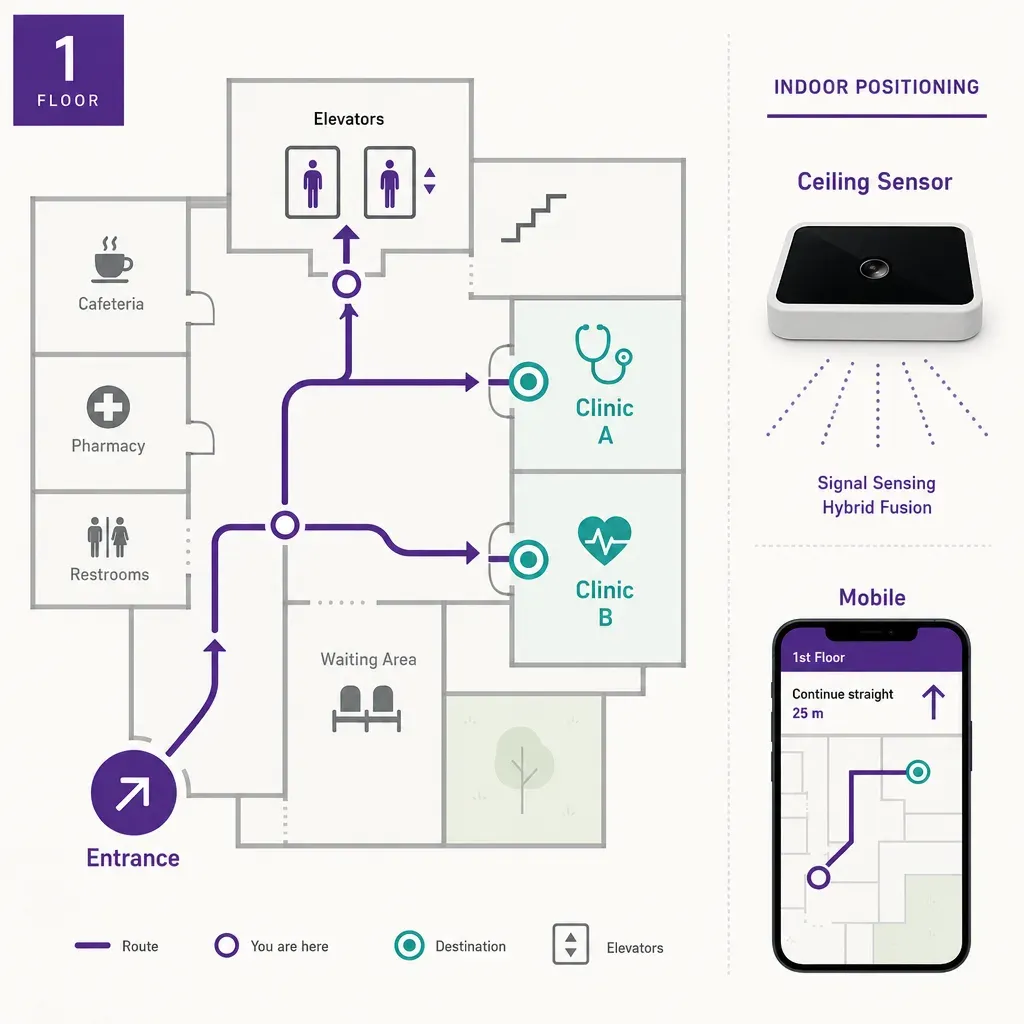
A reassurance moment is small and specific:
- A confirmation sign mid-corridor. Halfway down a long corridor, a small sign that just says the clinic name and an arrow. Not new information; a confirmation that the patient is still on the right path. This single sign cuts the rate at which patients turn around to look for help.
- A landmark the app can name. A coffee shop, a piece of art, a coloured wall, anything the indoor map can call out by name. Pass the courtyard with the willow tree is easier to follow than head along the corridor for fifty metres. Landmarks also let the app prompt a Where am I confirmation that is meaningful to the patient.
- A volunteer or information point at the failure cluster. Every outpatient building has two or three points where patients consistently get lost. They are visible in the counting data and in the volunteer logbook. Staffing those exact points with an information presence, not the main desk, is high-leverage.
- Calm seating before the destination. A short bench or a quiet alcove on the last stretch before the clinic gives a patient who is out of breath, anxious, or with a child, a moment to settle. Patients who arrive composed are easier to triage; patients who arrive panicked are more likely to leave before they are called.
The empirical question behind this rule is which points on the route are the drift points. Counting and live occupancy along the patient journey, anchored to the same wayfinding map, surface them. Where do patients pause, double back, ask, or turn around? Those are the spots that need a reassurance moment, and people counting across the building is what turns the question from a guess into evidence.
Rule 6: edge cases for mobility, age, and anxiety
The sixth rule is the one most wayfinding projects address last and most thinly, because the patient who is mobile, sighted, calm, and travelling alone gets to the clinic regardless. Every rule above bites hardest on the patient who is none of those things. A wayfinding design that works for the patient with the heaviest constraints works for everyone else by default.
The constraints that need explicit thought, not retrofit:
- Mobility. Accessible routes are step-free end to end. Door widths along the route fit a standard wheelchair. Ramp gradients are gentle enough that a manual chair can climb them without help. The accessible route from the disabled parking to the clinic is the same physical experience the building promises in the letter, not a longer ad-hoc detour. Where any of those things fail, the route is honest about it and offers an alternative or a person to help.
- Vision. Routes are usable by a patient with low vision: high-contrast wall signs at consistent heights, tactile maps at decision points, audio prompts available in the app, talking lifts. Print sizes are set for low vision, not corporate guidelines.
- Cognitive load and anxiety. Some patients arrive at outpatients in a state where they cannot reliably read complex signage at all. The route they need is short, the cues are repeated, the colour-coding is consistent end to end, and the destination is reached with as few choices as possible. The patient with dementia, the patient in pain, the patient with severe anxiety, the patient bringing a frightened child, all benefit from the same simplifications.
- Older patients. Older outpatients carry the highest constraints in combination: mobility, vision, hearing, and unfamiliarity with apps all at once. The building has to land for them through wall signage, audio, and physical comfort along the route, with the app as an option, not as the answer.
- Language and culture. Edge-case patients also include those whose first language is not the language of the building. The plain-language and multi-language work in rule four does most of the heavy lifting here, with one addition: the building should have a clear, signed path to interpretation services that does not depend on the patient asking for them at the desk.
None of this is about adding more signage. It is about choosing the signage that exists with the hardest case in mind, and then trusting that the same choices serve everyone else.
How counting and navigation fit together for an outpatient building
The six rules above are design rules. They get sharper when the building is instrumented to measure whether they work. The data picture that matters for outpatient wayfinding has two halves, and they share the same map.
The counting half answers operational questions. How many patients arrived through each entrance this hour? How does that compare to the appointment book? Which corridors are crowded ahead of the morning clinic? Which lifts are running at queue? Which information points are the busiest? These are footfall and occupancy questions, answered with Time-of-Flight depth sensing at entries and chokepoints (one sensor per entry, capturing geometry rather than images), with patented signal sensing through the rest of the building for zone occupancy. The streams carry no identifier by default, so the operational data sits below the personal data threshold without any pretence of anonymisation after the fact.
The navigation half answers patient questions. Where am I, where is my clinic, which way do I go, how long will it take, is there an accessible route. Indoor positioning runs on Wi-Fi and Bluetooth Low Energy signal patterns with map matching, opt-in through the trust's app, with no requirement to download anything if the patient prefers to follow the signs. The map underneath is the same map the counting side uses; the sensors and the data paths are separate.
What the two halves share is the floor model. A clinic is a polygon on the same map. A corridor is an edge on the same graph. A door is a node either side can point to. That shared geometry is what lets the trust ask, of any reassurance moment, whether it worked: did the share of patients who turned around at this junction drop after the new sign went in? Did the average walking time to dermatology fall? Did the share of patients arriving through Entrance B match the share the appointment letters sent? These are answerable questions, with the wayfinding map and the counting layer aligned, and they are the empirical floor under any claim that wayfinding is reducing did-not-attend rates. The data handling sits inside the privacy policy.
A short checklist for outpatient wayfinding scoping
If you are scoping a wayfinding project for an outpatient building and want to make sure none of the six rules above gets dropped along the way, these are the questions to put to the project in writing.
- Do the appointment letter, the road signs, and the entrance match? Walk the journey from the letter to the door. If the letter says Entrance B and the road sign says Main Reception, fix the road sign before you build the app.
- Are wall signs, floor cues, and the app saying the same thing? Pick three clinics and audit each modality for the same destination. Inconsistency between modalities is more confusing than a missing modality.
- Is the navigation app opt-in, with parity in the signed routes? Confirm a patient who does not use the app reaches the clinic just as easily. The app is a layer, not a load-bearing requirement.
- Are plain-language names paired with clinical names everywhere? Pull the directory and check each entry. If a clinical name has no plain-language pair, decide whether it stays or gets one.
- Where are the drift points, and what reassurance lives there? Use the counting data to surface where patients pause or turn around. Each one should be the home of either a confirmation sign or a staffed information presence.
- Does the hardest-case patient reach the clinic without asking? Pick the patient profile with the heaviest constraints (older, mobility-limited, low vision, low English, anxious) and walk their route. If they need to ask for help to complete it, the design is not done.
- Does the counting side share the same map as the navigation side? If the counting layer and the wayfinding layer are anchored to the same floor model, the trust can measure whether changes actually moved did-not-attend numbers. If they are not, you are guessing.
Related reading
FAQ
How much can wayfinding actually move the did-not-attend rate?
It depends on how much of the current rate is wayfinding-driven. A speciality where most no-shows are clinical (anxiety about the procedure, social reasons) will not move much on signage alone. A speciality where many patients are arriving on time at the campus and missing the slot because they could not find the clinic is wayfinding-bound, and good signage and a working accessible route can recover a meaningful share of those slots. The honest framing is that wayfinding is one of several levers, and it is the cheapest one to pull when the building is the problem.
Do patients need to download an app to find their clinic?
No. The first rule of honest wayfinding is that the building signs itself. The app is for patients who prefer turn-by-turn navigation and who tap a link in their appointment letter; the building signage is for everyone else. If the design requires the app, the building has failed the patient who cannot or will not use one.
How is indoor position determined inside a hospital building?
Inside the building, the navigation app reads Wi-Fi and Bluetooth Low Energy signal patterns and matches them against the indoor map. It does not require a separate beacon network installed for the purpose, and it does not use cameras or visual positioning. Accuracy is good in corridors and around landmarks, and degrades in large open atria and near long metal surfaces. An honest app says so, and prompts the patient to confirm at named landmarks rather than claiming precision it does not have.
Does the counting side ever see who an individual patient is?
No. Ariadne counts with Time-of-Flight depth sensing at entries and patented phone signal sensing inside the building. Time-of-Flight reads geometry, never an image, never a face. Phone signal sensing captures no MAC address by default, so no device identifier sits in the count. The wayfinding app and the counting layer share the same floor map but they run on separate sensors and separate data paths, and no personal identifier crosses from the navigation app into the operational counts.
What about accessibility routes that exist on paper but not in reality?
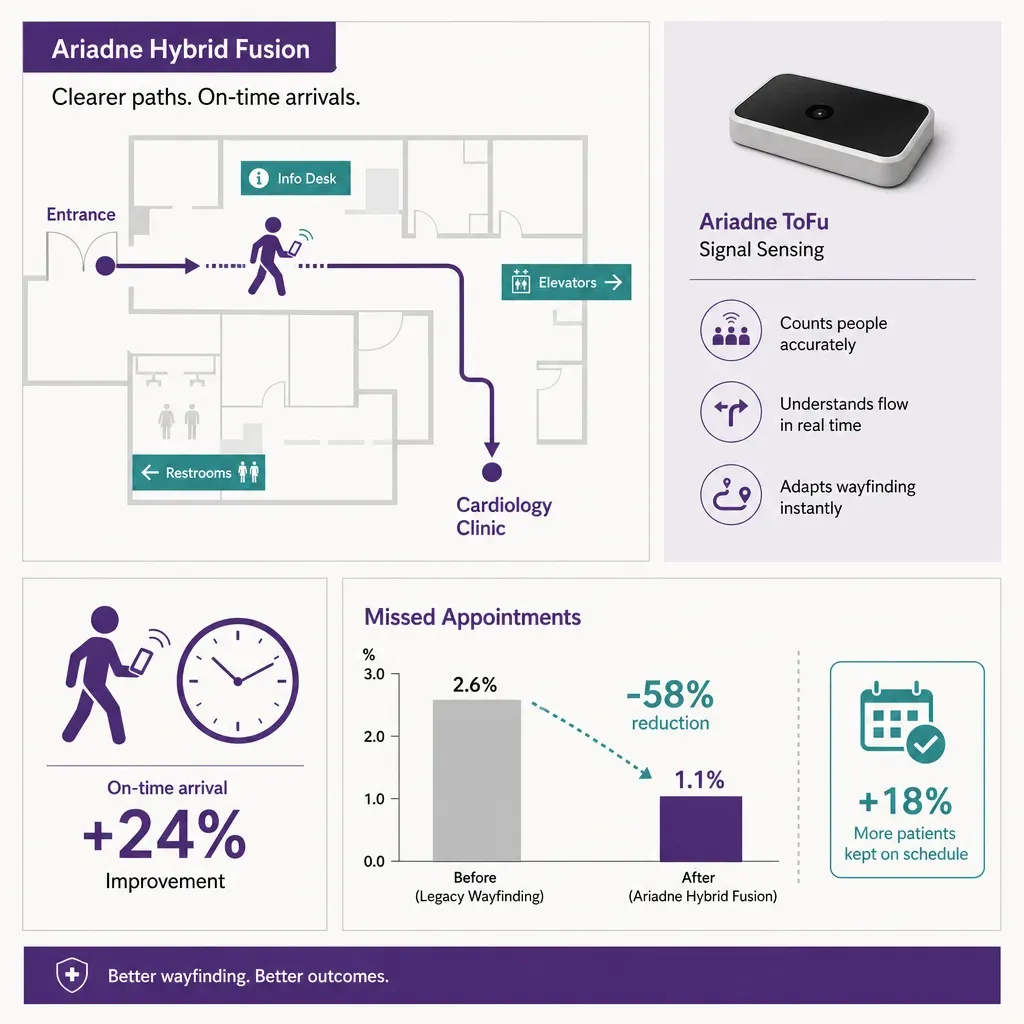
An accessible route that requires a key, a phone call, or a back-of-house detour is not really an accessible route. The audit question is whether the route in the app matches what a wheelchair user actually experiences end to end: step-free, doors wide enough, ramp gradients gentle enough, lifts that go to the right floors. Where the building fails that test, the honest move is to publish the constraint in the route and staff the failure point, while the physical fix is scheduled.


