
The one-metre spec, and why it does not mean what you think
Almost every indoor positioning vendor leads with a single accuracy number. One metre. Half a metre. Sub-metre. The figure looks decisive on a slide and almost always overstates what a navigation app will deliver to a visitor standing in the middle of a real building. The number is rarely wrong on its own terms. It is just answering a different question than the one a head of digital experience, an airport operations lead, or a hospital wayfinding owner needs answered.
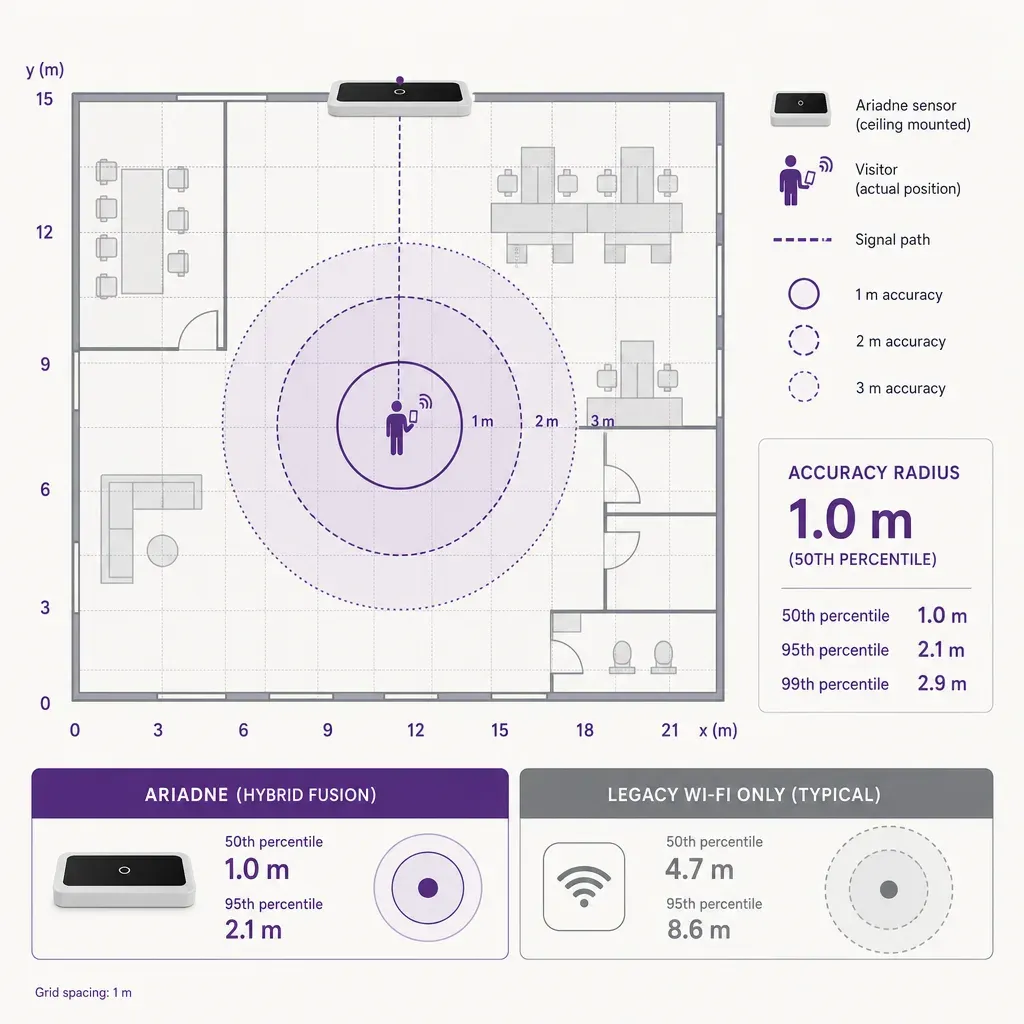
If you are evaluating an indoor navigation platform for a real estate or operations programme, the goal of this piece is to give you a working vocabulary for indoor positioning accuracy, so that you can read vendor decks more carefully and ask the small number of questions that separate a usable system from a frustrating one. The short version: a single accuracy number is almost meaningless without the statistical definition behind it, the environment it was measured in, and the failure modes it hides.
Three definitions hidden inside one number
When a vendor writes "1m accuracy", the figure can mean any of three different things. They are not interchangeable, and the gap between them is often the gap between a comfortable demo and a disappointing rollout.
- RMS, or root mean square error. The square root of the average squared error across many position samples. RMS treats large errors disproportionately, because squaring amplifies them, so a system with rare but big outliers will have a worse RMS than one with steady, modest error. RMS is the figure engineers usually quote internally.
- CEP, the circular error probable. Most often quoted as CEP50 or CEP90: the radius of a circle, centred on the true position, that contains 50 percent or 90 percent of the position fixes. CEP50 is roughly the median error; CEP90 is the radius you can trust nine times out of ten. CEP90 is much more honest for a navigation app, because users notice the bad fix, not the median one.
- Worst-case error. The largest individual fix the system produced in the test. Useful as a sanity check, because a worst case of 12 metres in a 4-metre-wide corridor will route a visitor through a wall regardless of how good the average looks. Vendors almost never lead with this number.
A vendor that quotes "1m" without saying which definition is in play is being either careless or deliberately optimistic. The same dataset can yield a 1m RMS, a 1.5m CEP90, and an 8m worst case, and all three figures describe the same system. The figure that matches what a visitor experiences is closer to CEP90 than to RMS.
Where the same system gives different numbers
Even after the definition is pinned down, indoor accuracy is not a single property of a positioning platform. It is a property of the platform interacting with a particular kind of indoor space. The same algorithm and the same sensor mix will produce visibly different numbers across the four environments below. Treat the ranges that follow as typical industry expectations, illustrative rather than measured at your site.
In-corridor, away from windows
A long corridor with structured signal sources on both sides, away from external windows, is the friendliest environment for any radio-based positioning approach. Signal reflections are bounded by the walls, the user's heading is constrained by the corridor geometry, and map matching can snap a noisy fix onto the corridor line with confidence. Industry expectations for a well-calibrated system in this kind of space typically sit in the low single-digit-metre range for CEP90, and the user experience is the demo experience: the blue dot moves where the user moves, with no apparent lag.
Open atrium or wide concourse
An atrium, a wide concourse, or any tall open volume is harder, for two reasons. Map matching has less to snap to, because the user can legitimately be anywhere in a large open polygon. And the geometry of the space changes how radio signals propagate, with longer paths and fewer near-field anchors. Typical CEP90 in open volumes is materially worse than in a corridor, often two to three times worse, and the visible symptom is a blue dot that drifts a few metres while the user stands still. The fix is usually a denser anchor pattern, not a different algorithm.
Near windows and exterior walls
Positioning quality often degrades near the perimeter of a building. GPS, which most phones still try to use indoors when they can, returns confident but inaccurate fixes near windows, and the platform must decide whether to trust them. Reflections off glass can also confuse radio-based signal pattern matching. A common failure mode is a blue dot that snaps to the outside of the building rather than the room the visitor is actually standing in. Industry expectations are noticeably worse along window walls than in interior corridors, and the gap shows up most clearly at perimeter retail units, gate-line lounges, and outpatient clinics with floor-to-ceiling glazing.
Multi-floor and floor transitions
Floor identification is its own accuracy problem and is often quoted separately from horizontal accuracy. A system can place the visitor within a metre on the wrong floor, and from a wayfinding perspective that is a worse error than being 5 metres out on the right one. The harder cases are stairwells, escalators, and split-level mezzanines, where the visitor is genuinely between floors for tens of seconds and the platform has to commit to a label. Honest vendors quote a separate floor accuracy figure, usually phrased as the percentage of fixes that are on the correct floor, and they distinguish steady-state floors from transition periods.
Why one number cannot describe all four
Once you accept that the same platform behaves differently in a corridor, an atrium, a perimeter unit, and a stairwell, the limit of the single-number spec is obvious. A 1m headline figure is usually the best of the four numbers, taken from a calibrated corridor in a controlled test, and presented as if it described the whole building. The single number is not a lie. It is a sampling problem dressed up as a specification.
A more useful framing, the one that matches what a navigation app actually delivers to a visitor, is a small table of CEP90 figures and a separate floor-accuracy figure: one CEP90 for typical interior corridors, one for open atria, one for perimeter zones near windows, and a percentage for correct-floor identification. Vendors who can provide that table tend to be the ones who have done the engineering work to deserve it. Vendors who refuse, and who insist that a single number is enough, are telling you something about how they expect you to measure them in production.
Where the floor plan does as much work as the radios
Indoor accuracy is not just a radio problem. A large share of practical accuracy comes from map matching, the step that takes a noisy raw fix and snaps it onto the navigable indoor map. A well-modelled floor plan, with walls, doors, escalators, and lift cores correctly geometried, will pull a 4-metre raw error back to a sensible position inside a corridor, because the algorithm knows the visitor cannot legitimately be inside the wall. A poorly modelled or out-of-date floor plan does the opposite: it places the visitor confidently in an impossible spot.
This is why an honest accuracy conversation has to cover the map as well as the radios. A vendor demoing on their own pristine reference floor plan will produce one set of numbers. The same platform running against your CAD export, with two missing walls and an outdated tenant fit-out, will produce another. When you compare quotes, compare like for like: the same map quality, the same calibration effort, and the same target metric.
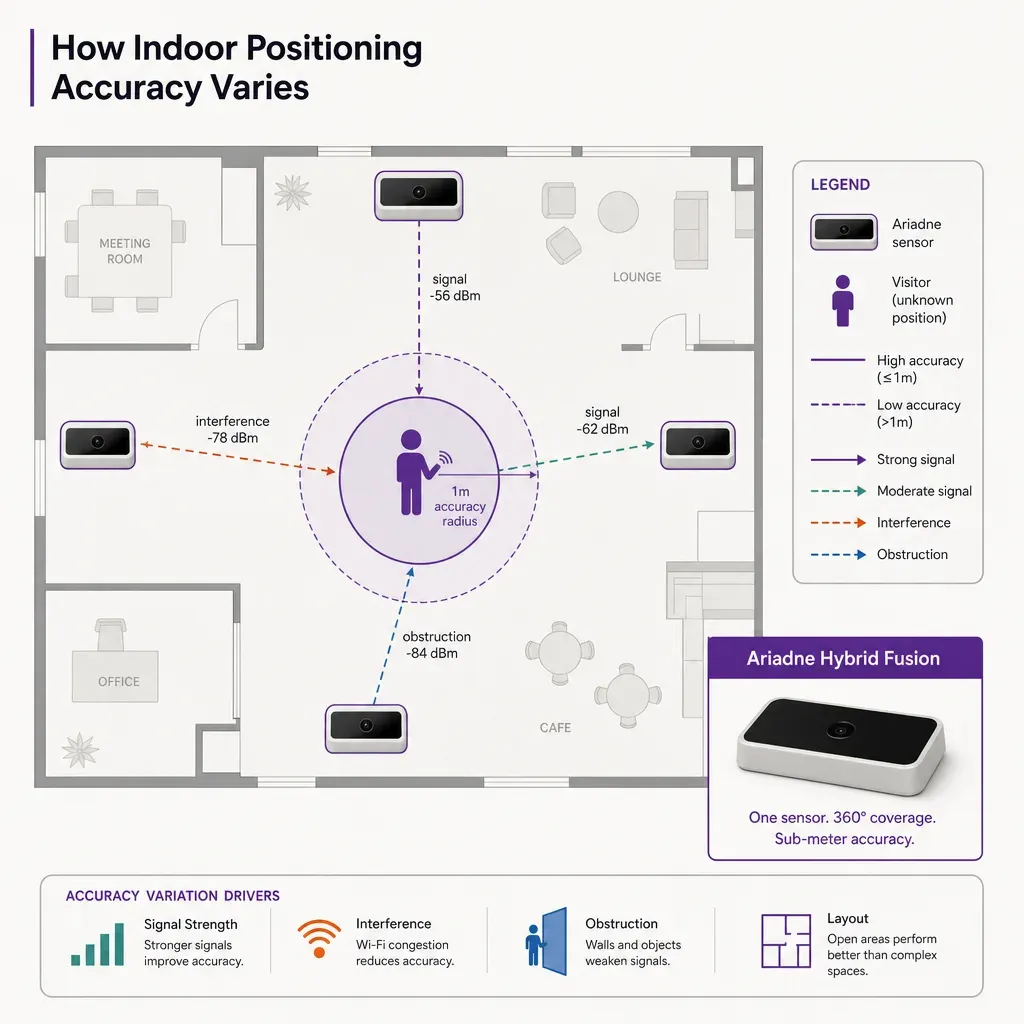
How Ariadne approaches positioning, plainly
Ariadne's indoor navigation uses Wi-Fi and Bluetooth Low Energy signal patterns combined with map matching to position a phone, with no BLE beacon hardware required and no ultra-wideband infrastructure. The platform does not rely on visual positioning or cameras for the navigation experience. Positioning is opt-in at the app level: the visitor downloads or opens a navigation app, accepts location use, and gets routed; nobody else's phone is positioned without that consent. That is the navigation side of the platform, separate from the anonymous people counting side described below.
On counts and dwell, the privacy posture is stronger and the engineering is different.
Ariadne measures this with Hybrid Fusion, its patented camera-free method. Time-of-Flight depth sensing counts every visitor at the entrances, capturing geometry rather than images, while patented phone signal sensing follows movement through the interior, detecting the signals a phone emits even in airplane mode. The sensor streams both feeds to Ariadne, where Hybrid Fusion combines them into one trajectory per visit and computes counts, dwell, and paths. The streams carry no identifier: no MAC address, no device ID, no biometric data, and no camera is involved. Identifiers are stored only when a visitor explicitly opts in, which keeps the method GDPR-friendly and outside biometric territory.
The two sides of the platform share infrastructure but answer different questions. The navigation side gives a consenting visitor turn-by-turn routing inside the building. The counting side measures how busy a space is, in aggregate, with nothing that identifies a visitor. Indoor positioning accuracy in the marketing sense, the blue dot on the visitor's phone, is a property of the navigation side. The sensor hardware that supports both sides sits in the Ariadne sensor lineup, and the broader data handling is set out in the privacy policy.
Questions worth asking a vendor in writing
If you are running an indoor positioning evaluation, the following questions tend to reveal whether the headline figure is honest. Ask them in writing before a trial, and ask for answers the vendor is willing to repeat in a contract schedule.
- Which definition does your accuracy number use? RMS, CEP50, CEP90, or worst case. If the answer is vague, treat the figure as a marketing claim rather than a specification.
- What was the test environment? A 50-metre straight corridor with a freshly calibrated radio map is not your building. Ask for the kind of space the figure was measured in, the floor plan quality, and the device used.
- What is the CEP90 in an open atrium or wide concourse? If the platform has only one accuracy figure for the whole building, you are looking at the corridor number. Ask for the open-space figure separately.
- What is the CEP90 within three metres of an external window? Perimeter degradation is the most common cause of user complaints, because window-side retail units, gate lounges, and outpatient rooms are exactly where visitors stop and check the app.
- What percentage of fixes are on the correct floor? Quoted separately from horizontal accuracy. Floor accuracy of 95 percent steady-state and a documented handling of stairwell and escalator transitions is reasonable; refusal to quote a floor figure at all is not.
- What does the worst 1 percent of fixes look like? Worst-case fixes are what users remember. A worst case inside the same wing as the true position is acceptable. A worst case on a different floor or outside the building is not.
- How is the floor plan modelled, and who maintains it? Map matching does much of the heavy lifting, so the quality and freshness of the floor model directly drives accuracy after a tenant change or fit-out.
- How is the radio environment calibrated, and how often? Some platforms calibrate once and decay slowly. Others self-calibrate on the fly. Ask which yours is, and how the calibration was validated.
What good looks like, from the visitor's seat
It is easy to lose perspective in a debate about CEP90 percentiles. The end of every indoor positioning project is a visitor on a concourse, in a corridor, or in an outpatient waiting area, looking at a phone and trying to get somewhere. From that seat, accuracy is felt as three properties, not one.
- Stability. The blue dot does not jitter or jump while the visitor stands still. Stability is closer to the variance of the position fix than to its mean, and a system with low average error and high variance feels worse than a system with a slightly higher average and tight variance.
- Responsiveness. The dot moves when the visitor moves, with a lag a person does not notice. A two-second lag is fine in a museum gallery; in a busy airport gate area where the visitor is checking the gate number against a screen, it feels broken.
- Sensible failure. When the system is uncertain, it shows the user a wider radius rather than a confident wrong position. Visitors trust a system that admits doubt; they distrust one that asserts they are 30 metres from where they actually are.
A platform that performs well on all three usually has CEP90 figures of a few metres in interior corridors, a slightly worse figure in open volumes, an honest perimeter caveat, and a documented floor-identification accuracy. It will also, in the procurement conversation, give you those four figures separately rather than collapsing them into one. That is the practical bar for a navigation experience visitors will actually use, and it is the bar most marketing one-liners quietly fail to meet.
FAQ
Is one-metre indoor positioning accuracy realistic?
In limited circumstances, yes. A long, structured interior corridor away from external windows, on a recent floor plan, with a calibrated radio environment and a well-tuned platform, can hit a CEP90 figure in the low single-digit-metre range. The same platform will return wider figures in open atria, near windows, and during floor transitions. Treat a one-metre headline as the best-case figure, not the everywhere-in-the-building figure, and ask for separate numbers for the harder environments.
What is the difference between RMS and CEP90?
RMS, root mean square error, averages squared errors and is sensitive to large outliers; it tends to be the smaller of the two numbers. CEP90 is the radius that contains 90 percent of fixes and is closer to what a visitor experiences, because it reflects the worse fixes that users actually notice. A figure quoted as CEP90 is almost always more honest than the same figure quoted as RMS, because RMS hides the long tail that drives user complaints.
Does indoor positioning use cameras or biometric data?
No. Ariadne counts with Hybrid Fusion: Time-of-Flight depth sensing plus patented phone signal sensing, never cameras. Time-of-Flight captures geometry rather than images, and signal sensing captures no MAC address by default, so the measurement involves no video, no faces, and no biometric data.
Does Ariadne need BLE beacons or UWB hardware?
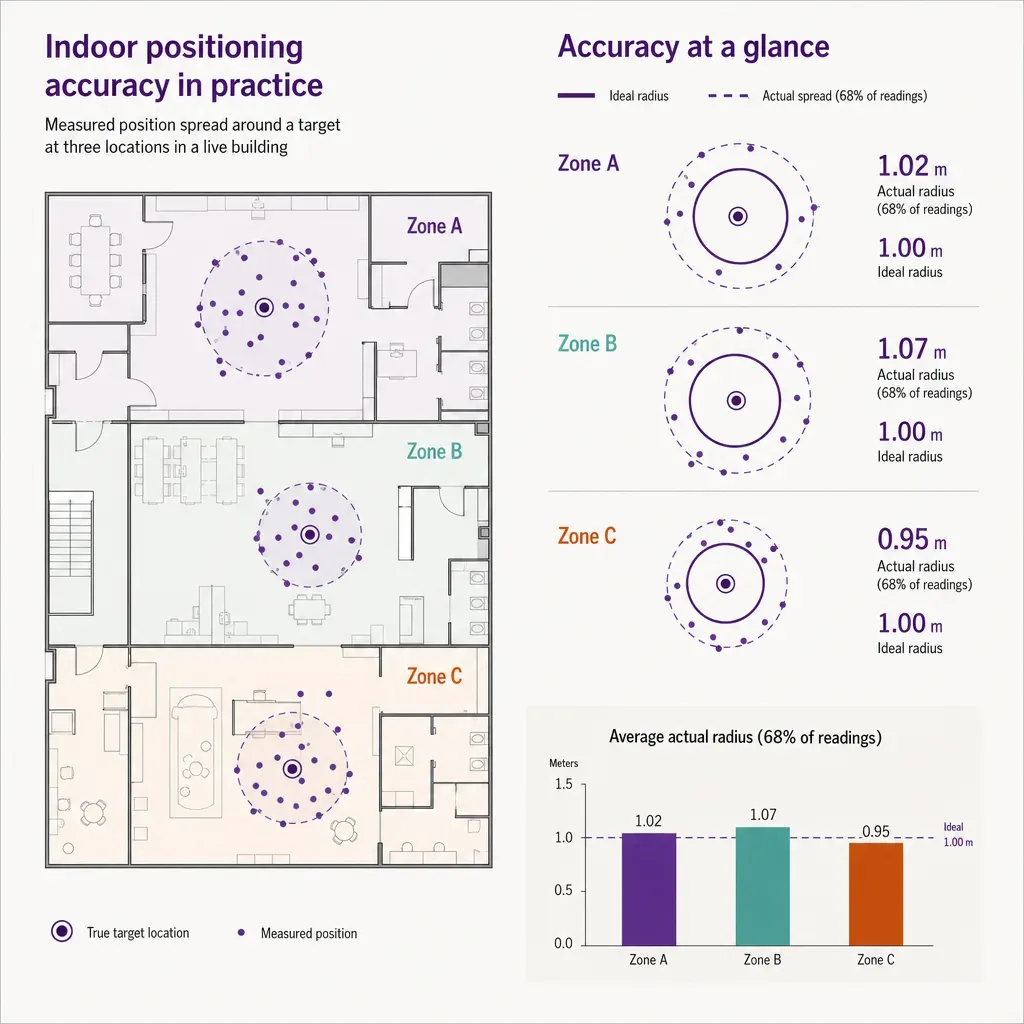
No. Ariadne's navigation positions a phone from Wi-Fi and Bluetooth Low Energy signal patterns combined with a map-matched floor model, without dedicated BLE beacon hardware and without ultra-wideband infrastructure. That keeps the install footprint smaller and the dependency on per-floor hardware lower than positioning approaches that require dense beacon or UWB networks.


