
Why calibration matters more than the sensor spec sheet
A people counter is only as accurate as the assumptions baked into its setup. A sensor that read within a percentage point of manual ground truth in March can drift by mid-summer for reasons that have nothing to do with the hardware: a fixture moved into the field of view, a new sliding door changed how visitors approach the threshold, a wall came down between two zones and the count line is now sitting in the middle of an open route. The number on the dashboard keeps updating. The reality underneath it has changed.
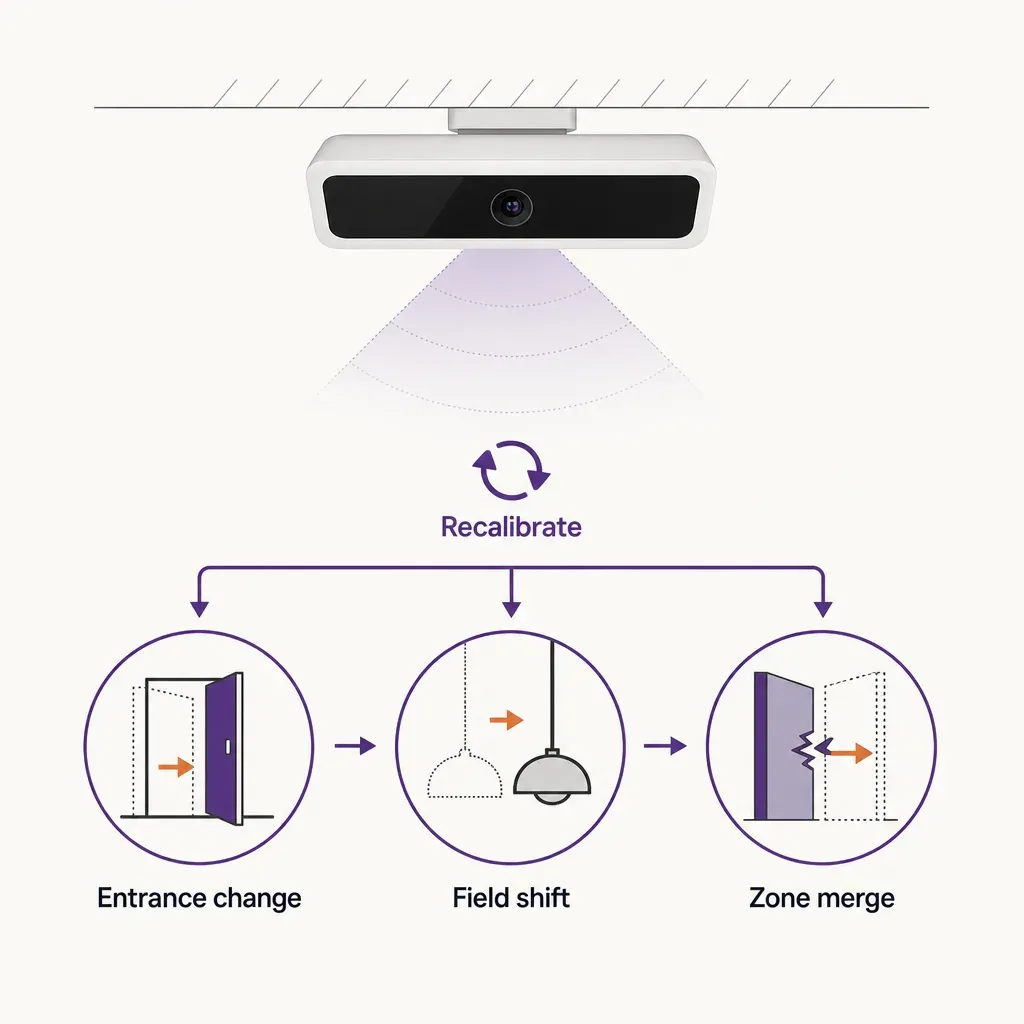
Calibration is the discipline of keeping the count honest as the building around it changes. For a people counter deployment that supports operational decisions, weekly staffing, capacity caps, exhibition reports, marketing attribution, the cost of an uncalibrated sensor is not a bad reading. It is a bad decision made on a reading that nobody knew to question.
This guide walks through the calibration workflow most teams underestimate: what to recount after a floor remodel, fixture change, or entrance redesign; how to detect drift before it shows up in a quarterly review; and when to re-zero a baseline rather than keep adjusting around it.
What calibration actually means for a people counter
Calibration is not one action. It is a set of checks that confirm three things are still aligned: what the sensor sees, what the system reports, and what is actually happening at the threshold. In practice, a calibration pass touches four layers.
- Geometry. The physical placement of the sensor and its count line. Mount height, tilt, field of view, the position of the count line relative to the door, and any obstructions in the path. This is the layer that floor remodels disturb the most.
- Counting logic. The rules the system applies to a crossing event: direction, minimum object size, hold time between counts, deduplication of staff or groups. These need to match the traffic the building actually sees.
- Zone definitions. How the building is divided into counting zones for occupancy and dwell. Walls, fixtures, and routes change. The zones on the dashboard should match the building as it stands today.
- Baseline. The reference period the dashboard compares against. A baseline taken before a major change is no longer a like-for-like comparison once the change is in place.
A good calibration cadence keeps all four in sync. Most accuracy complaints trace back to one of these layers slipping out of alignment without anyone resetting the others.
What changes after a floor remodel
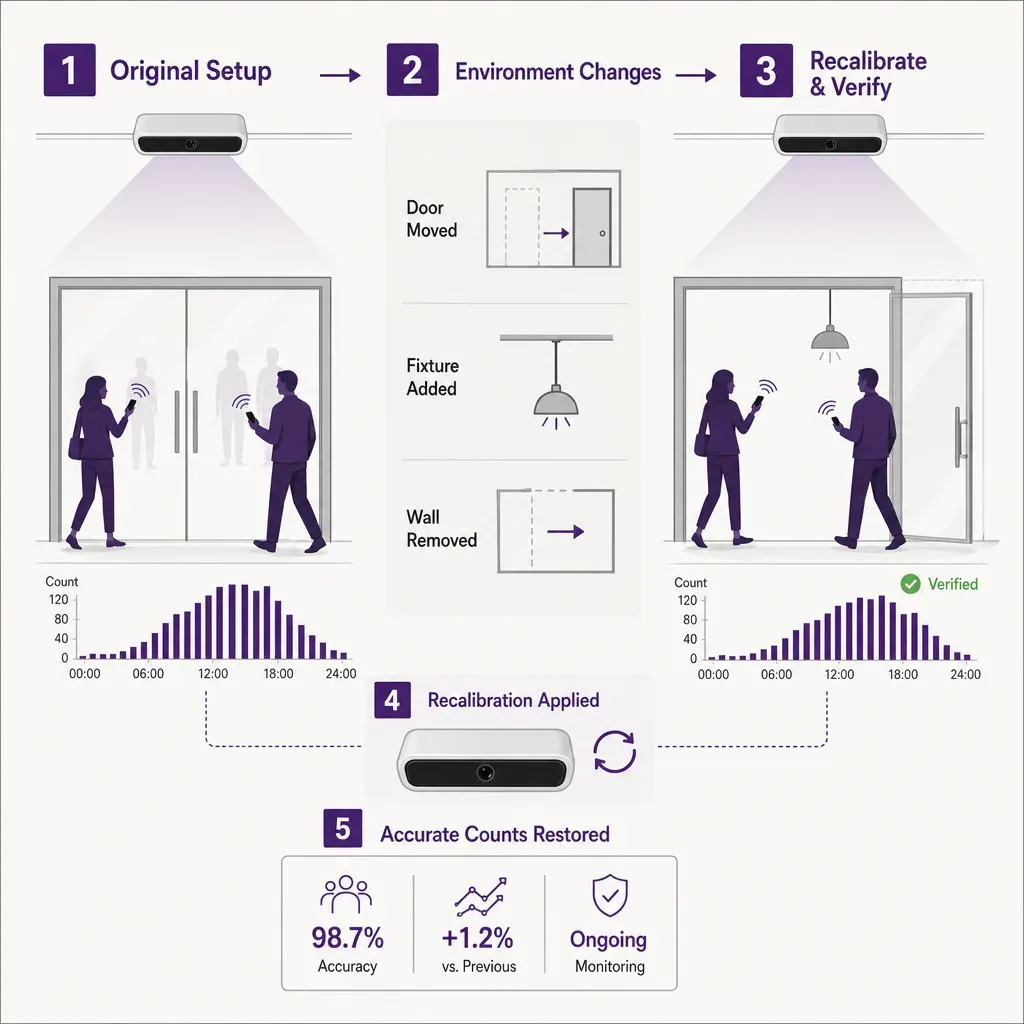
A floor remodel almost never asks the question, will this break the people counter. It tends to assume the sensor is hardware and the count is software, so neither will notice. Both notice. Here is the checklist of what to recount and what to reset after a remodel touches a space where sensors are installed.
Recount the field of view
Walk to each sensor and look at what is now under it. A ceiling-mounted Time-of-Flight unit reads a cone-shaped volume below it; if a new partition, a tall display, a column wrap, or a hanging fixture now intrudes into that cone, the unit may be counting the obstruction, missing visitors who pass beside it, or both. The fix is rarely subtle: move the obstruction, move the sensor, or redraw the count line so the obstruction sits outside it.
Recount the count line
Count lines are virtual: they are coordinates inside the sensor's view that define what counts as an entry or an exit. A remodel that shifts the door by even half a metre, widens the entrance from a single leaf to a double, or changes the angle of approach can leave the count line in the wrong place. After any threshold change, verify the count line is centred on the new path of travel and the direction vectors match the actual in or out flow.
Recount staff and stockroom paths
A remodel often reroutes the staff path from a back door through a public threshold, or the other way around. Either change inflates or deflates the count if the system was tuned to handle staff traffic differently. Re-walk the back-of-house route. If staff now cross a counted threshold every time they restock, decide whether to exclude that path by schedule, by direction, by a dedicated staff line, or by accepting the noise and documenting it.
Recount the zones
When walls come down or fixtures change, the zones a dashboard tracks may no longer match the building. A gallery that was two zones is now one open hall; a single counting zone for the womenswear floor now includes the new beauty hall that pulls a different kind of traffic. Redraw the zones on the system before reporting on them. Otherwise the dwell numbers compare a zone that no longer exists against a building that has moved on.
Reset the baseline
Once geometry, counting logic, and zones reflect the building as it is now, the comparison baseline needs to follow. A baseline taken in the old layout will keep flagging the new layout as an anomaly. The cleanest practice is to mark the remodel date in the analytics tool, hold the old data for historical reference, and start a fresh baseline window from the first full operating week after the remodel completes. Two to four weeks of stable post-remodel data usually settles into a usable new normal.
What changes after a fixture change or merchandising reset
Not every change is a remodel. Stores reset merchandising several times a year; a museum changes a temporary exhibition every few months; a transport hub redesigns wayfinding for a season. These smaller changes hit the count too, just in narrower ways.
- Fixture height. Tall gondolas or display walls placed near a sensor can block part of its view. A typical symptom is a sudden drop in counts at one sensor while neighbouring sensors hold steady.
- Queue paths. A new till layout, a new ticketing line, or a pop-up activation that draws a queue across a count line will produce false repeats as people shuffle forward and back across the same coordinates.
- Zone meaning. A zone called Womenswear that is now Beauty is the same coordinates with a different meaning. The historical comparison is no longer apples to apples even though the count line never moved.
For fixture and merchandising changes, the rule of thumb is: if anything physical sits within roughly two metres of a sensor or its count line, walk the space, verify the view, and update the zone label if its meaning changed. A full baseline reset is usually not needed for these smaller events; a note on the dashboard explaining the change is enough to keep year-on-year comparisons honest.
What changes after an entrance redesign
Entrances are the most consequential threshold a counting system measures. Almost everything else in the building flows from them. An entrance redesign deserves its own checklist because small changes there propagate everywhere downstream.
- Door geometry. A single sliding door replaced by a double, an airlock vestibule added, a revolving door swapped for an automatic slider: each of these changes the path visitors take through the count line and the speed at which they cross. The sensor may need to be repositioned, retilted, or supplemented with a second unit to cover the new width.
- Approach angle. A new ramp, a relocated bollard, or a covered porch can change whether visitors approach the threshold head-on or at an angle. Off-axis approaches are a common source of miscounts because the system was set up for a perpendicular crossing.
- Capture rate test. After the entrance change, run a ground-truth test: a person counts manually at the door for a sample period of an hour or two during a representative traffic pattern, and the manual tally is compared to the system count over the same window. Capture rate is the percentage of real entries the system caught. Typical well-calibrated indoor doorways sit in the high nineties; a sudden drop after an entrance change is a calibration signal, not a hardware failure.
- Group handling. Families, school groups, and couples crossing close together are an edge case the counting logic handles based on minimum object size and separation rules. A wider entrance lets groups spread out and become easier to separate; a narrower one squeezes them together and may cost a count. Verify the group counts on the dashboard against the manual ground truth.
- Reset the entrance baseline. Entrances are the comparison anchor for almost every downstream metric. After an entrance redesign, restart the baseline window for at least the entrance zone, even if the rest of the building has not changed.
Drift detection: how to spot a calibration problem before it shows up in a quarterly review
Drift is the slow degradation of accuracy that happens between deliberate calibration passes. It rarely announces itself. The job is to put cheap, automatic checks in place so drift surfaces in days rather than quarters.
Compare paired sensors
When a building has more than one counted entrance, the ratio between them is a stable signature. Door A typically carries roughly 60 percent of traffic, door B carries 40 percent, the pattern holds across most weeks. If the ratio shifts meaningfully and stays shifted for more than a week without a known cause, one of the sensors is probably drifting.
Compare against a paired downstream zone
The sum of entries across all doors should approximate the sum of the first downstream zone counts, allowing for staff movement and overlap. A persistent gap between door totals and first-zone totals is a flag. The cause may be a sensor in one zone, a missed count line at one door, or a zone that has lost coverage since the last fixture change.
Track day-shape variance
Most buildings have a daily traffic curve that is remarkably stable: a slow morning, a midday peak, an afternoon trough, an evening rise. A sensor that suddenly delivers a flat curve, or a curve that no longer matches its neighbours, is signalling either a hardware issue or an obstruction that has appeared in its field of view.
Track capture-rate drift
A short manual ground-truth check at each major doorway once a quarter is enough to surface capture-rate drift. If the high-traffic doorway used to read in the high nineties and now reads in the high eighties, something has changed: the sensor itself, the path of travel, or the threshold.
When to re-zero a baseline
A baseline is the period the dashboard compares the present against. The temptation is to keep using a baseline forever because the longer it runs the more stable the comparisons look. The risk is that a stale baseline keeps showing improvement or decline against a building that no longer exists.
Re-zero the baseline when any of the following is true:
- A remodel has changed walls, fixtures, or zone definitions.
- An entrance has been added, removed, or redesigned.
- A sensor has been added, moved more than half a metre, or had its count line redrawn.
- Counting logic has been changed for any reason: staff rules, group handling, minimum object size.
- Trading hours, opening rules, or admission rules have changed in a way that affects visitor patterns.
When in doubt, mark the change on the dashboard and start a fresh baseline alongside the old one for a few weeks. Keep both. Decide which to retire only when you can see the new pattern stabilise.
How Ariadne handles calibration
Ariadne is built around the assumption that buildings change and that the count needs to keep up without a service truck for every small adjustment.
Ariadne measures this with Hybrid Fusion, its patented camera-free method. Time-of-Flight depth sensing counts every visitor at the entrances, capturing geometry rather than images, while patented phone signal sensing follows movement through the interior, detecting the signals a phone emits even in airplane mode. The sensor streams both feeds to Ariadne, where Hybrid Fusion combines them into one trajectory per visit and computes counts, dwell, and paths. The streams carry no identifier: no MAC address, no device ID, no biometric data, and no camera is involved. Identifiers are stored only when a visitor explicitly opts in, which keeps the method GDPR-friendly and outside biometric territory.
On the calibration side, this design has practical consequences. Time-of-Flight depth sensing reads geometry, not images, so it is largely indifferent to lighting changes that often disturb other sensor families. The count line, zone definitions, and counting rules live in software, so a fixture change, an entrance redesign, or a zone rename is a configuration update rather than a re-installation. Drift checks, paired-sensor ratios, capture-rate trends, day-shape variance, can be set up as continuous alerts inside Ariadne Analytics so a calibration issue surfaces in days rather than at the end of a quarter. The deeper engineering of the sensor and the platform is on the how it works page.
A calibration checklist you can use today
If you take one thing from this post, take this checklist. Run it after any physical change to a counted space, and at least once a quarter as a maintenance pass.
- Walk every sensor. Stand under it. Look at what is now in its field of view. Note any new obstruction, hanging fixture, or sight-line change.
- Verify the count line. Confirm it sits on the actual path of travel for the threshold it measures, and that the direction vectors point the right way.
- Confirm the zones. Open the zone map and check it against the floor plan as built today. Redraw any zone where a wall, fixture, or function has changed.
- Re-check counting rules. Staff exclusions, group handling, minimum object size. Make sure they reflect how the space is actually used now.
- Run a ground-truth test. Manual count at each major doorway for a representative hour. Compare to the system count. Document the capture rate.
- Reset the baseline if needed. Mark the change date. Start a fresh baseline window for any zone or doorway that changed.
- Schedule the next pass. Put the next calibration check in the calendar. Quarterly is a reasonable minimum for a busy space.
A people counter that has been calibrated for the building as it stands today is the difference between a number on a dashboard and a number a decision can rest on. The hardware does a lot of the work. The discipline of keeping the setup honest is what makes the number worth quoting. The people counting platform is built around exactly that loop.
Related reading
FAQ
How often should a people counter be calibrated?
A full calibration pass after any physical change to the counted space, and a maintenance pass at least once a quarter. Busy or fast-changing environments benefit from monthly checks. Continuous drift alerts on paired sensors and capture rate close the gap between scheduled passes.
What is a typical capture rate for a well-calibrated indoor doorway?
Well-calibrated indoor doorways with a clean sight line and a perpendicular approach typically sit in the high nineties as a percentage of manual ground truth. Outdoor thresholds, very wide entrances, and entrances with heavy group traffic tend to sit a few points lower. Treat any sudden drop as a calibration signal, not a hardware failure.
Does the system use cameras?
No. Ariadne counts with Hybrid Fusion: Time-of-Flight depth sensing plus patented phone signal sensing, never cameras. Time-of-Flight captures geometry rather than images, and signal sensing captures no MAC address by default, so the measurement involves no video, no faces, and no biometric data.
When should we re-zero the baseline rather than keep adjusting around it?
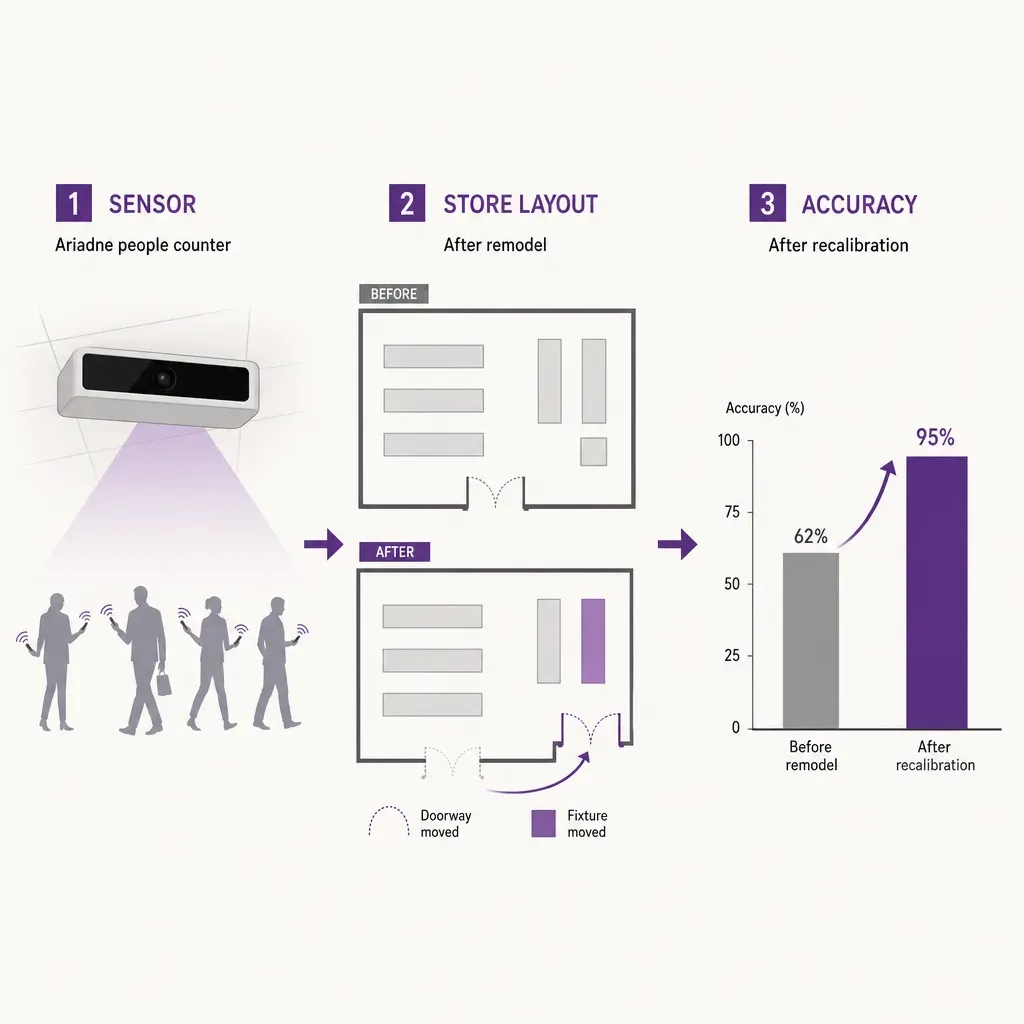
Re-zero when the building, the entrance, the sensors, the zones, or the counting rules have changed enough that the old baseline is no longer like-for-like. Smaller changes can be handled with a note on the dashboard. Major remodels, entrance redesigns, and zone redraws are the cases that genuinely call for a fresh baseline window.


