
What office occupancy analytics actually measures
Office occupancy analytics is the practice of measuring how a workplace is really used: how many people are in the building, which floors and zones they occupy, how long meeting rooms stay busy, and how all of that changes through the day and the week. It is a different question from how many people badged in this morning. The first is a live picture of space being used. The second is a list of entry events. A hybrid-work workplace strategy lives or dies on the first question, because the decisions that ride on it (how much space to lease, how to lay out a floor, when to add desks or close a wing) depend on knowing what is occupied right now and on average, not who opened a door at 8:42.
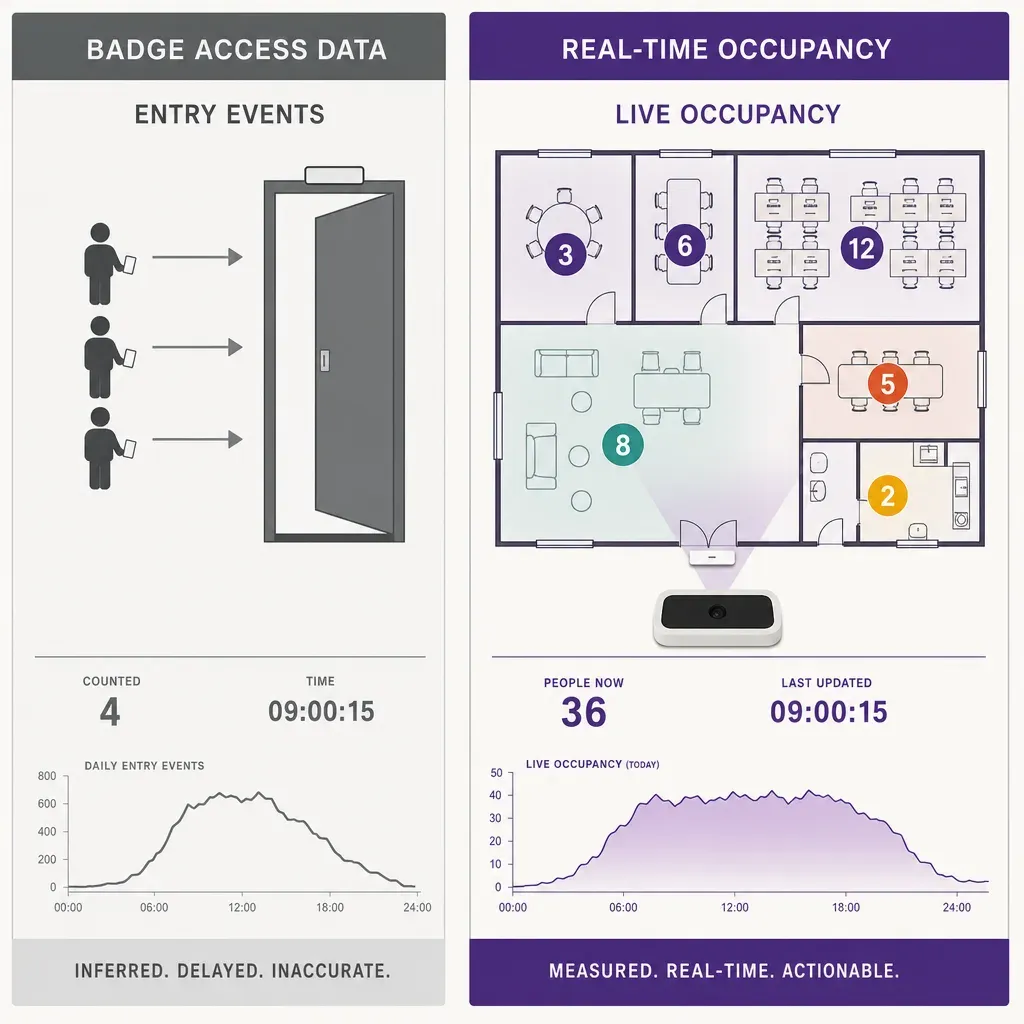
Most facilities and real-estate teams already have some occupancy signal. The point of a dedicated people counting system is to turn a vague sense that the third floor feels empty into a number a finance team can act on, broken down by zone, in real time, and consistent enough to trend over months.
"We already have badge access. Doesn't that count everyone?"
This is the first thing nearly every facilities team says, and it is a fair question. If everyone taps a card to get in, the access control system already holds a record of who entered and when. So why pay for a counting system on top of it? The honest answer is that badge data and occupancy data look similar on a dashboard but measure two genuinely different things, and the gap between them is exactly where workplace decisions go wrong.
Badge access records an entry event tied to a credential. It tells you a card was presented at a reader at a moment in time. That is useful for security and for a rough headcount of who came to the office at all on a given day. What it does not do is tell you how a space is being used, and the reasons are concrete rather than theoretical.
- It counts entries, not occupancy. A badge swipe at the front door does not say whether that person is at their desk, in a meeting on the fourth floor, in the cafe, or already gone for the day. To turn entry events into live occupancy you have to assume people stay for a fixed period and never move between zones, and neither assumption holds in a real office.
- It misses everyone without a card. Visitors, contractors, interview candidates, delivery staff, and clients in for a meeting are real bodies taking up real space and real safe-capacity headroom, and most of them never badge in. In a busy reception or a client-facing floor that undercount is not a rounding error.
- Tailgating breaks the count both ways. When two or three people walk through one opened door on a single tap, the building sees one entry and holds several people. Polite tailgating is normal office behaviour, and it means the badge count systematically understates how full the building is.
- Meeting rooms usually have no reader. The decision most offices are trying to make is whether they have the right number and size of meeting rooms. Badge access almost never controls individual rooms, so it is silent on the one space type that drives the most contention. A room booked but empty, or grabbed without a booking, is invisible to the access log.
- It says nothing about duration or zone. Badge data has no concept of how long a space stayed occupied or which part of a floor filled up first. A person who taps in once can spend the day anywhere in the building, and the access record cannot follow them or tell you the east wing was packed while the west wing sat empty.
None of this makes badge access useless. It is the right tool for door security and for a daily came-in count. It is simply the wrong tool for the questions occupancy analytics exists to answer: how full is this zone right now, how long do meeting rooms actually stay busy, and is the lease sized to how the space is really used. Those need a system that measures live occupancy by zone directly, rather than inferring it from entries.
The three numbers a workplace team actually needs
Strip away the dashboard noise and occupancy analytics comes down to three measurements, each answering a question badge data cannot.
Live occupancy by zone
How many people are in a given floor, neighbourhood, or wing right now. This is the figure that drives real-time decisions: which floors to keep open on a quiet Friday, when a space is approaching its comfortable limit, how to balance hot-desking demand across the building. It is also the basis for any safe-capacity or evacuation planning that depends on knowing how many people are inside a zone at a given moment, which a sum of morning badge swipes cannot give you.
Meeting-room utilization
How much of the time a room is genuinely in use, and by how many people relative to its capacity. This is where most space money is wasted. For example, a floor might show booking calendars at ninety percent while sensors report rooms sitting empty half the time, the classic ghost-booking gap, or a team of two routinely occupying an eight-person boardroom while smaller rooms run a waitlist. Those are illustrative patterns, not Ariadne measurements, but they are the patterns occupancy data exists to surface, and a booking calendar plus a badge log cannot see either one.
Dwell and peak by zone
How long people stay in a space and when it peaks. Dwell separates a thoroughfare people pass through from a neighbourhood where they settle in to work. Peak timing tells you whether the building has a single midday crunch or a flatter profile, which changes how many desks and rooms you actually need. A lease decision built on peak occupancy is very different from one built on an average that hides a sharp Tuesday-to-Thursday spike.
Put those three together across every zone and you have what badge access can never assemble: a continuous, room-level map of how the workplace is used, the input a real-estate team needs to right-size a lease and a facilities team needs to run the building day to day.
What you can do with the data
Occupancy analytics earns its place when the numbers turn into decisions. A few of the most common, with illustrative figures rather than measured results.
- Right-size the lease. If, for example, a company leases eight floors but peak occupancy never crosses six, that is two floors of evidence to sublet, hand back at renewal, or repurpose. Real-estate is usually the second-largest line on the budget after payroll, so even a modest occupancy correction is a large number.
- Fix the meeting-room mix. Utilization by room size shows whether the building is short on two-person huddle rooms while large boardrooms sit idle. That redesign is far cheaper than leasing more space to relieve a shortage that is really a mismatch.
- Plan hybrid days with evidence. Occupancy by day of week shows the real shape of attendance, so a flexible-desk ratio or an anchor-day policy can be set against measured demand instead of a guess.
- Run cleaning and energy to demand. Zones that were lightly used can be cleaned, heated, and lit on a lighter schedule, and a closed wing on a quiet day is a direct utilities saving.
Measuring occupancy without watching people
An office is a workplace, and the people in it are employees who spend most of their waking week there. That raises the privacy bar higher than a shop or a station, not lower. A system that recognises faces or tracks named individuals around the building is the fastest way to lose the workforce, the works council, and the data protection officer in a single meeting. The good news is that none of the three measurements above needs anything like that. They need to know how many people are in a zone and for how long, not who they are.
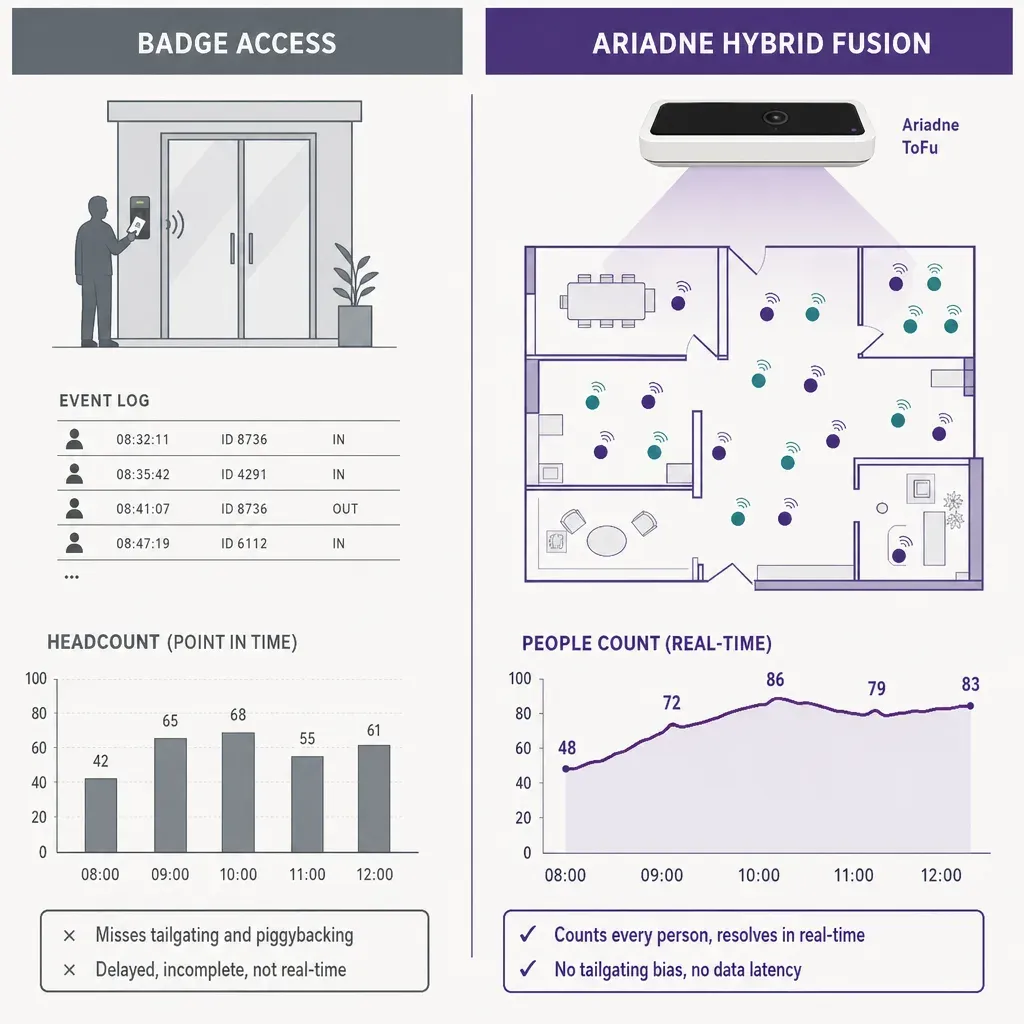
The cleanest way to clear that bar is to choose a method that never captures identifying data in the first place. There is nothing to anonymise later, because nothing identifying was collected to begin with.
- Time-of-Flight depth sensing at entries. A ceiling-mounted sensor fires infrared pulses and measures how long they take to return, which gives the height and shape of whatever passes below it to roughly 30 centimetres. It counts every person crossing a threshold, including visitors and contractors who never carry a badge, and it counts each body in a tailgating group rather than each opened door. It reads geometry, not images, so there is no picture to store and nothing to recognise.
- Patented signal sensing across the floor. Inside the building, sensors detect the radio signals a phone emits, even in airplane mode, and resolve how many distinct people are in a zone and how long they linger, without recording who they are. This is the part that turns an entry count into live occupancy by zone, which is exactly the gap badge data leaves open.
Neither method uses a camera, and neither produces video, faces, or biometric data. That is the property that matters in a workplace: the system can report how full a floor is and how long a meeting room stays busy, while an employee walking the building is never photographed, recognised, or identified.
How Ariadne fits
Ariadne builds the two sensing methods above into one system, designed so that nothing identifying is captured at any point.
Ariadne measures this with Hybrid Fusion, its patented camera-free method. Time-of-Flight depth sensing counts every visitor at the entrances, capturing geometry rather than images, while patented phone signal sensing follows movement through the interior, detecting the signals a phone emits even in airplane mode. The sensor streams both feeds to Ariadne, where Hybrid Fusion combines them into one trajectory per visit and computes counts, dwell, and paths. The streams carry no identifier: no MAC address, no device ID, no biometric data, and no camera is involved. Identifiers are stored only when a visitor explicitly opts in, which keeps the method GDPR-friendly and outside biometric territory.
For an office, the practical consequences answer both the badge objection and the privacy bar at once. Because the count is measured live by zone rather than inferred from entries, it reflects everyone in a space, badged or not, and follows how that space fills and empties through the day. Because there is no camera and no video, there is no image of an employee to store or to lose. The streams carry no MAC address by default and no device identifier, so there is no personal data in the count. Identifiers are stored only when someone explicitly opts in, for example by logging into guest Wi-Fi, which is a choice the company can simply decline to offer. The result is live occupancy, meeting-room utilization, and dwell by zone across the building, produced without anything a data protection officer or works council would classify as personal data. The sensor hardware sits in the Ariadne sensor lineup, and the data handling is set out in the privacy policy.
A buyer checklist for facilities and real-estate teams
If you are evaluating an occupancy system, these are the questions worth putting to any vendor in writing before a trial.
- Does it measure live occupancy, or infer it from entries? You want a system that reads how many people are in a zone right now, not one that estimates occupancy by assuming a fixed stay length from badge or door events.
- Does it count people without a badge? Confirm it captures visitors, contractors, and tailgating groups, since those are exactly what access control misses.
- Can it report per meeting room and per zone? A single building total is not enough. You need utilization by room and occupancy by floor or neighbourhood to act on the data.
- Does it capture any personal data? Ask whether the system records images, faces, MAC addresses, or device identifiers. You want a clear no by default, with any identifier limited to explicit opt-in.
- Is there a camera anywhere in the path? A method built on Time-of-Flight depth and signal sensing avoids cameras entirely, which is the cleanest answer to give a works council or a data protection officer.
- Will the figures export and trend? Occupancy data is only useful for a lease decision if it exports cleanly and stays consistent enough to compare month over month.
Related reading
FAQ
Doesn't our badge access system already count occupancy?
No. Badge access records entry events tied to a credential, which is a list of who tapped in and when. It does not report live occupancy by zone, it misses everyone without a card such as visitors and contractors, it under-counts when several people tailgate through one opened door, and it usually has no reader on meeting rooms at all. Occupancy analytics measures how full a space is right now and how long it stays busy, which is a different and more useful number than a count of morning swipes.
Does the system use cameras?
No. Ariadne counts with Hybrid Fusion: Time-of-Flight depth sensing plus patented phone signal sensing, never cameras. Time-of-Flight captures geometry rather than images, and signal sensing captures no MAC address by default, so the measurement involves no video, no faces, and no biometric data.
Can it report utilization for individual meeting rooms?
Yes. With sensors placed across the floor, each room or neighbourhood becomes its own zone, with its own live occupancy and dwell time. That per-room breakdown is what shows whether the building has the right mix and number of rooms, rather than knowing only how many people entered the building that day.
Is camera-free occupancy counting acceptable to a works council?
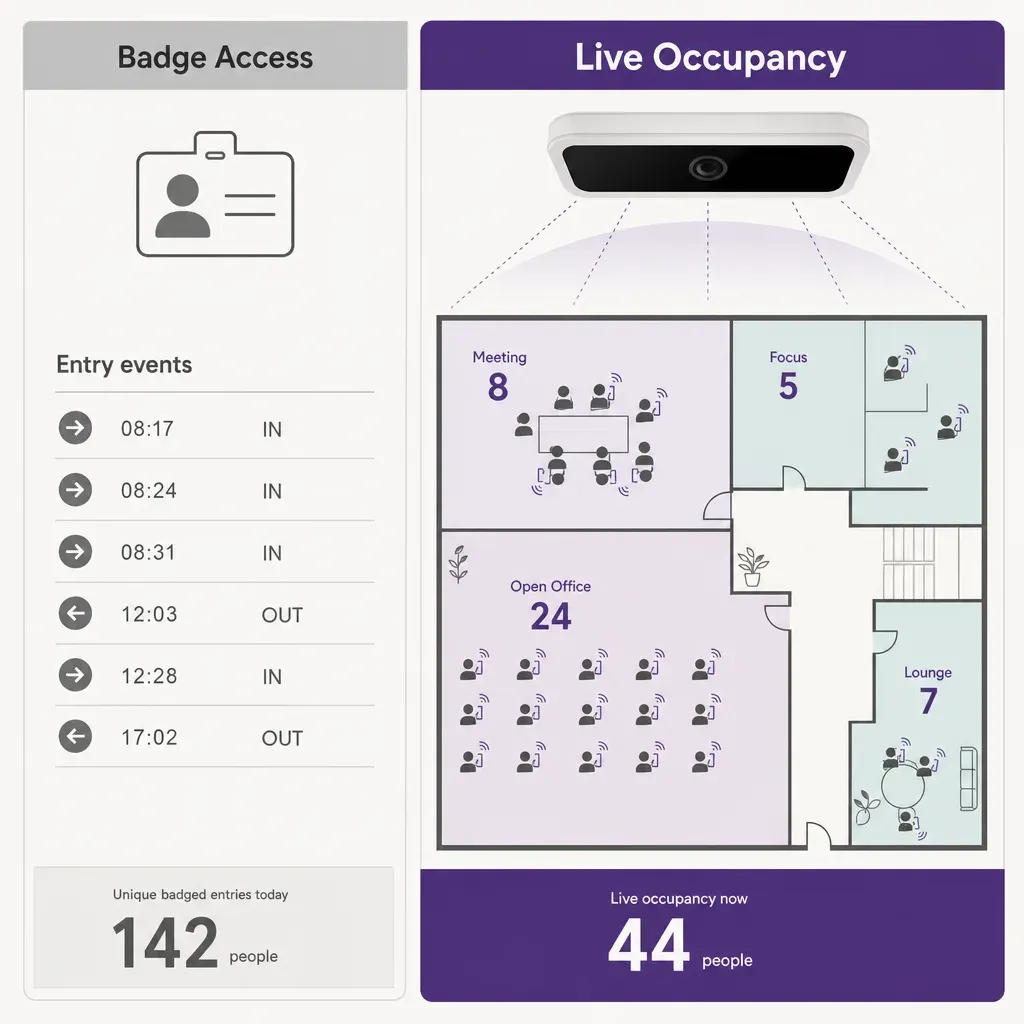
It is a far easier case to make than a camera-based system, because a method that captures no images, no faces, and no device identifiers by default is not processing personal data about employees. There is nothing identifying collected to anonymise, and the measurement is of spaces, not individuals. Confirm the specifics with your own data protection officer and employee representatives, but a no-personal-data design is the easiest occupancy method to bring to that conversation.


