
Why indoor positioning is a different problem from GPS
GPS works because the satellites and the receiver agree on a clock and an open sky. Step inside a mall, an airport, a hospital, or a large office, and both of those break. The roof blocks the satellites, the multipath off concrete and glass blurs the timing, and the floor plan needs centimetres of meaning where GPS gives you tens of metres of noise. Anyone who has tried to find their gate, their consultation room, or their meeting room from a phone map at street level knows the feeling. Indoor positioning is a separate engineering problem with its own families of solutions, and they are not interchangeable.
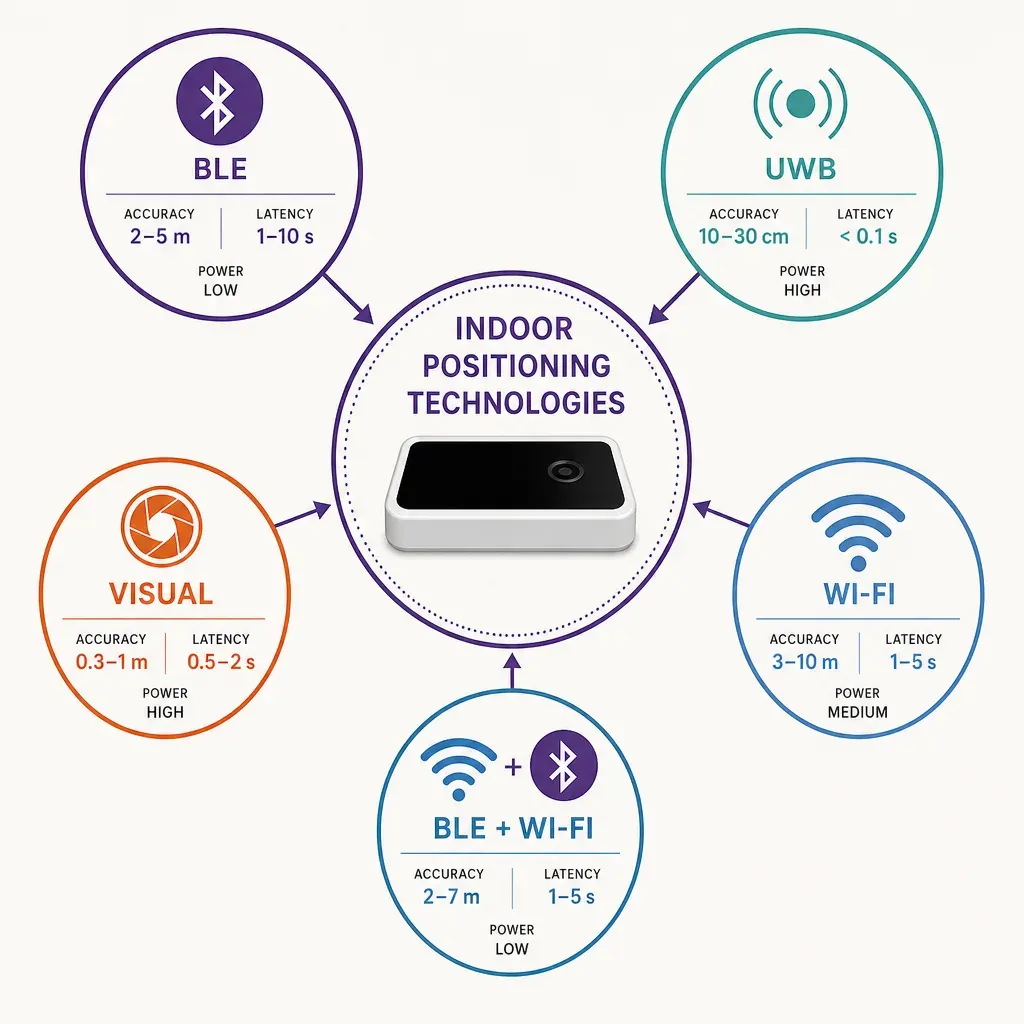
This post compares the four broad families that show up in real deployments: Bluetooth Low Energy (BLE) beacons, Ultra-Wideband (UWB), visual or vision-based positioning, and Wi-Fi plus BLE signal-pattern positioning. It does not name vendors. The aim is to give a buyer, an architect, or a product owner an honest read of what each family does, what it costs, and where it falls short, before the procurement conversation begins. Ariadne's own approach sits in the Wi-Fi plus BLE signal-pattern family, and that is described in the same plain terms as the rest. For the wider context of what an indoor navigation system actually has to deliver, the indoor navigation hub is the reference.
The four technology families at a glance
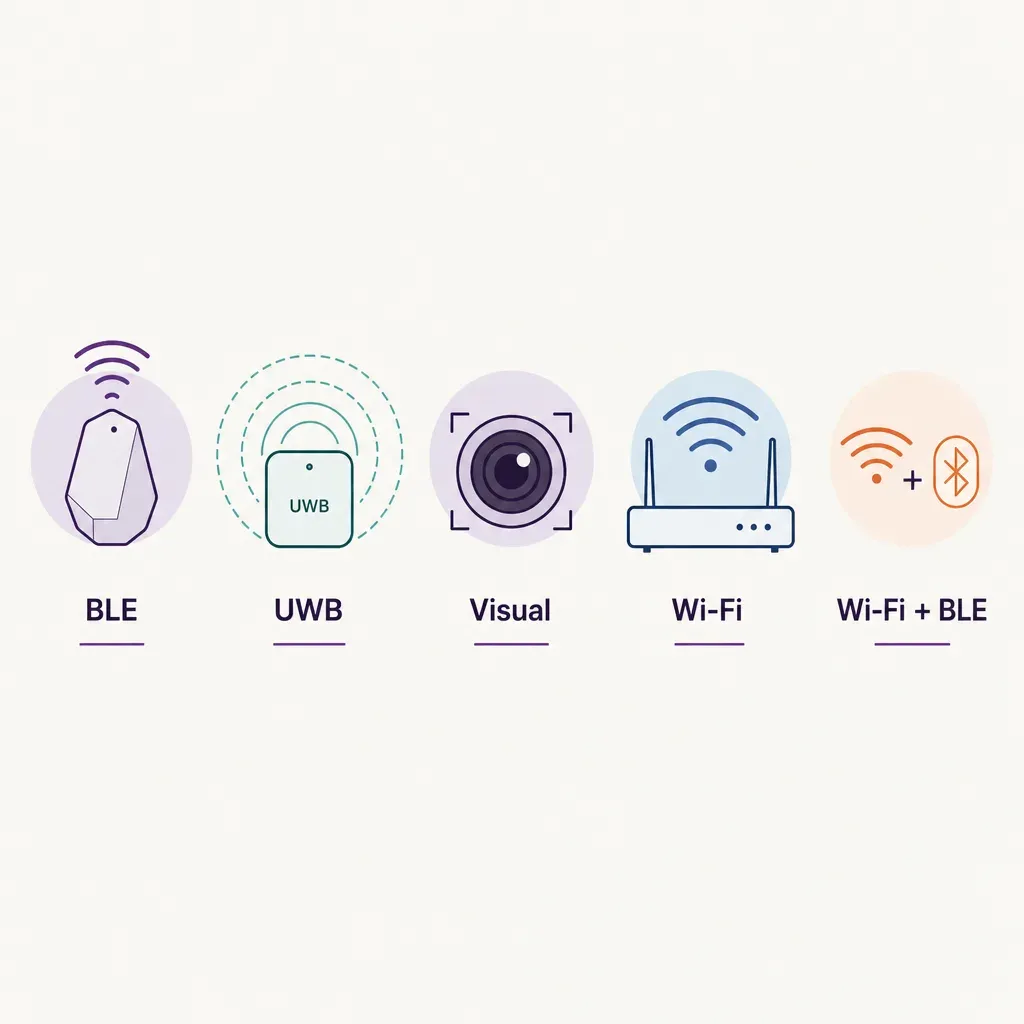
Each family answers two questions in its own way: how does a device know where it is, and what does the building have to install for that to work? The differences flow from there.
- BLE beacons. Small radio transmitters placed throughout the building broadcast identifiers. A phone reads the signal strength of nearby beacons and infers a position. The location intelligence is in the layout of the beacons; the phone does the maths.
- Ultra-Wideband (UWB). Anchors mounted in the ceiling exchange precisely timed radio pulses with a UWB-capable device. The position is computed from time-of-flight, not signal strength, which is what gives UWB its accuracy.
- Visual or vision-based positioning. The phone camera reads features in the scene, walls, signs, structural detail, and matches them against a pre-built visual map of the building. The position is recovered from image geometry.
- Wi-Fi plus BLE signal-pattern positioning. The building already has Wi-Fi access points, and most modern phones already broadcast BLE. The system learns the pattern of radio signals across the floor plan, then matches a live phone's pattern back to a location, with the building's geometry as a constraint.
Each family carries a different bill of materials, a different accuracy profile, and a different privacy posture. The next sections work through them one at a time, then the comparison comes back together as a table-style summary.
BLE beacons
BLE beacons were the first widely deployed answer to indoor positioning at scale, and the model is straightforward. A small battery-powered transmitter sits on a wall or shelf and broadcasts a beacon ID at a fixed cadence. A phone running an app listens for nearby beacons, reads the received signal strength, and either looks up the location of the closest beacon or estimates a position from the strengths of several.
Where it does well. Beacons are cheap individually and the technology is mature. For room-level or zone-level accuracy, where the user only needs to know roughly which area they are in, they can work well. They are also useful for proximity triggers, for example unlocking a tour stop in a museum or pushing a check-in prompt at a gate.
Where it struggles. Signal strength is a noisy proxy for distance. Walls, bodies, and other radios change it in ways the maths cannot fully undo, so typical reliable accuracy in real buildings tends to land in the few-metre range rather than the sub-metre range that marketing copy sometimes suggests. The infrastructure also has a quiet ongoing cost: batteries drain, beacons fall off walls, IDs need to be reassigned when stores move, and the map of beacons has to be kept in sync with the floor plan. The bigger the building, the more painful that becomes.
Typical illustrative ranges. Reliable positioning of a few metres at zone level in busy spaces, with stronger results possible in static, low-density environments. Battery life on a beacon is typically a year or two depending on broadcast cadence. The dominant cost over time is not the hardware unit price but the labour to keep hundreds of devices working across a large estate.
Ultra-Wideband (UWB)
UWB sits at the high end of indoor positioning accuracy. Instead of guessing distance from signal strength, UWB measures it directly. Anchors on the ceiling and a UWB-capable device exchange short, broadband radio pulses, and the system computes the time the signal takes to travel between them. Because the pulses are short and the timing is precise, the distance estimate is good to tens of centimetres in well-installed environments.
Where it does well. Use cases that actually need sub-metre accuracy: tracking high-value assets in a warehouse, finding a specific tool on a factory floor, or supporting safety zones where a worker entering a danger area has to be detected reliably. Many recent smartphones also include a UWB chip, which lets the same infrastructure power consumer wayfinding in a high-end venue.
Where it struggles. The cost is the catch. UWB demands dedicated anchors mounted across the ceiling and powered, plus a UWB-capable tag or phone for everything that needs to be located. The infrastructure is purpose-built for positioning, so it does not share its build-out with anything else the building already runs. For a hundred-thousand-square-metre mall or airport that wants navigation for any visitor with any phone, the economics rarely work. The right home for UWB tends to be a defined area with a defined population: a warehouse aisle, a hospital wing tracking specific assets, a manufacturing line.
Typical illustrative ranges. Accuracy of tens of centimetres in environments without heavy multipath. Anchor density is typically several per large room, with cabling and power runs to each one. Total cost per square metre lands well above the other three families, which is precisely the trade-off being made for accuracy.
Visual or vision-based positioning
Visual positioning uses the camera the user is already carrying. The building is mapped in advance, either by walking it with a sensor rig or by aggregating images from devices already in use, and a visual fingerprint of the space is built. When the user opens the navigation app and points the camera, the system matches what it sees against the map and recovers position and orientation.
Where it does well. Accuracy can be high, especially in feature-rich environments such as transit hubs and museums where the geometry of walls, signs, and structural detail is distinctive. Augmented-reality overlays sit on top of the same pipeline, so route arrows can be rendered on the live camera view, which is a strong experience for first-time visitors.
Where it struggles. Three constraints tend to bite. First, the user has to hold the phone up with the camera open, which is fine for a short orientation moment and tiring for a long walk. Second, the visual map has to be kept current as the building changes: a refit, new signage, or different lighting can degrade matching until the map is refreshed. Third, the privacy posture has to be designed carefully. Images of the surroundings are being processed to recover position, and any system that does this server-side, or uses crowd-sourced imagery to keep the map fresh, has to be very clear with users about what is and is not stored.
Typical illustrative ranges. In well-mapped environments, position and orientation accuracy can support an augmented-reality wayfinding experience that feels precise to the user. The dominant operating cost is not anchors but the visual-map refresh cycle and the engineering to keep the matcher robust across lighting and crowd changes.
Wi-Fi plus BLE signal-pattern positioning
The fourth family takes a different starting point. A modern building already has dense Wi-Fi coverage for productivity reasons, and modern phones already broadcast BLE for system features such as accessory pairing. Signal-pattern positioning treats those signals as a measurement field. The positioning engine learns how Wi-Fi signal strengths and BLE characteristics vary across the floor plan, then matches a live phone's reading back to a most-likely location, constrained by the geometry of the building so that the answer always falls in a place a person could actually be.
Where it does well. The infrastructure is the infrastructure the building already has. No new anchor on every ceiling tile, no battery to change, no camera to hold up. Coverage extends naturally over a large estate because Wi-Fi already covers a large estate. The accuracy is good enough for the dominant indoor navigation use cases, which are turn-by-turn wayfinding inside a venue, zone analytics for footfall and dwell, and asset-light location-aware experiences. Because the signals being measured do not have to carry an identity, the privacy posture can be kept clean by default.
Where it struggles. Sub-decimetre accuracy is not on offer. If the use case strictly requires sub-metre location of a specific item, signal-pattern positioning is not the right tool, and UWB or another purpose-built family will fit better. Signal patterns also need a calibration baseline tied to the floor plan; once that baseline exists, ongoing maintenance is light, but the initial map build is real work. Multi-floor buildings need careful handling so the engine does not confuse a position on level 2 with the same coordinates on level 3.
Typical illustrative ranges. Position accuracy that supports useful indoor wayfinding and zone-level analytics across very large floor areas, without dedicated positioning hardware in the ceiling. The dominant build cost is the initial calibration and the floor-plan-to-map step. Ongoing cost rides on top of the Wi-Fi network's own maintenance budget.
Compare on six axes
It is easier to make a procurement decision when the families are lined up against the same questions. The summary below is illustrative and applies to typical buildings rather than any specific deployment. Real numbers shift with site geometry, density, and ambition.
Accuracy
UWB leads, with tens of centimetres in well-installed environments. Visual positioning can match UWB in feature-rich spaces while the camera is open. Signal-pattern positioning is in the few-metre range, which is the right level for navigation and analytics in big venues. BLE beacons at scale tend to land in the few-metre range as well, sometimes coarser when density is low or signals are crowded.
Deployment cost
Signal-pattern positioning is the cheapest to deploy when the building already has Wi-Fi, because no positioning-specific hardware is added in every ceiling. BLE beacons sit in the middle: low unit cost, real labour to install and maintain. Visual positioning's cost is concentrated in the mapping and refresh effort rather than in hardware. UWB is the highest, because it requires dedicated anchors and cabling across the entire serviced area.
Infrastructure required
BLE beacons need rows of small transmitters on walls and shelves. UWB needs anchors and cabling across every area it serves. Visual positioning needs a current visual map of the building and engineering to keep it current. Signal-pattern positioning piggybacks on Wi-Fi the building already runs, with the navigation app and positioning engine on top.
Scalability across a large building
UWB scales linearly with cost, because every new area means more anchors. Visual positioning scales with the cost of mapping. BLE beacons scale with the labour of maintaining hundreds or thousands of small devices over time. Signal-pattern positioning scales the most gracefully across very large estates, because Wi-Fi already had to scale across them for separate reasons.
Energy use and maintenance
BLE beacons carry an ongoing battery-swap obligation. UWB anchors are mains-powered, so battery is not the issue, but they add to the building's permanent load. Visual positioning runs heavy on the phone when the camera and matcher are active. Signal-pattern positioning is the lightest standing-energy choice, because the radios are already on for unrelated reasons and the user's phone is not held up running the camera.
Privacy posture
Privacy is a design choice as much as a technology choice, but the starting point varies by family. UWB is positional information about a specific tagged device or chip; whether that identity becomes personal data depends on how it is bound to a person. BLE beacons themselves are passive broadcasters, but the apps that listen to them often request other phone data. Visual positioning needs particular care because the camera is involved and what the camera sees is rarely just walls. Signal-pattern positioning can be designed so the device's identity is never stored, because the signals being measured can be treated as a measurement field rather than an identity log. Vendors in any family can do well or badly on privacy; the underlying physics just sets the easier and harder defaults.
How Ariadne fits this picture
Ariadne's positioning approach sits in the Wi-Fi plus BLE signal-pattern family. The shape of it: a building's existing Wi-Fi access points, the BLE signal characteristics the platform reads, and a map-matching layer that snaps positions to walkable geometry on the floor plan. There are no BLE beacons to install, no UWB anchors to mount, and no cameras anywhere in the path. An opt-in app on a visitor's phone uses that engine for turn-by-turn navigation, and the same coverage powers zone-level analytics that the venue's operations team uses separately.
On the counting side, the question is slightly different. Counts and dwell come from Ariadne's people-counting method, which is independent of the positioning engine.
Ariadne measures this with Hybrid Fusion, its patented camera-free method. Time-of-Flight depth sensing counts every visitor at the entrances, capturing geometry rather than images, while patented phone signal sensing follows movement through the interior, detecting the signals a phone emits even in airplane mode. The sensor streams both feeds to Ariadne, where Hybrid Fusion combines them into one trajectory per visit and computes counts, dwell, and paths. The streams carry no identifier: no MAC address, no device ID, no biometric data, and no camera is involved. Identifiers are stored only when a visitor explicitly opts in, which keeps the method GDPR-friendly and outside biometric territory.
Two things are worth being explicit about. First, Ariadne does not claim UWB-class sub-metre positioning. If a use case strictly requires that, UWB is the right family for it. Second, the positioning side and the counting side are deliberately separable. A venue can deploy Ariadne people counting for occupancy and dwell without any consumer-facing navigation app, and a venue can use the navigation app without depending on the counting sensors for anything other than capacity awareness. The relevant hardware sits in the Ariadne sensor lineup, and the data handling is set out in the privacy policy.
How to choose between the four families
There is no universal best answer. There is a best fit for a building, a budget, and a use case. The five questions below tend to settle most of the decision before vendors enter the room.
- What accuracy does the use case actually need? Turn-by-turn wayfinding for a visitor is a few-metre problem. Tracking a specific tool to a specific bay is a sub-metre problem. Naming the threshold up front prevents over-buying and under-buying.
- How big is the area, and how much of it has to be covered? Big estates favour families that share their infrastructure with something else, because dedicated positioning hardware everywhere scales painfully. Small, defined areas can carry the cost of a purpose-built install.
- What does the building already have? Dense Wi-Fi, a recently refit visual environment, or a clean ceiling with cable routes already in place each push the answer in a different direction. The cheapest path is often the one that reuses existing infrastructure.
- Who is being located, and on what device? A visitor with their own phone, a worker with a company-issued device, and a tagged asset are three different problems. Some families assume one of these and not the others.
- What is the privacy promise to users? If the public promise is that the system never holds personal data, the easier-default families let the engineering match the promise without heavy custom work. The promise should drive the family choice, not the other way round.
Related reading
FAQ
Which family gives the best accuracy?
UWB, in well-installed environments. The trade-off is that UWB requires dedicated anchors across every area being served, which sets a cost floor that does not suit very large public buildings where most users carry an ordinary phone. Visual positioning can be similarly accurate in feature-rich spaces while the camera is open. Signal-pattern positioning gives few-metre accuracy that is sufficient for navigation and analytics across very large estates.
Does Ariadne use cameras for positioning or counting?
No. Ariadne counts with Hybrid Fusion: Time-of-Flight depth sensing plus patented phone signal sensing, never cameras. Time-of-Flight captures geometry rather than images, and signal sensing captures no MAC address by default, so the measurement involves no video, no faces, and no biometric data.
Does Ariadne need BLE beacons installed in the building?
No. The Ariadne positioning approach uses Wi-Fi plus BLE signal-pattern positioning with map matching, which does not require a network of installed BLE beacons. Buildings that already have BLE beacons for other reasons can keep them, but they are not a prerequisite for navigation.
Can these families be combined?
Yes, and in practice large venues often do. Signal-pattern positioning can carry the general indoor navigation experience for any visitor, while UWB handles a specific high-accuracy use case in a defined area, and BLE proximity drives a few targeted triggers at exhibits or gates. The point of comparing the families is to put each one where its strengths line up with the job, rather than treating one as a single answer to every indoor location question.


