
Two different products, two different privacy stories
Indoor positioning gets discussed as if it were a single category. In practice, two distinct products tend to share the same building and get confused with each other. The first is an indoor navigation app a visitor downloads to find a gate, a meeting room, or a clinic. The visitor installs it, grants location permission, and uses it the way they would use a maps app outdoors. The second is a venue analytics product that counts visitors and measures dwell so the operator can run the building. Visitors do not install anything for that one and do not see it.
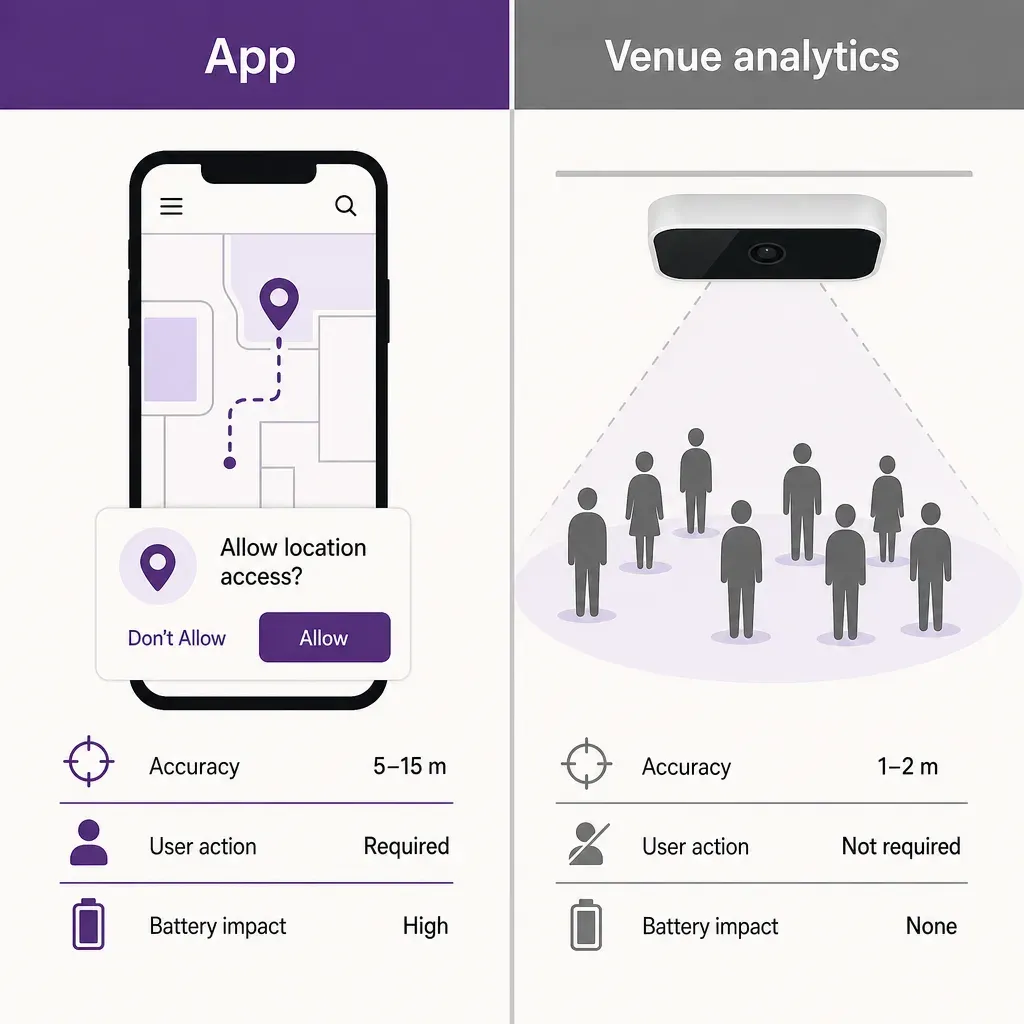
These two products process completely different data under completely different legal bases. The navigation app processes location data tied to a person who pressed the install button and tapped accept on a permission prompt. The analytics product, when it is built properly, processes no personal data at all. Every privacy conversation about indoor positioning gets cleaner the moment you separate those two.
This post walks through what a navigation app actually knows about you on the positioning side, what the venue operator sees versus what the app vendor sees, how location data is supposed to be retained under European law, and how Ariadne's anonymous-count product sits entirely on the other side of that line.
The navigation side: what an opt-in app actually knows
When a visitor installs a navigation app for a mall, a hospital, or an airport and opens it inside the building, several things happen in sequence. The app asks for location permission. The operating system, on iOS or Android, decides what radios the app is allowed to use and at what granularity. The app reads radio signals, usually Wi-Fi and Bluetooth Low Energy, sometimes magnetometer and inertial sensors, and turns those readings into a position on the venue's indoor map.
There are two broad architectural choices for how that position is computed, and they have very different privacy properties.
Client-only inference
In a client-only design, the phone collects the radio readings, matches them against a fingerprint or signal-pattern map that the app has downloaded, and computes the position locally. The phone knows where the visitor is. The server does not, unless the user shares it for a specific feature such as turn-by-turn directions or a saved location. This is the lightest-footprint pattern. The raw radio scans, which can be sensitive because they reveal nearby networks and devices, never leave the phone.
Server-side trilateration
In a server-side design, the phone sends radio readings up to a positioning service, which computes the position and sends it back. This is more flexible, makes ongoing model improvements easier, and lets the venue operator see a live view of where opted-in users are. It also means that raw radio scans plus a position trace, both tied to the install identifier and often to an account, are stored on a server. That is location data under the GDPR and needs the full set of obligations attached to it: legal basis, retention limit, data subject rights, and a plain explanation in the privacy notice.
Most production wayfinding apps blend the two: positioning is computed locally by the app, but a trace is sent to the server when the user opts into a specific feature such as a meeting point share, a friend finder, or an indoor analytics feature that the user accepts. Either way, the visitor has consented twice. Once at install to having the app on the phone at all, and once at the OS permission prompt to letting it read location.
What the venue operator sees, what the app vendor sees
A second source of confusion is who exactly is processing what. In a venue app, three parties sit in the data flow and they do not see the same things.
- The visitor. Sees their own position, the route they chose, and any features they have opted into. Can revoke location at any time in the OS settings and uninstall the app at any time.
- The app vendor. The software company that built the app. Sees whatever the app sends back to its servers, which for a well-designed app is no more than what the venue operator needs and the visitor consented to. The app vendor is usually a processor acting on the venue's instructions, with a data processing agreement in place.
- The venue operator. The mall, hospital, or airport that commissioned the app. Sees aggregate measures of how the app is being used (route popularity, search terms, conversion to direction starts) and, depending on opt-in, may see individual route traces for support and product improvement. The venue operator is the controller for visitor data flowing through their app.
The clean position for a privacy notice to take is that the visitor consents to the venue operator processing their location, the venue operator instructs the app vendor to do the technical work, and the legal basis is consent. That basis is revocable, which means the visitor can stop the processing at any time without needing a reason. That is a stronger position than legitimate interest and is the one most large venue apps adopt by default.
Permissions and the OS layer
iOS and Android put a layer between the app and the radios that the app cannot bypass. The visitor sees standardised permission prompts and can reduce what the app gets without uninstalling it. The choices look broadly similar across platforms.
- While using the app. Location is only available when the app is in the foreground. This is the right default for an indoor wayfinding app and the most common selection.
- Precise versus approximate. Precise gives the radios the app needs to position the visitor on the floor plan. Approximate is fine for a venue lookup or a coarse city-level filter but cannot drive indoor turn-by-turn.
- Bluetooth. Indoor positioning that uses BLE signal patterns or beacons needs the OS-level Bluetooth permission separately. A user who declines this can still navigate from a static map but loses the live blue dot.
- Nearby devices. On Android, this controls whether the app can scan for Bluetooth devices without claiming location. Apps that lean on it for positioning should explain why they need it; users are increasingly likely to decline blanket prompts.
A practical test for any venue app is whether it works gracefully when the visitor reduces permissions. An app that becomes useless without the most expansive setting is asking for more than it needs. A well-built app degrades in obvious ways (no blue dot, fewer features) but still helps the visitor find their gate.
Location data retention
Once a venue app does collect location data, the GDPR question is no longer whether it can but how long it keeps it and what it does with it. Three principles cover most of the design space.
- Purpose limitation. Location data collected to provide wayfinding can be used for wayfinding. Using the same data for marketing profiling, employee surveillance, or third-party advertising is a separate purpose and needs its own basis and notice.
- Storage limitation. Raw traces should live for the shortest period that supports the stated purpose. A common pattern is to keep raw traces for a short troubleshooting window (days, not months), then aggregate them into non-identifying statistics for longer retention.
- Data subject rights. The visitor should be able to ask what the app has on them, request a copy, and ask for it to be deleted, without the venue operator needing a special workflow. In practice that means designing the storage so a user's traces can be looked up and removed by identifier.
A privacy notice that explains all of this plainly, in the venue's own privacy policy or in a notice linked from the app's install screen, is what a data protection officer looks for. The shorter the notice, the easier it is to defend the practice it describes.
The other product: anonymous counting at the venue
All of the above is about an opt-in app a visitor chose to install. The other product, people counting at the venue, runs continuously, sees every visitor, and is the basis for operational decisions such as staffing, capacity management, and cleaning cadences. People sometimes assume that because it is always on, it must be the more invasive of the two. The opposite is true when the system is built properly.
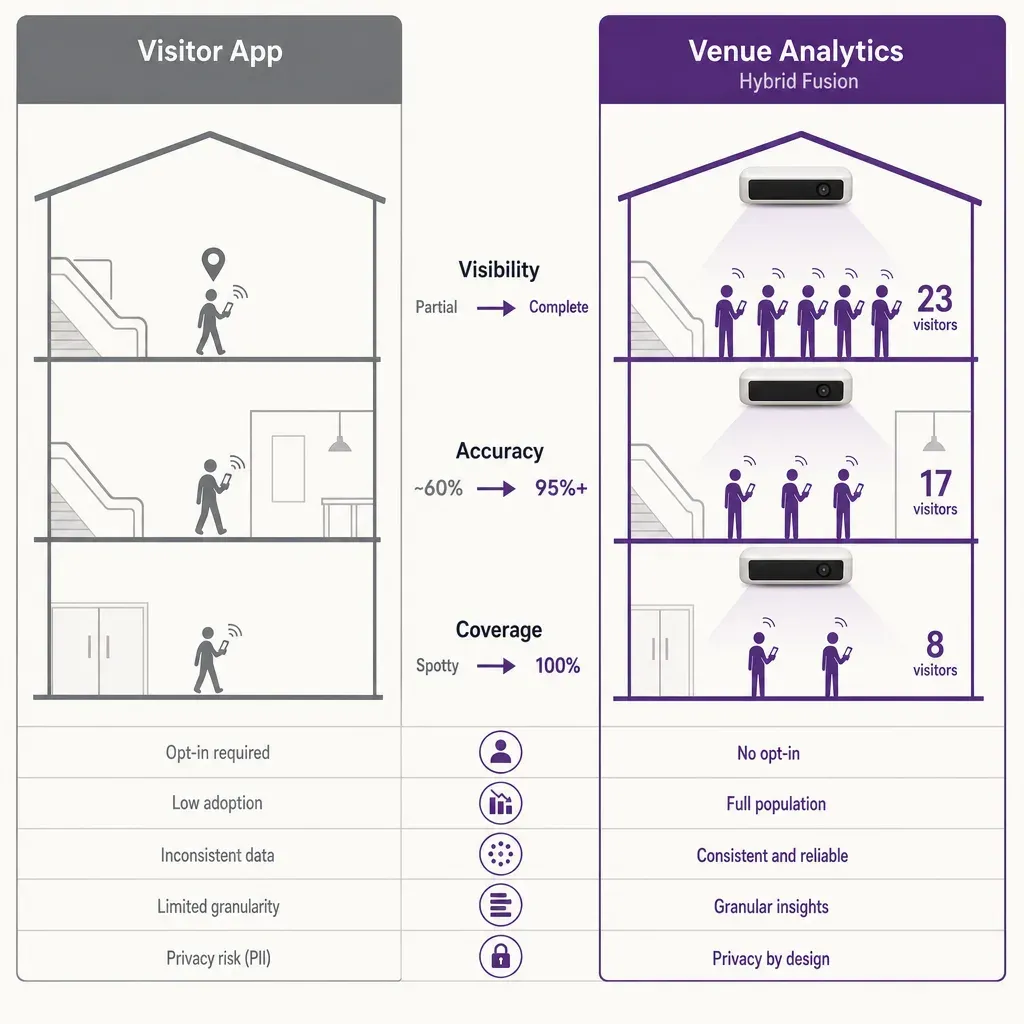
Ariadne measures this with Hybrid Fusion, its patented camera-free method. Time-of-Flight depth sensing counts every visitor at the entrances, capturing geometry rather than images, while patented phone signal sensing follows movement through the interior, detecting the signals a phone emits even in airplane mode. The sensor streams both feeds to Ariadne, where Hybrid Fusion combines them into one trajectory per visit and computes counts, dwell, and paths. The streams carry no identifier: no MAC address, no device ID, no biometric data, and no camera is involved. Identifiers are stored only when a visitor explicitly opts in, which keeps the method GDPR-friendly and outside biometric territory.
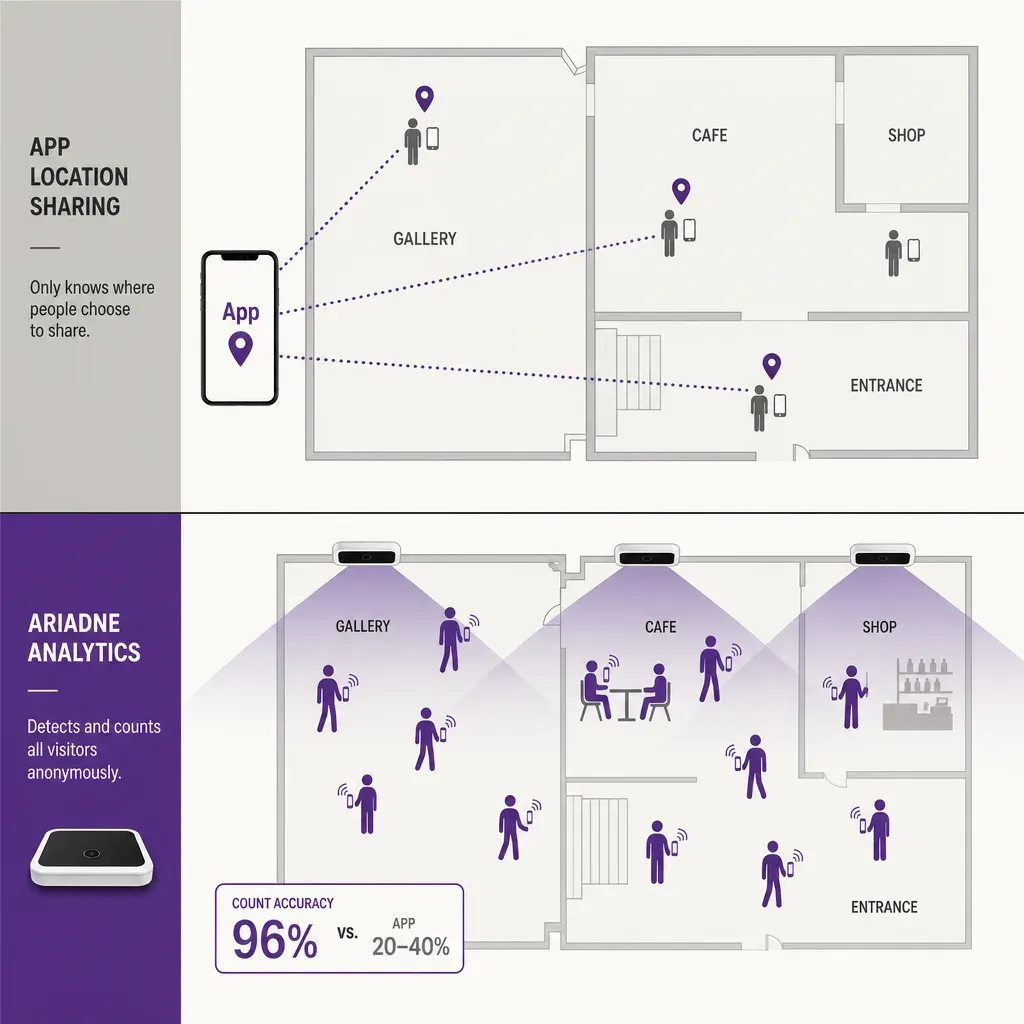
Three properties of this design are worth pulling out in a privacy conversation. The measurement is camera-free, so there is no image of a visitor to retain. The streams carry no identifier by default, so there is no MAC address and no device ID flowing through to the venue. And the geometry stored is at the level of counts, dwell, and paths, not at the level of a person, so a visitor cannot be picked out of the data later. That is a different privacy footprint than location data on a phone, and it is a stronger one.
Why the navigation side and the analytics side are not the same data
It is worth being explicit about a question that comes up in venue procurement: does the app know the analytics? Does the analytics product know the app users? The answer in a clean design is no on both sides.
- Different products. The navigation app and Ariadne's counting system are separate products. They can be deployed in the same building without sharing data and, in most cases, are.
- Different data. The app stores location traces tied to an install identifier under consent. The counting system stores counts and dwell tied to no personal identifier at all. There is nothing to join between them even if someone wanted to.
- Different consent. The app's basis is consent from the installed user. The counting system does not process personal data, so it does not need consent in the GDPR sense; the venue's signage and privacy notice still explains it to set visitor expectations.
If a venue wants to connect insights across the two, the responsible pattern is to surface them side by side in the venue operator's dashboard, not to merge user-level data. Aggregate flow from the counting system can sit next to aggregate route popularity from the app; the operator gets both views without anyone reidentifying a visitor.
GDPR fit
Putting the two sides together, here is how an honest GDPR review of the package looks.
- Navigation app. Processes location data of opted-in users under consent. The venue operator is the controller, the app vendor a processor, and the data subject rights are exercisable through the venue's normal channels. Retention is short for raw traces, longer for aggregated statistics.
- Analytics system. Processes no personal data by default. No images, no faces, no MAC addresses, no device identifiers. The heaviest GDPR obligations do not attach to the measurement because there is nothing identifying captured to attach them to. The venue still acknowledges the system in its on-site signage and privacy notice because that is good practice, not because the law forces a consent banner for a non-personal data flow.
The combination is unusually clean to explain to a data protection officer because the line between the two systems is sharp. One processes personal data with consent and retention controls. The other processes no personal data at all.
EU AI Act framing
The EU AI Act adds a second framing on top of the GDPR. Two of its provisions are directly relevant to indoor positioning.
- Biometric categorisation. Systems that infer identity or sensitive attributes from biometric data face strict obligations, and some uses are prohibited outright. Ariadne's measurement captures no biometric data: no face, no voice, no gait, no iris. There is nothing biometric in the pipeline to categorise on.
- Emotion recognition and demographic inference. Systems that infer emotion or sensitive demographic attributes in public spaces are restricted. Ariadne does not infer age, gender, ethnicity, or emotional state. It counts visitors and measures how long they stay. Those are not protected attributes.
The structural property doing the work here is that no PII is captured at the sensor. That is the same property that makes the GDPR conversation short. It also keeps the analytics side outside the scope of the AI Act provisions that would otherwise apply, because there is no biometric or demographic data to feed a model on. The navigation side is a different scope question: an indoor wayfinding app is not biometric and not demographic, so the AI Act provisions on biometric categorisation do not attach to it either.
A buyer checklist for venue privacy
If you are evaluating an indoor positioning deployment for a mall, hospital, or airport, these are the questions worth asking before signing. Half should be addressed to the navigation app vendor and half to the analytics vendor; in most procurements they are different companies.
- Is positioning client-only or server-side? Knowing where the raw radio scans live tells you which body of data the venue operator has to govern.
- What is the legal basis for the app's location processing? Consent is the cleanest answer for a venue app. Legitimate interest is harder to defend for visitor location.
- How long are raw traces kept and how long are aggregates kept? Short for raw, longer for aggregate is the defensible pattern; anything else needs a specific justification.
- Does the analytics system capture any personal data? No images, no faces, no MAC addresses, no device identifiers by default is the answer to look for. Identifiers should only ever appear with explicit visitor opt-in.
- Is there a camera anywhere in the analytics pipeline? A camera-free design built on Time-of-Flight depth and signal sensing is the cleanest answer to give a board or a data protection officer.
- Can the two systems share user-level data? The answer should be no by default. Aggregate side-by-side reporting is the responsible alternative.
Ariadne's own sensor hardware sits in the sensor lineup, and the data handling is set out in the privacy policy.
FAQ
Does an indoor navigation app track me even when I am not using it?
Only if you grant the app background or always-on location permission and only for as long as you keep that permission granted. The default for most venue apps is while in use, which means location stops the moment the app is in the background. You can revoke the permission in your operating system settings at any time without uninstalling the app.
Does the venue operator see my location?
It depends on the app design and on the features you opt into. A client-only positioning design keeps your raw location on your phone, and the operator sees only what you choose to share, such as your route choice or a saved location. A server-side design sends position data to the venue's service. The privacy notice for the app should say which model is in use; if it does not, that is a reason to ask.
Does Ariadne's anonymous counting system see app users differently?
No. The counting system is a separate product that captures no personal data and does not know whether a visitor has the navigation app installed. It cannot join its data to the app's data because there is no shared identifier on its side. The two products run in the same building without seeing each other's users.
Are cameras used anywhere in the measurement?
No. Ariadne counts with Hybrid Fusion: Time-of-Flight depth sensing plus patented phone signal sensing, never cameras. Time-of-Flight captures geometry rather than images, and signal sensing captures no MAC address by default, so the measurement involves no video, no faces, and no biometric data.
Does Ariadne infer age, gender, or emotion?
No. The system counts visitors and measures how long they stay. It does not classify by age, gender, ethnicity, or emotion. Those inferences would need biometric data the system does not capture, and they fall under EU AI Act provisions that the design is built to stay outside of.


