
What demand based scheduling actually means in retail
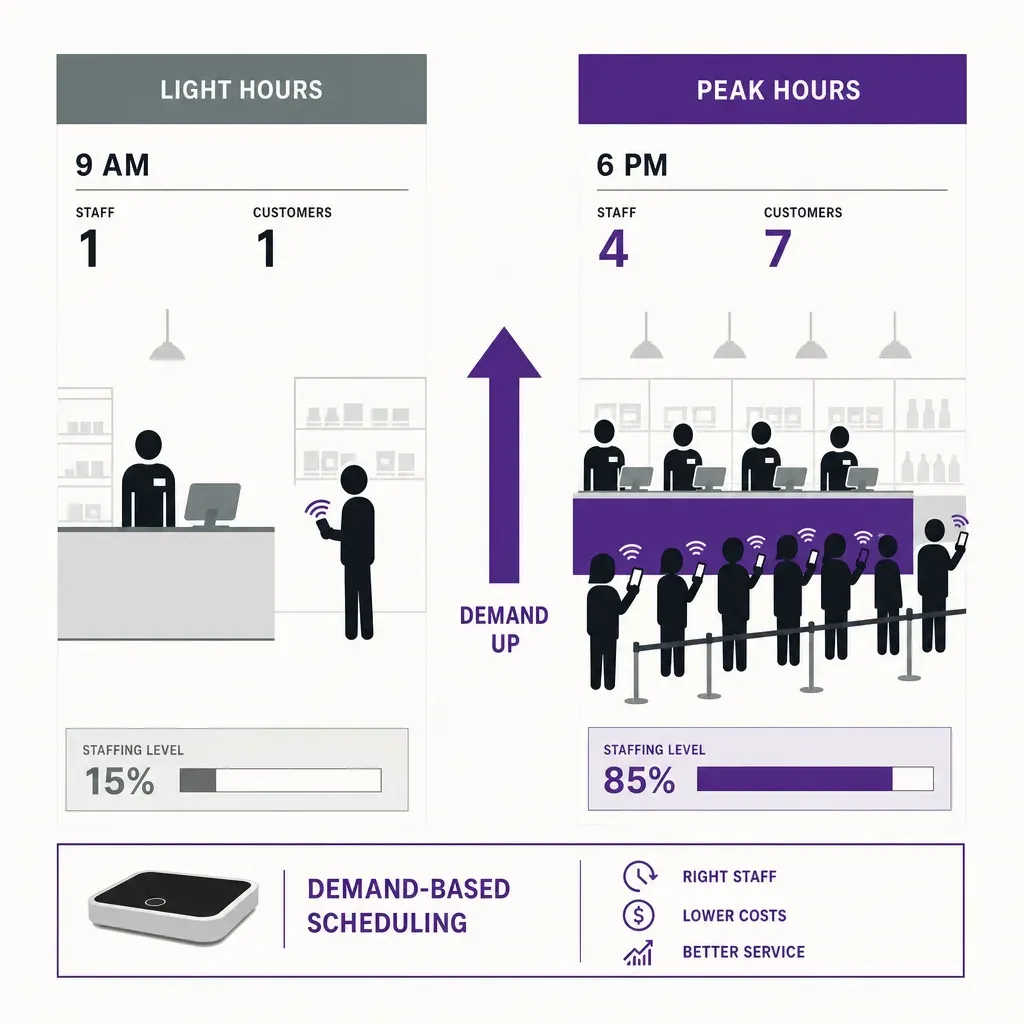
A retail store does not have a constant level of work through the day. A Tuesday morning at 10:00 and a Saturday afternoon at 15:00 are different shops with different problems. The first has one customer in the store, a delivery to put out, and a fitting room to reset. The second has a queue at the till, three customers waiting for a size, and a try-on rate that is climbing. The number of associates needed in those two hours is not the same, and a roster that gives them the same headcount is wrong on both ends: overstaffed at 10:00 and short at 15:00. Employee scheduling that takes this seriously is called demand based scheduling. It starts from a forecast of the work coming into the store and builds shifts that match it, rather than starting from last week's roster and nudging it.
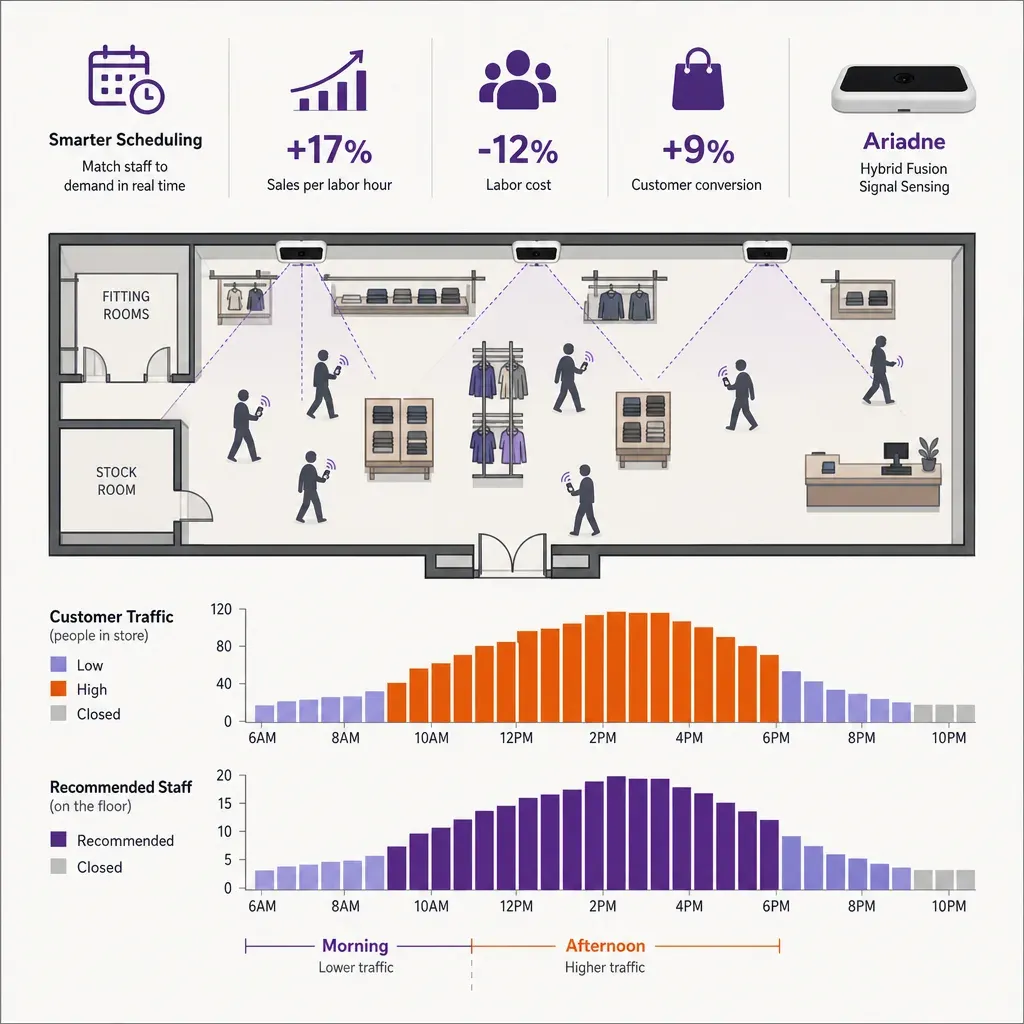
The term gets used loosely, so it is worth being precise. Demand based scheduling has three properties. The roster is built from a forward-looking forecast, not from a backward-looking template. The forecast is at a granularity small enough to matter (an hour or finer), not a daily total. And the shift building respects a set of constraints (contracts, fairness, fatigue, cost) instead of just placing bodies at peaks. Take any of those three away and you have something simpler, useful in its own right, but not the same thing.
This post walks through the practice in eight steps. It is written as a methodology, not as a vendor pitch: the same eight steps apply whether a retailer runs the rota in a spreadsheet, in a homegrown tool, or in a workforce management platform. At the end, it explains how a counting system fits into the first step, because the most common reason demand based scheduling fails in practice is that the demand signal feeding it is wrong.
Step 1: pick the demand signal
The first decision is also the most consequential. The forecast is only as good as the signal it learns from. Three signals are commonly used in retail, and they answer different questions.
- Transactions. The number of receipts per hour, pulled from the point of sale. Easy to get, but it counts the customers who already bought. It misses everyone who walked in and left, which is exactly the population that needs more staff to convert.
- Units sold. Closer to a work proxy because more units mean more bags, more replenishment, more fitting-room turnover. Still post hoc and still blind to non-converting visits.
- Footfall. The number of visitors entering the store, regardless of whether they buy. This is the upstream signal: every transaction came from a visit, and every visit creates some level of work whether or not it converts. A roster built on transactions undercounts the staffing a busy non-converting hour needs; one built on footfall does not.
For a specialty retailer with a high abandonment rate, the difference between a transaction-based forecast and a footfall-based forecast is not small. An afternoon hour with 200 visitors and 20 transactions reads, in the point of sale, as a quiet hour. On the floor, it is a hard one. Demand based scheduling that wants to fix conversion has to start from a signal that sees the upstream traffic, not just the closed sales.
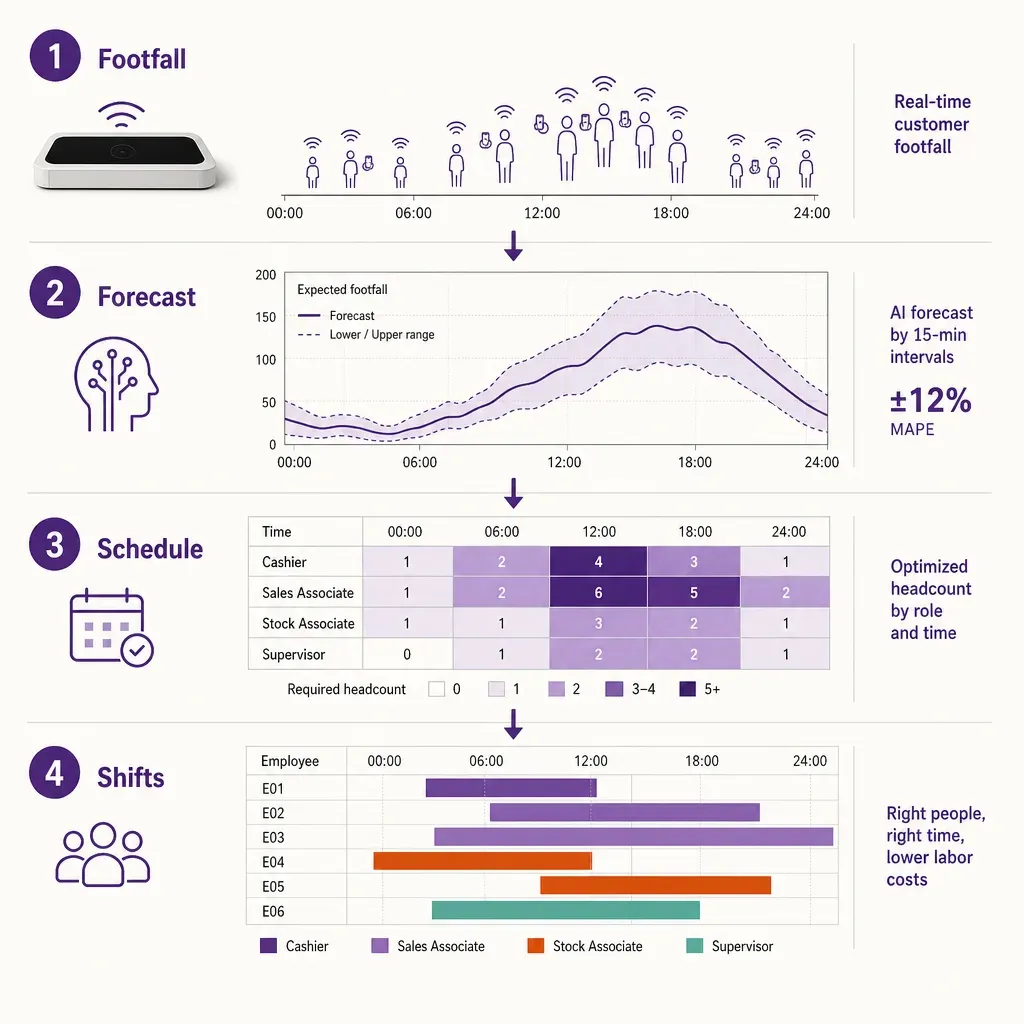
Most production designs use footfall as the primary demand signal and bring transactions in as a secondary check. The forecast predicts visitors per hour. A separate model converts visitors per hour into work units (selling, replenishment, fitting room support, queue management) using a coefficient set per task type. That keeps the roster sensitive to upstream traffic while still acknowledging that not every visitor creates the same amount of work.
Step 2: choose the forecast horizon
The second decision is how far ahead the roster is built. Three horizons matter in retail scheduling, and a serious operation runs all three at once.
- Long horizon, six to twelve weeks. Used for hiring, contract mix, and committing seasonal hours. The forecast at this horizon is coarse (week-level, not hour-level) and uses long trend signals such as comparable-store growth, calendar events, and macro factors. Mistakes here are expensive because they show up as an under-resourced peak season or as labor budget left on the table.
- Medium horizon, two to four weeks. The roster horizon. This is what the store manager publishes to the team and what associates plan their lives around. The forecast at this horizon is at hour-level and uses recent weekly patterns, the trading calendar, weather, and known events. Most labor laws require schedules to be published at least a week or two in advance, and predictable scheduling rules in some jurisdictions push that further out, so the medium horizon is the one that gets read by the regulator.
- Short horizon, zero to seven days. Used for in-week adjustments, swaps, and intra-day reallocations. The forecast at this horizon picks up the things the medium horizon could not know: a weather change, an unplanned event nearby, a delivery delay. It is the horizon on which a store manager opens or closes additional till positions in the same trading day.
A common mistake is to skip the short horizon entirely and treat the published roster as final. Real demand changes inside the week, and a system that cannot respond loses the gains that demand based scheduling promised. A common second mistake is to skip the long horizon and discover at the start of December that the contracted hours pool is twenty percent smaller than the trading calendar needs.
Step 3: choose the granularity
Granularity is the third decision, and it is the one that determines whether the forecast can actually drive shifts. Three options come up in practice, and the right answer depends on the format.
- Daily. A daily total tells you how many hours to spread across an open day. It does not tell you where to put them. Useful as a budgeting unit, useless as a scheduling unit. Demand based scheduling at daily granularity is not really demand based; it is daily-total based.
- Hourly. The most common scheduling granularity. An hourly forecast lets the roster respond to a morning lull and an afternoon peak in the same day, and most contracts and break rules are expressed in hours, so the math is straightforward. Hourly is the right default for specialty, department, mass-market, and most grocery formats.
- Fifteen-minute. Finer granularity matters for formats with very fast intra-hour swings: quick service food, drive-throughs, ticketing windows, concession stands, and the till lines of a high-traffic supermarket on a weekend. At fifteen-minute granularity, you can roster a half-shift starting at 12:15 and a second one starting at 12:30, and the till plan looks different at 12:45 than at 13:00. Below fifteen minutes, the noise in the forecast usually outweighs the precision gain.
A test for whether the granularity is right is whether two staffing decisions inside a single trading day would look obviously different on the roster. If a fashion store would visibly add a third associate at 15:00 and pull them at 17:00, the schedule needs to be able to express that, which rules out daily granularity. If a quick service restaurant would open a second till for the 12:30 rush and close it at 13:15, the schedule needs to be able to express that, which rules out hourly granularity for that format.
Step 4: build a shift template library
A forecast tells you how much labor an hour needs. A shift template library is the bridge between that need and a real human roster. Shifts cannot be arbitrary blocks of time, because they have to fit contracts, breaks, transport, and the rest of an associate's life.
The library tends to contain a small number of canonical shapes. A four-hour opener that runs from store opening into the morning task window. A six-hour mid that overlaps the lunch peak. An eight-hour core that covers the trading bulk of the day. A four-hour closer that runs from late afternoon into close-down. A short on-peak shift used for high-density hours, usually three to five hours over the busiest band. The exact shapes vary by country and format, but the principle is the same: a handful of well-designed templates covers the vast majority of the staffing need, and the scheduler picks combinations of them rather than inventing new ones.
Two design properties matter. The library should be small enough that store managers can remember it and associates can request shifts against it, which means a dozen or so shapes, not fifty. And the templates should compose. If the lunch peak needs three associates from 12:00 to 14:00, the scheduler should be able to drop two on-peak shifts and one mid shift on top of the morning core to fill it, without manually carving new blocks. The math of demand based scheduling becomes much easier when the building blocks are standardized.
Step 5: define the swap rules
A roster published two weeks out will not survive contact with reality. Associates get sick, swap shifts with each other, drop hours, and pick up extra. The scheduling system needs explicit rules for how that happens, because the alternative is a manager rebuilding the rota in a group chat at 21:00.
- Open shift offers. When a vacancy appears, who gets offered the hours first? A common pattern is to offer to associates whose contract minimums are unmet, then to the wider trained pool, then to associates flagged as wanting extra. The offer should expire automatically.
- Peer-to-peer swaps. Two associates can trade a shift if the swap leaves both legal (no break or rest-period violations) and the receiving associate is trained for the swapped role. Manager approval can be an audit step rather than a gating one.
- Late cancels and call-outs. When someone calls in within a short window of a shift, the system needs a defined fallback: an on-call pool, an offer to nearby stores, a willingness to operate one head down. A documented fallback is not a luxury; it is the difference between a managed shortfall and a crisis on the sales floor.
The rule set should be visible to associates, not buried in a manager's procedure. A team that understands how shifts move around accepts the system; a team that cannot see the rules treats every swap as a favor from the manager, and the scheduler stops working as designed.
Step 6: encode fairness constraints
Demand based scheduling has a reputation for being unkind, and it deserves the reputation when fairness constraints are an afterthought. A scheduler that only minimizes the gap between forecast and headcount will produce rosters that satisfy the math and break the team: too many closing shifts for the same associate, weekend after weekend on the rota, no two consecutive days off, fragmented split shifts. Fairness has to be encoded into the optimization, not bolted on after.
A workable set of fairness constraints includes the following kinds of rules. Minimum and maximum hours per associate over the period. A floor on rest hours between shifts (eleven hours in much of Europe, with shorter floors elsewhere). A cap on consecutive days worked. A target distribution of weekend shifts across the team rather than the same names every Saturday. A cap on opener-to-closer (or closer-to-opener) sequences. A preference layer where associates state availability, and the scheduler respects it unless it is impossible.
These are not optional in many jurisdictions: predictable scheduling laws and posted rest periods are legal floors, not soft preferences. Beyond the legal floor, encoded fairness is what makes the system durable. A roster that an associate cannot predict and cannot influence is one they will leave, and retail attrition is expensive enough that any labor saving from demand-tighter shifts has to be net of the cost of higher turnover.
Step 7: set cost guardrails
Demand based scheduling can be told to do at least two different things, and they pull in different directions. It can be told to cover the demand forecast as completely as possible (a service-led objective). Or it can be told to minimize labor cost subject to a service floor (a cost-led objective). Neither is the right answer in isolation. The scheduler needs guardrails on both sides.
- A labor budget. Expressed as a target labor hour total or a target labor-to-sales ratio for the trading period. The scheduler respects this as a soft ceiling and warns when it would be exceeded.
- A staffing floor. Minimum heads required at any given hour for safety, opening, closing, and basic store coverage. The scheduler treats this as a hard floor and will not roster below it even when the demand forecast is quiet.
- A service target. Expressed as a maximum acceptable visitor-to-associate ratio at peak, or as a minimum coverage percentage on the busiest hours. The scheduler treats falling below this as a flagged exception that needs a documented choice.
- An overtime cap. A ceiling on overtime hours per associate per period, above which the scheduler will not schedule even if it would fix a gap.
Illustrative ranges only, but to make this concrete: a specialty fashion store might run a labor-to-sales ratio in the high single digits to low teens, a quick service restaurant in the high teens to low twenties, a supermarket in the mid single digits. Those are not Ariadne data, they are widely cited industry ranges that vary by country, format, and operating model. The point is that each format has a ratio band the scheduler is allowed to operate inside, and demand based scheduling should be defended on whether it improves the ratio inside the band, not on whether it hits one absolute number.
Step 8: handle exceptions
The last step is the one most introductions to demand based scheduling skip. A live roster has to handle exceptions, both the foreseeable ones and the surprises, and the exception path is what determines whether the system works on the day or only on the spreadsheet.
- Forecast misses. Sometimes the morning is twenty percent quieter than the model said it would be, or the weekend twenty percent busier. The system needs a defined response: a short-horizon re-forecast, a list of associates available to extend, and a manager dashboard that surfaces the gap before the peak hits, not after.
- Event and weather shocks. A nearby event, a transport disruption, an unexpected weather day moves traffic in ways the medium-horizon forecast does not see. The short-horizon model needs to ingest those signals and the swap rules need to be able to act on them inside a day.
- Call-outs and no-shows. The defined fallback from step 5 kicks in. The exception is documented so the medium-horizon forecast learns about the pattern.
- Promotion and trading exceptions. Sale launches, new product drops, and unexpected viral interest can change visitor levels far above what any historical model expects. These need a manual override channel that lets a buyer or store director add load above forecast for a fixed window.
A useful exception design treats each kind of exception as a feedback signal back into the forecast. Repeated weekend overshoots in a particular store mean the model has structurally underweighted weekend trading; a manager fix on the day is fine, but the model should learn from the override so it stops needing to be overridden.
How Ariadne fits into the picture
All eight steps depend on the quality of the demand signal in step 1. Most of the work of running this system well is in the forecast and the rules, but the upstream measurement is what either earns the rest of the chain a chance to perform or invalidates it before it starts.
Ariadne's role in demand based scheduling is upstream: the people counting system at the entrance counts every visitor entering the store, broken down by hour or fifteen-minute window, and feeds that count into the scheduler as the demand signal. Two properties of that measurement matter for scheduling.
Ariadne measures this with Hybrid Fusion, its patented camera-free method. Time-of-Flight depth sensing counts every visitor at the entrances, capturing geometry rather than images, while patented phone signal sensing follows movement through the interior, detecting the signals a phone emits even in airplane mode. The sensor streams both feeds to Ariadne, where Hybrid Fusion combines them into one trajectory per visit and computes counts, dwell, and paths. The streams carry no identifier: no MAC address, no device ID, no biometric data, and no camera is involved. Identifiers are stored only when a visitor explicitly opts in, which keeps the method GDPR-friendly and outside biometric territory.
The first property is that the count is independent of conversion. A non-converting busy hour still shows up as a busy hour in the demand signal, which is exactly the population a sharper roster is trying to convert. The second is that the count carries no personal data: no images, no faces, no MAC addresses, no device identifiers by default. The scheduler is fed an integer per period, not a stream of recognized people, so the same measurement that powers the roster also clears the privacy bar that retailers and works councils ask about. Group sizing comes from the patented signal sensing inside the store, where one ToF sensor at the entrance is enough to handle the count itself. Hardware specifications and data handling sit in the privacy policy.
Most workforce management platforms can ingest an external time series as a forecast input. The pattern is: footfall per hour from Ariadne goes into the scheduler, the scheduler combines it with transactions and operational tasks to produce a work-units forecast, and the eight-step chain described above takes it from there. A store director sees a roster, not a sensor feed. The sensor side is invisible, which is the right behaviour for a scheduling input.
Common mistakes
A few patterns come up often enough that they are worth naming.
- Forecasting on transactions only. The most common mistake. The roster looks tight, the busy non-converting hours stay understaffed, and conversion does not move. Footfall as the upstream signal is the fix.
- Daily granularity passed off as demand based. If the roster cannot distinguish 10:00 from 15:00, the system is not demand based. Hourly is the floor for most formats.
- No fairness constraints. Rosters that optimize the math break the team. Encoded fairness is what makes the gain durable.
- No short-horizon channel. A two-week-published roster with no in-week swap channel will leak labor every time the forecast misses, which is often.
- Cost-only objective. Scheduling for the smallest hour total wins the labor-cost report and loses the conversion line. A service floor and a cost ceiling, run together, are the right setup.
- No feedback loop. An exception that does not feed the forecast is a manual workaround forever. Each override should improve the model.
A short evaluation checklist
If you are reviewing a demand based scheduling design for a retail estate, these six questions cover most of what matters.
- What is the demand signal? Look for a visit count that includes non-converting traffic, not a transaction count.
- What is the granularity? Hourly for most formats, fifteen-minute for fast intra-hour swings.
- How many shift templates does the library hold? A small, composable set is a better sign than fifty bespoke shapes.
- Which fairness constraints are encoded? Rest, consecutive days, weekend distribution, opener-to-closer caps, and associate preferences should all be in the model.
- What are the cost guardrails? A labor budget, a staffing floor, a service target, and an overtime cap should be visible.
- How are exceptions fed back? Each override should improve the forecast for next time, not sit as a manual workaround.
Demand based scheduling is not a single product. It is a chain of decisions about signal, horizon, granularity, templates, rules, fairness, cost, and exceptions. Get the chain right and the roster moves with the trading day. Get the first link wrong and the rest of the chain optimizes against the wrong question. For a starting point on how counts at the entrance turn into a usable scheduling input, the retail industry overview and the employee scheduling solution page cover the operational side.
Related reading
- The electronics retail customer journey
- seven measurable levers that raise conversion
- what to look for in retail scheduling software
- the scheduling maturity model, five stages
FAQ
Why use footfall instead of sales as the demand signal?
Sales are a lagging indicator. A non-converting busy hour reads as a quiet hour in the transaction log but creates real work on the floor and is the population a sharper roster is trying to win. Footfall is the upstream signal that includes both converters and non-converters, which is what scheduling for conversion needs.
How fine does the forecast granularity need to be?
Hourly is the floor for most retail formats and the right default for specialty, department, mass-market, and most grocery. Fifteen-minute granularity matters for quick service food, ticketing windows, and very high-frequency till lines, where staffing decisions inside an hour are visibly different. Daily is too coarse to drive shifts and should be treated as a budgeting unit, not a scheduling unit.
Does demand based scheduling require a workforce management platform?
No. The eight steps can run in a spreadsheet for a small estate and many do. A workforce management platform earns its place when the estate is large, the legal landscape is complicated, or the swap and exception flows need to be machine-managed. The methodology is independent of the tool.
Does the counting system identify customers?
No. Ariadne counts with Hybrid Fusion: Time-of-Flight depth sensing plus patented phone signal sensing, never cameras. Time-of-Flight captures geometry rather than images, and signal sensing captures no MAC address by default, so the measurement involves no video, no faces, and no biometric data.
How long does it take to see results?
A meaningful gain usually takes a full trading cycle (typically a quarter), because the forecast needs to learn the store's recent patterns and the scheduler needs to settle into the team's preferences. The biggest wins come from removing structural understaffing in busy non-converting hours and structural overstaffing in genuinely quiet ones; both are visible within the first few rosters once the signal is right.


