
Most people who search for 3D indoor mapping already have a floor plan. What they do not have is a model a visitor can actually be guided through. A printed or PDF floor plan is a flat drawing: useful for reading a building, useless for placing a person inside it and turning them toward the room they need. A 3D indoor map is a different kind of object, and the gap between the two is where a lot of wayfinding projects either succeed or stall.
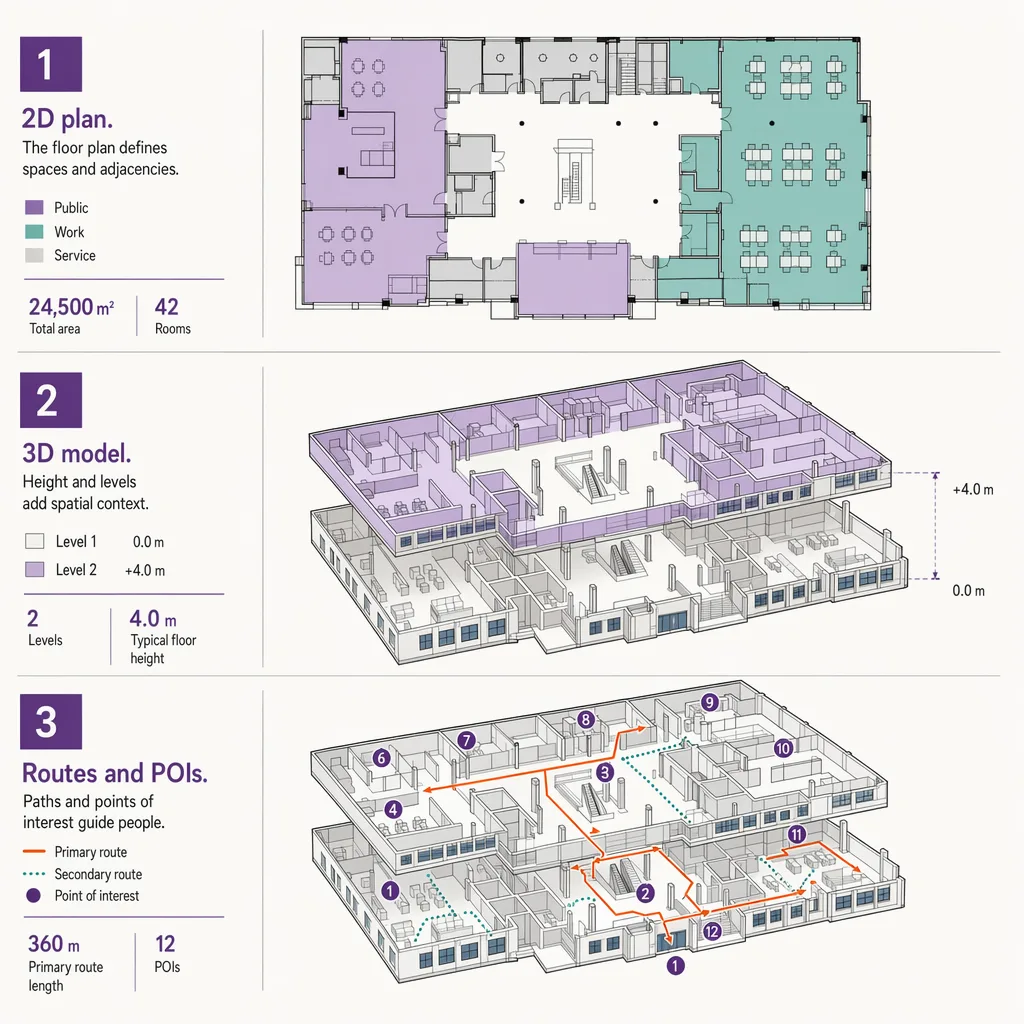
This post covers the 3D indoor map itself: what it is, how it differs from a 2D floor plan and from a digital twin, how it gets built from CAD or BIM source data, and the two properties that make interior 3D genuinely hard, which are multi-floor movement and level-of-detail. It ends with the point most 3D mapping explainers skip: a map, in any number of dimensions, shows the space but does not locate anyone in it. For the broader picture of how indoor wayfinding works, start with the pillar; this post assumes you want the map artefact specifically.
What is 3D indoor mapping?
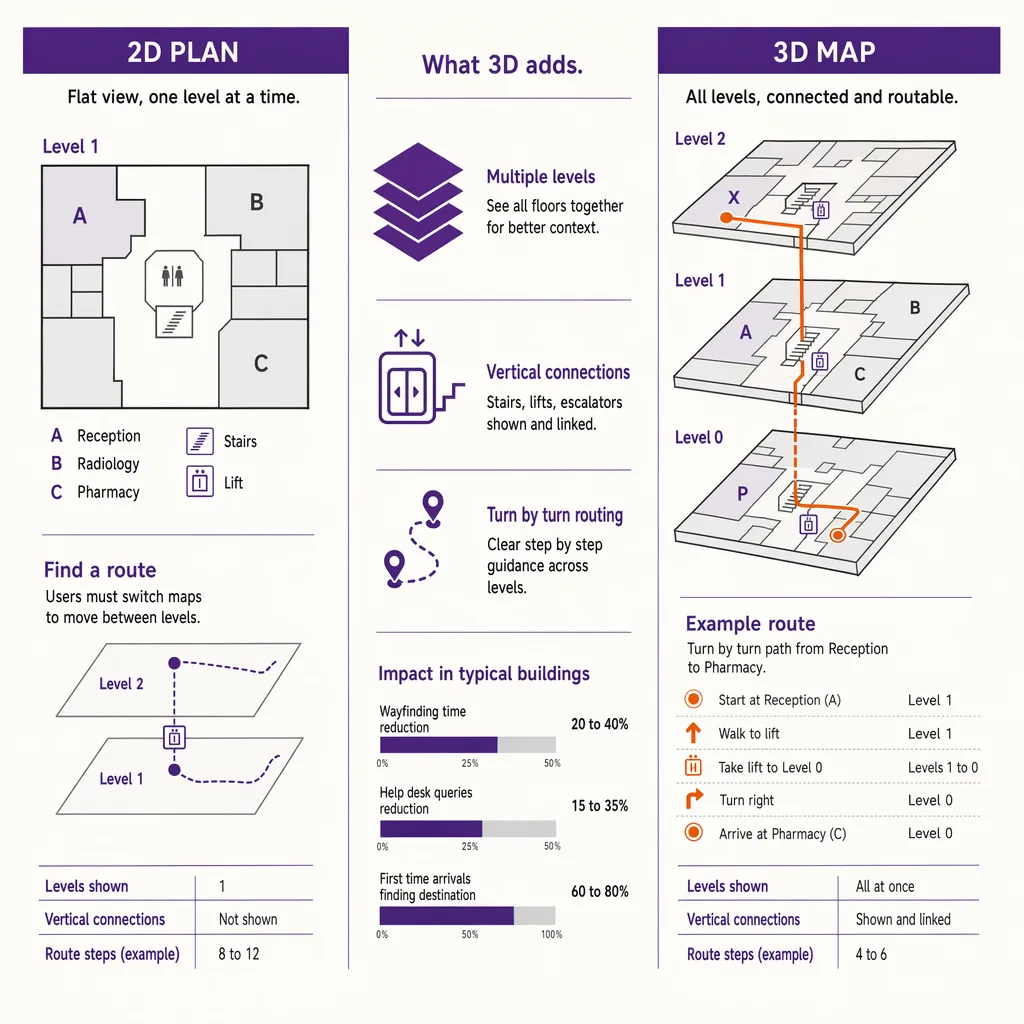
3D indoor mapping is the process of building a digital, dimensional model of a building's interior, with floors, walls, rooms, stairs, and points of interest represented as navigable geometry rather than a flat drawing. Unlike a 2D floor plan, a 3D indoor map can show vertical movement between levels, render sightlines and landmarks a visitor actually sees, and drive turn-by-turn routing. On its own a 3D map only shows the space. It becomes navigation when a positioning layer places the visitor on that map in real time.
The rest of this post separates the map from the navigation, because conflating the two is the single most common mistake in indoor projects. A beautiful 3D model of a terminal is an architectural asset. It is not, by itself, a wayfinding system.
3D indoor map vs 2D floor plan vs digital twin
These three terms get used interchangeably, and they should not be. They describe different artefacts with different purposes and different amounts of data behind them.
| Property | 2D floor plan | 3D indoor map | Digital twin |
|---|---|---|---|
| Dimensionality | Flat drawing, single plane per level | Dimensional geometry with height, walls, and volumes | Full 3D model plus live operational data |
| Multi-floor | One sheet per floor, no vertical link | Levels connected by stairs, lifts, and ramps as routable geometry | Levels connected, plus real-time state of assets and systems |
| Level of detail | Fixed detail for reading, not scaling | Detail tuned for rendering and routing at multiple zoom levels | High detail tied to building systems and sensors |
| Typical data source | CAD drawings, PDFs | CAD or BIM converted to a navigable mesh and map format | BIM plus live feeds from building management and IoT systems |
| Primary use | Reading and documenting a building | Wayfinding, routing, and spatial visualization | Operations, simulation, facilities management |
The practical takeaway sits in the last row. A digital twin is a much larger commitment than a 3D map for wayfinding, because it keeps a live link to the building's operational systems. Many venues that want visitor navigation do not need a twin at all; they need a well-built 3D map and a way to place people on it. Treating the two as the same thing is how a wayfinding brief quietly turns into a facilities-management program. Ariadne provides the positioning and analytics layer under a map, not a 3D-authoring suite or a digital-twin platform, and it is worth being clear about that boundary before scoping a project.
How a 3D indoor map gets built: from CAD or BIM to a navigable mesh
A 3D indoor map almost always starts from source data the building already has. For newer buildings that is a BIM model produced during design and construction; for older ones it is CAD drawings, sometimes only PDFs that have to be redrawn. The conversion from that source into a navigable map is a project in its own right, and it is covered in depth in the guide to turning BIM data into a wayfinding map.
The short version: raw BIM carries far more than a map needs. It has structural members, mechanical ductwork, and construction metadata that a visitor never sees and a routing engine never uses. Building a usable 3D indoor map means extracting the parts that matter for navigation, which are the spaces a person can occupy, the boundaries between them, the connections between levels, and the destinations worth routing to. The output is a lighter, navigable mesh plus a structured description of levels, units, and points of interest, encoded in a map format a rendering and routing engine can read. The heavy architectural model stays behind; the map that ships is a deliberate simplification of it.
The format question matters here too. A 3D map that lives only inside one proprietary tool is hard to reuse across venues or hand to a routing engine. Standard encodings for indoor maps exist precisely so floors, connections, and destinations can be described consistently, which is the subject of a separate reference post on indoor map data standards.
Multi-floor routing and level-of-detail: the hard parts of interior 3D
Two problems make interior 3D harder than it looks from the outside.
The first is vertical movement. Outdoor mapping is mostly a single plane; interior mapping is stacked planes that people move between. A route from a ground-floor entrance to a third-floor office is not one path, it is a sequence of horizontal segments joined by a specific staircase, escalator, or lift. The map has to represent those connections as routable geometry, not as decoration, so the routing engine knows which vertical transition to use and can offer a step-free option when one is needed. Get the vertical links wrong and the map still looks correct while producing routes that send a wheelchair user to a staircase.
The second is level-of-detail. A 3D indoor map is viewed at many zooms: a whole-building overview, a single-floor plan, a close-up of one concourse. Showing every rendered wall and label at every zoom produces a slow, cluttered view; showing too little makes the map useless up close. A well-built map carries detail at several tiers and reveals it progressively as the viewer zooms in, so an overview stays readable and a close-up stays informative. This is craft, not automation, and it is one of the reasons a good 3D indoor map costs more effort than exporting a model and calling it done.
Both problems are about the map serving movement rather than looking impressive in a screenshot. A model that renders well but routes badly has optimized the wrong thing.
The missing layer: a 3D map needs positioning to become navigation
Here is the point that reframes the whole topic. Everything above produces a map. A map answers "what does this space contain and how is it connected." It does not answer "where am I standing right now, and which way am I facing." Those are positioning questions, and a map cannot answer them on its own no matter how detailed it is.
This is why a turn-by-turn indoor experience needs a positioning layer under the map. The map supplies the geometry and the routes; the positioning layer supplies the visitor's live location and heading, so the route can update as they move and the "you are here" dot means something. Without it, a 3D indoor map is a very good interactive directory, which is valuable but is not navigation. Choosing how to place people on the map is a decision with real trade-offs across accuracy, infrastructure, and privacy, and it is the whole subject of the survey on the positioning layer underneath a navigable map.
The distinction also affects how you use the map for the building itself. A directory or kiosk built on a 3D map guides visitors, and where you place its points of interest changes whether people find them. That is a wayfinding design question in its own right, covered in the piece on placing points of interest a visitor can find. But even perfect placement guides a visitor to a destination; it still does not track where that visitor is between decisions. Only a positioning layer does that.
How Ariadne fits: camera-free positioning under the map
Ariadne sits at the positioning layer, not the map-authoring layer. You bring, or build, the 3D indoor map of your venue; Ariadne provides the camera-free measurement that places movement on it and turns the model into something that reflects how the building is actually used. Because that measurement is anonymous by default, it works for continuous visitor flow without asking every person to install anything or carry a tag.
Ariadne measures this with Hybrid Fusion, its patented camera-free method. Time-of-Flight depth sensing counts every visitor at the entrances, capturing geometry rather than images, while patented phone signal sensing follows movement through the interior, detecting the signals a phone emits even in airplane mode, and tracks that movement to about one-metre precision. The sensor streams both feeds to Ariadne, where Hybrid Fusion combines them into one trajectory per visit and computes counts, dwell, and paths. The streams carry no identifier: no MAC address, no device ID, no biometric data, and no camera is involved. Identifiers are stored only when a visitor explicitly opts in, which keeps the method GDPR-friendly and outside biometric territory.
Read against the 3D map, that gives a venue two things a static model cannot: where visitors actually are on the map in real time, and how the space is used over time, which routes carry the most people, where they slow down, which levels they reach. The map describes the building; the positioning layer describes its use. For how the two combine into a live product, see Ariadne indoor navigation. About one-metre interior precision is enough to guide a person along a corridor and place them on the correct floor, which is what a navigable 3D map needs to stop being a picture and start being navigation.
FAQ
What is the difference between a 3D indoor map and a 2D floor plan?
A 2D floor plan is a flat drawing, one sheet per level, made for reading a building. A 3D indoor map is dimensional geometry that links levels through stairs, lifts, and ramps as routable connections, renders what a visitor actually sees, and can drive turn-by-turn routing. The 3D map is built to be navigated, not just read.
Is a 3D indoor map the same as a digital twin?
No. A digital twin is a 3D model kept in live sync with the building's operational systems for facilities management and simulation. A 3D indoor map for wayfinding is lighter: it carries the geometry, connections, and destinations a routing engine needs, without a live link to building systems. Many venues need the map, not the twin.
Do I need cameras for indoor positioning?
No. Ariadne counts with Hybrid Fusion: Time-of-Flight depth sensing plus patented phone signal sensing, never cameras. Time-of-Flight captures geometry rather than images, and signal sensing captures no MAC address by default, so the measurement involves no video, no faces, and no biometric data.
Why does a 3D indoor map need a positioning layer?
Because a map shows the space but cannot tell where a person is standing or which way they face. Turn-by-turn navigation needs a positioning layer that places the visitor on the map in real time and updates the route as they move. Without it, a 3D map is an interactive directory rather than a navigation system.
What source data do you need to build a 3D indoor map?
Usually a BIM model for newer buildings or CAD drawings for older ones, sometimes redrawn from PDFs. The source is simplified into a navigable mesh plus a structured description of levels, units, and destinations, encoded in an indoor map format a rendering and routing engine can consume.
---


